
Choosing the right photo editing software is a critical decision for photographers and designers. The best way to make an informed choice is to try before you buy—through photo editing software free trials.
This guide covers everything you need to know about photo editing software free trials: what to look for, how to evaluate them, and which tools offer the best trial experiences.
At a Glance: The Best Photo Editing Software Free Trials 2026
- Best Overall: Adobe Photoshop – 7-day free trial, full features.
- Best for Photographers: Adobe Lightroom – 7-day free trial, full features.
- Best for Non-Designers: Canva – Free version with powerful features.
- Best Free Version: GIMP – Free forever (no trial needed).
- Best Lifetime Deals: BackgroundCut, LightX – Lifetime access with one-time payment.
Photo Editing Software Free Trials: What to Test
1. Core Features
- Editing Tools: Layers, masks, retouching.
- RAW Support: Test raw file processing.
- Export Quality: Test export quality and formats.
- Performance: Smooth editing experience.
2. User Experience
- Navigation: Is the interface intuitive?
- Learning Curve: How quickly can you get started?
- Support: Is customer support responsive?
Popular Photo Editing Software Free Trials
| Tool | Free Trial | Free Version | Key Features | Best For |
|---|---|---|---|---|
| Adobe Photoshop | 7 days | ✗ | Professional editing | Professionals |
| Adobe Lightroom | 7 days | ✗ | RAW processing | Photographers |
| Canva | N/A | ✓ | Templates, design | Non-designers |
| GIMP | N/A | ✓ | Professional editing | All users |
| BackgroundCut | Lifetime (AppSumo) | ✗ | Background removal | E-commerce |
How to Evaluate a Photo Editing Software Free Trial
- Test Core Features: Basic editing, retouching, and effects.
- Test RAW Support: Import and edit raw files.
- Test Export Quality: Does it export in the formats you need?
- Test Support: Check customer support responsiveness.
Questions to Ask During a Trial
- How long is the free trial? Is it enough to test?
- What features are included? Any limitations?
- What are the pricing tiers after the trial?
- Is there a free version available?
- What kind of support is available during the trial?
💡 The AppSumo Advantage
Affiliate Disclosure: Some links are affiliate links.
BackgroundCut and LightX offer lifetime deals that eliminate the need for a free trial—you get full features with a one-time payment.
Lifetime Deal Alternatives
BackgroundCut: Lifetime Background Removal
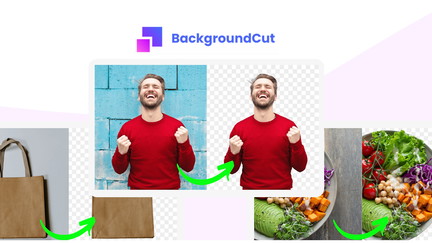
BackgroundCut offers AI-powered background removal with a one-time payment.
Why It’s Better Than a Free Trial
- Lifetime access: No recurring costs.
- Full features: No trial limitations.
- Batch processing: Remove backgrounds in bulk.
- Lifetime deal: $99 one-time.
Who Should Choose BackgroundCut?
BackgroundCut is perfect for e-commerce businesses needing bulk background removal.
LightX: Lifetime AI Product Photography
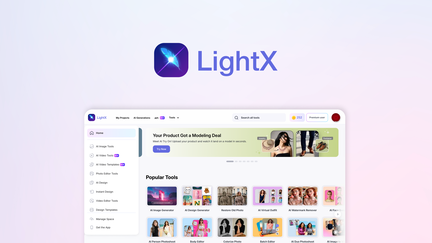
LightX generates professional product shots with AI and a one-time payment.
Why It’s Better Than a Free Trial
- Lifetime access: No recurring costs.
- Full features: No trial limitations.
- AI product shots: Professional results.
- Lifetime deal: $39 one-time.
Who Should Choose LightX?
LightX is ideal for marketers and e-commerce businesses needing professional product photos.
Decision Framework
What’s your primary photo editing need?
- Professional editing: Try Adobe Photoshop (7-day trial).
- Photography workflow: Try Adobe Lightroom (7-day trial).
- Free professional: Use GIMP (free version).
- Non-designer: Use Canva (free version).
- Lifetime value: Choose BackgroundCut or LightX.
Final Verdict
Adobe Photoshop offers the best professional free trial. Adobe Lightroom is excellent for photographers. GIMP is the best free version.
For lifetime value, BackgroundCut and LightX offer exceptional one-time payment deals.
Our Top Recommendations
Best Free Trial: Adobe Photoshop – 7-day free trial with full features.
Best Lifetime Deal for Background Removal: BackgroundCut offers AI-powered background removal with a one-time payment.
 Lifetime Deal
BackgroundCut AI Background Remover
AI-powered background removal and photo editing at scale
Pros
- +Lifetime deal pricing
- +AI-powered background removal
- +Bulk processing
- +Photo editing tools
- +Flexible export options
Cons
- −Limited advanced editing features
- −Additional format support would be beneficial
- −User interface learning curve
Alternatives: Remove.bg Photoshop Canva
Best Lifetime Deal for AI Product Photos: LightX generates professional product shots.
 Lifetime Deal
−46%
Lifetime Deal
−46%
LightX
Generate product shots, packaging, logos, and marketing visuals with AI—no studio required
Pros
- +AI-generated product shots
- +Packaging design capabilities
- +Logo creation
- +Marketing visual generation
- +Lifetime deal pricing
Cons
- −Could offer more customization
- −Quality may vary
- −Limited for high-end professional use
Alternatives: General Design Tools Professional Design Services AI Design Platforms
Try the photo editing software free trial that fits your needs.