
Whether you’re a podcaster, musician, content creator, or video editor, the right audio editing software can transform your sound quality. From removing background noise to mixing multiple tracks, professional audio editing tools help you create polished, broadcast-ready content without a studio budget.
With options ranging from free open-source tools like Audacity to professional DAWs like Adobe Audition, finding the best audio editing software can feel overwhelming. This comprehensive guide compares the top audio editors for 2026, breaking down the best tools for podcasters, musicians, video editors, and beginners.
At a Glance: The Best Audio Editing Software for 2026
- Best Overall (Professional): Adobe Audition – Industry standard with comprehensive features.
- Best Free Option: Audacity – Powerful, open-source, and completely free.
- Best for Podcasters: Descript – All-in-one with transcription and AI features.
- Best for Musicians: Logic Pro (Mac) / Reaper (Windows) – Full-featured DAWs for music production.
- Best for Beginners: GarageBand (Mac) – Free, intuitive, and surprisingly capable.
- Best Lifetime Deals (AppSumo): GSpeech, Unmixr AI, Amical – AI-powered tools for text-to-speech, transcription, and dictation.
What to Look For in Audio Editing Software
Before diving into specific tools, let’s establish what makes great audio editing software. The best choice for you depends on several key factors:
Key Features to Prioritize
- Ease of Use: Can you start editing immediately, or is there a steep learning curve?
- Multi-Track Editing: Can you work with multiple audio tracks simultaneously for complex projects?
- Noise Reduction: Does it have tools to remove background noise, hum, and hiss?
- Effects and Plugins: Does it support VST plugins for EQ, compression, reverb, and other effects?
- Format Support: Does it support common audio formats (WAV, MP3, AAC, FLAC)?
- AI-Powered Tools: Features like auto-transcription, voice cloning, and text-to-speech can dramatically speed up your workflow.
- Integrations: Does it connect with video editing software or other tools in your workflow?
Audio Editing Software Types
- Professional DAWs (Digital Audio Workstations): Full-featured tools for music production, mixing, and mastering (e.g., Adobe Audition, Logic Pro, Reaper).
- Podcast Editors: Tools optimized for spoken word editing with transcription and AI features (e.g., Descript, Alitu).
- AI-Powered Audio Tools: Specialized tools for specific tasks like text-to-speech, transcription, and dubbing (e.g., GSpeech, Unmixr AI).
- Free Tools: Open-source and freemium options for budget-conscious users (e.g., Audacity, GarageBand).
Comparing the Top Audio Editing Software
| Tool | Ease of Use | Pricing | Best For | Weakness | Learning Curve |
|---|---|---|---|---|---|
| Adobe Audition | Medium | $22.99/mo | Professionals, video editors | High cost, steep learning curve | High |
| Audacity | Easy | Free | Beginners, budget-conscious users | Outdated UI, limited advanced features | Low |
| Descript | Very Easy | $12/mo | Podcasters, content creators | Limited music production features | Very Low |
| Logic Pro | Medium | $199.99 (one-time) | Musicians (Mac users) | Mac only, can be overwhelming | Medium-High |
| Reaper | Medium | $60 (one-time) | Budget-conscious music producers | Steeper learning curve, dated UI | Medium-High |
| GarageBand | Very Easy | Free (Mac only) | Beginners (Mac users) | Mac only, limited advanced features | Very Low |
| GSpeech | Easy | $69 (Lifetime) | Text-to-speech, voiceovers | Not a full audio editor | Very Low |
| Unmixr AI | Easy | $79 (Lifetime) | TTS, transcription, dubbing | Not a full audio editor | Very Low |
| Amical | Easy | $49 (Lifetime) | Dictation, speech-to-text | Not a full audio editor | Very Low |
Detailed Breakdown of the Best Audio Editing Software
1. Adobe Audition: The Professional Standard
Pros: Comprehensive audio editing tools, seamless integration with Premiere Pro and other Adobe apps, advanced noise reduction, spectral frequency editing, excellent for video post-production.
Cons: High subscription cost, steep learning curve, requires powerful hardware.
Best For: Video editors, post-production professionals, podcasters who need advanced tools, and anyone working in professional audio production.
2. Audacity: The Free Powerhouse
Pros: Completely free, open-source, supports VST plugins, cross-platform (Windows, Mac, Linux), extensive community support.
Cons: Outdated user interface, limited advanced features compared to professional DAWs, slower performance with large projects.
Best For: Beginners, budget-conscious users, podcasters just starting out, and anyone who needs basic audio editing without cost.
3. Descript: The Podcast Editor’s Dream
Pros: Revolutionary text-based editing (edit audio like a document), automatic transcription, AI voice cloning, screen recording, all-in-one podcasting tool.
Cons: Limited music production features, subscription model, not ideal for complex audio projects.
Best For: Podcasters, content creators, video editors, and anyone who wants to edit audio as easily as editing a document.
4. Logic Pro: The Musician’s Choice (Mac)
Pros: Massive library of instruments and effects, industry-standard for music production, one-time payment, excellent for Mac users.
Cons: Mac only, can be overwhelming for beginners, steep learning curve for advanced features.
Best For: Musicians, producers, and composers working on Mac.
5. Reaper: The Budget-Friendly DAW
Pros: Extremely affordable, highly customizable, supports all major VST plugins, cross-platform, powerful for its price.
Cons: Steeper learning curve, dated user interface, can feel overwhelming for beginners.
Best For: Budget-conscious music producers, podcasters, and anyone who wants professional DAW features without the high cost.
6. GarageBand: The Beginner’s Gateway (Mac)
Pros: Completely free, incredibly intuitive, great for beginners, includes a library of instruments and loops.
Cons: Mac only, limited advanced features, not suitable for professional production.
Best For: Mac users who are just starting with audio editing, musicians exploring digital production, and podcasters on a budget.
💡 The AppSumo Advantage
Affiliate Disclosure: Some links are affiliate links, meaning we may earn a commission. We only recommend products we believe provide genuine value.
GSpeech, Unmixr AI, and Amical are not full audio editors, but they offer exceptional lifetime value for specific AI-powered tasks—text-to-speech, transcription, and dictation—that complement your main audio editing workflow.
7. GSpeech: AI-Powered Text-to-Speech
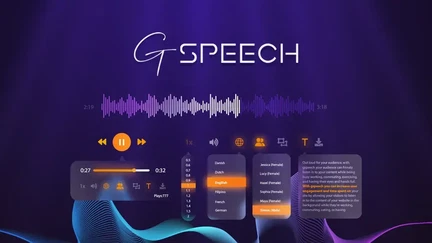
GSpeech converts any text into realistic AI-generated audio. It’s designed for creating voiceovers for videos, podcasts, presentations, and more.
GSpeech Pros
- Realistic AI voices that sound natural.
- Multi-language support for global content.
- Easy content integration with existing workflows.
- Customization options for tone and speed.
- Lifetime deal: One-time payment via AppSumo.
GSpeech Cons
- Not a full audio editor – does only text-to-speech.
- Limited voice options compared to subscription services.
Who Should Choose GSpeech?
GSpeech is perfect for content creators, educators, and businesses who need professional voiceovers without hiring voice actors or paying recurring fees for text-to-speech services.
8. Unmixr AI: Text-to-Speech, Transcription & Dubbing
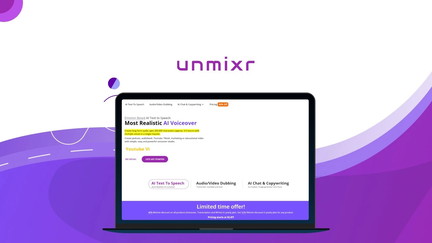
Unmixr AI is a comprehensive AI audio tool that handles text-to-speech, speech-to-text transcription, and AI dubbing for content localization.
Unmixr AI Pros
- Text-to-speech with realistic voices.
- Speech-to-text transcription for podcasts and videos.
- AI dubbing for content localization.
- Multi-language support for global audiences.
- Lifetime deal: One-time payment via AppSumo.
Unmixr AI Cons
- Not a full audio editor – combines several AI audio tasks.
- Quality may vary depending on the language and voice.
Who Should Choose Unmixr AI?
Unmixr AI is ideal for content creators, video editors, and businesses who need to transcribe content, create voiceovers, or localize content for international audiences without monthly subscriptions.
9. Amical: Universal Dictation Tool
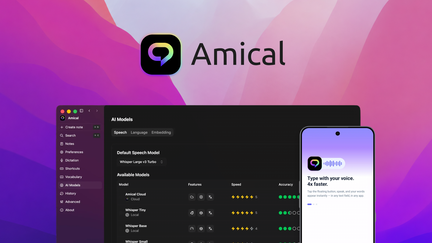
Amical turns your speech into polished text in any app. It’s designed for professionals who want to write by speaking, with support for 100+ languages and local or cloud AI options.
Amical Pros
- Universal dictation in any app.
- 100+ language support for international teams.
- Local or cloud AI options for privacy control.
- Polished text output with automatic editing.
- Lifetime deal: One-time payment via AppSumo.
Amical Cons
- Not an audio editor – focuses on dictation and transcription.
- Best for speech-to-text, not audio production.
Who Should Choose Amical?
Amical is perfect for writers, content creators, and professionals who want to dictate emails, documents, and content instead of typing.
Decision Framework: Which Audio Editing Software Is Right for You?
What’s your primary use case?
- I’m a beginner on a budget: Choose Audacity (free) or GarageBand (Mac, free).
- I’m a podcaster: Choose Descript or use Audacity with Unmixr AI for transcription.
- I’m a video editor: Choose Adobe Audition (professional) or Audacity (free).
- I’m a musician: Choose Logic Pro (Mac) or Reaper (Windows).
- I need voiceovers: Choose GSpeech.
- I need transcription and dubbing: Choose Unmixr AI.
- I want to dictate instead of type: Choose Amical.
5-Year Cost Comparison: Subscription vs. One-Time
| Tool | Pricing Model | Cost Over 5 Years |
|---|---|---|
| Adobe Audition | Subscription ($22.99/mo) | $1,379.40 |
| Descript | Subscription ($12/mo) | $720 |
| Logic Pro | One-Time ($199.99) | $199.99 |
| Reaper | One-Time ($60) | $60 |
| Audacity | Free | $0 |
| GSpeech | One-Time ($69) | $69 |
| Unmixr AI | One-Time ($79) | $79 |
| Amical | One-Time ($49) | $49 |
Lifetime deals offer exceptional savings for specific AI tasks, while professional DAWs often provide the most value for musicians through one-time payments.
- Plugins: Professional audio editing often requires paid VST plugins for specific effects.
- Hardware: Audio interfaces, studio monitors, and microphones add significant costs.
- Storage: High-quality audio files can be large and require significant storage.
- Learning Resources: Advanced tools may require paid courses or tutorials to master.
Common Mistakes to Avoid
- Choosing a Tool That’s Too Complex: Don’t start with professional DAWs if you just need basic editing.
- Not Considering Your Workflow: What tools does the software integrate with? Can you export in the formats you need?
- Ignoring AI Tools: AI-powered tools can dramatically speed up repetitive tasks like transcription and voiceovers.
- Forgetting About Hardware: Audio editing often requires a good sound card and speakers or headphones.
Implementation Roadmap
- Start with a Free Tool: Begin with Audacity or GarageBand to learn the fundamentals.
- Master the Basics: Learn to record, trim, cut, and export audio before exploring advanced features.
- Identify Pain Points: What tasks are taking the most time? (e.g., transcription, voiceovers, noise removal).
- Add Specialized Tools: If you find repetitive tasks, add a specialized AI tool like GSpeech, Unmixr AI, or Amical to streamline your workflow.
- Upgrade as Needed: As your skills grow, consider upgrading to professional tools like Adobe Audition or Logic Pro.
Final Verdict
Choosing the best audio editing software depends on your specific needs. For most professionals, Adobe Audition offers the most comprehensive features. For beginners, Audacity is an excellent free starting point.
For podcasters, Descript revolutionizes the editing workflow with text-based editing. For musicians, Logic Pro (Mac) and Reaper (Windows) are top choices.
If you’re looking to eliminate recurring costs for specific AI tasks like text-to-speech (GSpeech), transcription and dubbing (Unmixr AI), or dictation (Amical), the AppSumo lifetime deals offer exceptional value.
Our Top Recommendations
Best Overall (Professional): Adobe Audition – The industry standard for audio editing.
Best Free Option: Audacity – Powerful, open-source, and completely free.
Best Lifetime Deal for Text-to-Speech: GSpeech offers realistic AI voices with a one-time payment.
 Lifetime Deal
−30%
Lifetime Deal
−30%
GSpeech
Convert any text content into engaging audio with this realistic AI voice generator
Pros
- +Lifetime deal pricing (saving $30)
- +Realistic AI voice generation
- +Multi-language support
- +Content integration
- +Customization options
Cons
- −Limited voice options
- −Additional customization features would be beneficial
- −User interface learning curve
Alternatives: ElevenLabs Murf.ai Speechelo
Best Lifetime Deal for Transcription & Dubbing: Unmixr AI handles TTS, transcription, and dubbing in one tool.
 Lifetime Deal
−81%
Lifetime Deal
−81%
Unmixr AI - Text to Speech, Speech to Text, Audio/Video Dubbing
AI text-to-speech, transcription, and dubbing for creators and businesses
Pros
- +Lifetime deal pricing (saving $341)
- +Text-to-speech
- +Speech-to-text transcription
- +AI dubbing
- +Content localization
Cons
- −Limited voice options
- −Additional language support would be beneficial
- −User interface learning curve
Alternatives: ElevenLabs Descript Murf.ai
Best Lifetime Deal for Dictation: Amical turns speech into polished text in any app.
 Lifetime Deal
−73%
Lifetime Deal
−73%
Amical
Turn speech into polished text in any app—with local or cloud AI and support for 100+ languages
Pros
- +Lifetime deal pricing (saving $131)
- +100+ language support
- +Local or cloud AI options
- +Universal dictation
- +Polished text output
Cons
- −Limited advanced editing features
- −Additional business tool integrations would be beneficial
- −User interface learning curve
Alternatives: Dragon Google Speech SpeechTexter
Remember, the best tool is the one you’ll actually use. Start simple, master the basics, and add specialized tools as your needs grow.