
Whether you’re a professional photographer, a social media manager, or someone who just wants to make their photos look better, the right photo editing software can transform your images. But with countless options available—from industry giants like Adobe Photoshop to beginner-friendly tools like Canva—finding the perfect fit can feel overwhelming.
This comprehensive guide compares the best photo editing software for 2026, breaking down the top tools by skill level, use case, and budget. We’ll help you find the perfect editor for your creative workflow, whether you’re retouching portraits, designing social media graphics, or editing product photos.
At a Glance: The Best Photo Editing Software for 2026
- Best Overall (Professional): Adobe Photoshop – Unmatched depth and industry-standard capabilities.
- Best for Photographers: Adobe Lightroom – Purpose-built for raw processing and photo management.
- Best for Social Media & Non-Designers: Canva – Intuitive templates and vast asset library.
- Best Free Option: GIMP – Powerful open-source alternative with a steep learning curve.
- Best AI-Powered Editor: Skylum Luminar Neo – Advanced AI tools for creative edits.
- Best Lifetime Deals (AppSumo): BackgroundCut, LightX – One-time payment solutions for specific tasks.
What to Look For in Photo Editing Software
Before diving into specific tools, let’s establish what makes great photo editing software. The best choice for you depends on several key factors:
Key Features to Prioritize
- Ease of Use: Can you start editing immediately, or is there a steep learning curve?
- Adjustment Layers & Non-Destructive Editing: Ability to make changes without permanently altering your original image.
- RAW File Support: Essential for serious photographers who shoot in raw format.
- Selection Tools: Ability to isolate and edit specific parts of an image.
- Retouching Tools: Features for removing blemishes, objects, and skin imperfections.
- AI-Powered Tools: Background removal, sky replacement, facial retouching, and more can dramatically speed up your workflow.
- Integrations: Does it connect with other tools in your workflow?
Comparing the Top Photo Editing Software
| Tool | Ease of Use | Pricing | Best For | Weakness | Learning Curve |
|---|---|---|---|---|---|
| Adobe Photoshop | Medium/Expert | $22.99/mo | Professionals, graphic designers | High cost, steep learning curve | High |
| Adobe Lightroom | Easy/Medium | $11.99/mo | Photographers, raw processing | Limited advanced compositing | Medium |
| Canva | Very Easy | Free / $12.99/mo | Beginners, social media, marketing | Limited advanced editing | Very Low |
| GIMP | Medium/Expert | Free | Budget-conscious users, hobbyists | Outdated UI, steep learning curve | High |
| Skylum Luminar Neo | Easy | $17.99/mo or $299 (one-time) | AI-powered creative edits | Limited cataloging features | Medium |
| Affinity Photo | Medium | $69.99 (one-time) | Budget-conscious professionals | Fewer plugins, smaller community | Medium |
| BackgroundCut | Very Easy | $99 (Lifetime) | Bulk background removal | Limited to one task | Very Low |
| LightX | Very Easy | $39 (Lifetime) | AI product shots, marketing visuals | Not a full-featured editor | Low |
Detailed Breakdown of the Best Photo Editing Software
1. Adobe Photoshop: The Industry Standard
Pros: Unmatched depth of features (layers, masks, filters, plugins), industry-standard file support, powerful integration with other Adobe apps, massive community and tutorial ecosystem.
Cons: High subscription cost, steep learning curve, requires powerful hardware.
Best For: Professional photographers, graphic designers, digital artists, and anyone who needs the absolute best tool for complex edits and compositions.
2. Adobe Lightroom: The Photographer’s Workflow
Pros: Excellent raw processing, powerful cataloging and organization tools, seamless cloud sync, intuitive for photographers, strong mobile app.
Cons: Focuses on photo enhancement, not manipulation; lacks advanced compositing features found in Photoshop.
Best For: Photographers who need to process large volumes of raw images, manage portfolios, and apply non-destructive edits.
3. Canva: The Democratization of Design
Pros: Incredibly easy to use, thousands of templates for any project, vast library of stock assets, great for quick designs and social media, free version available.
Cons: Limited for serious photo editing; can lead to “cookie-cutter” designs.
Best For: Beginners, social media managers, marketers, content creators, and anyone who needs to create professional-looking visuals quickly without prior design knowledge.
4. GIMP: The Powerful Free Alternative
Pros: Completely free, highly customizable, boasts features comparable to Photoshop, a large community for troubleshooting.
Cons: User interface is dated and less intuitive than its competitors, a steeper learning curve to unlock its full potential.
Best For: Budget-conscious users, hobbyists, and those willing to invest time in learning a free, powerful tool.
5. Skylum Luminar Neo: AI-Enabled Creative Editor
Pros: Great AI tools for sky replacement, background removal, and portrait retouching; modern UI; available for a one-time purchase.
Cons: Lacks robust cataloging features, editing capabilities not as deep as Photoshop.
Best For: Amateur and semi-professional photographers looking for efficient, AI-powered editing tools.
6. Affinity Photo: The No-Subscription Photoshop Alternative
Pros: A powerful, professional-grade tool for a one-time payment; modern UI; supports PSD files.
Cons: Smaller community and fewer third-party plugins than Photoshop.
Best For: Professionals and enthusiasts who want to avoid subscription fees and need a capable alternative to Photoshop.
💡 The AppSumo Advantage
Affiliate Disclosure: Some links are affiliate links, meaning we may earn a commission. We only recommend products we believe provide genuine value.
BackgroundCut and LightX are not replacements for Photoshop or Lightroom, but they offer exceptional lifetime value for specific, repetitive tasks that can otherwise take hours.
7. BackgroundCut: Automate Background Removal
Manually cutting out backgrounds is tedious and time-consuming, especially when working with hundreds of product photos. BackgroundCut uses AI to remove backgrounds from images in seconds.
BackgroundCut Pros
- Batch Processing: Remove backgrounds from thousands of images at once.
- AI-Powered: Delivers professional results quickly and accurately.
- Lifetime Deal: No recurring subscription.
BackgroundCut Cons
- Limited Functionality: It does one thing (background removal), but does it very well.
- Not a full photo editor: You’ll still need another tool for other edits.
Who Should Choose BackgroundCut?
BackgroundCut is perfect for e-commerce businesses, photographers, and marketers who need to process large batches of images and want to avoid the monthly cost of subscription-based background removal tools.
8. LightX: AI-Generated Product Shots
Need professional-looking product photos but lack a studio or photographer? LightX uses AI to generate high-quality product shots and marketing visuals from simple prompts or your own images.
LightX Pros
- AI-Generated Shots: Creates professional product photos without a photoshoot.
- Saves Time and Money: No expensive studio rentals or professional photographers needed.
- One-Time Payment: Through the AppSumo lifetime deal.
LightX Cons
- Not a Full Editor: Designed for specific marketing tasks; not a replacement for a dedicated editing suite.
- Quality Can Vary: AI-generated results may not always match your exact vision.
Who Should Choose LightX?
LightX is ideal for marketers, business owners, and e-commerce entrepreneurs who need professional product visuals but don’t have the budget for a full photoshoot.
Decision Framework: Which Photo Editing Software Is Right for You?
What’s your primary use case?
- Professional graphic design or complex compositing: Choose Adobe Photoshop or Affinity Photo.
- Photography, raw processing, and image management: Choose Adobe Lightroom.
- Social media marketing and quick designs: Choose Canva.
- I need to remove backgrounds in bulk: Choose BackgroundCut.
- I need AI-generated product shots: Choose LightX.
- I’m on a tight budget: Choose GIMP (free) or Affinity Photo (one-time).
5-Year Cost Comparison: Subscription vs. One-Time
| Tool | Pricing Model | Cost Over 5 Years |
|---|---|---|
| Adobe Photoshop | Subscription ($22.99/mo) | $1,379.40 |
| Adobe Lightroom | Subscription ($11.99/mo) | $719.40 |
| Canva Pro | Subscription ($12.99/mo) | $779.40 |
| Affinity Photo | One-Time ($69.99) | $69.99 |
| BackgroundCut | One-Time ($99) | $99 |
| LightX | One-Time ($39) | $39 |
| GIMP | Free | $0 |
The lifetime value of one-time payment tools is exceptional, but they offer specific features rather than comprehensive editing suites.
- Stock Assets: While some tools include stock libraries, premium assets may require additional subscriptions.
- Hardware Upgrades: Professional editing software may require a more powerful computer.
- Plugins and Add-Ons: Photoshop and other professional tools often require paid plugins for specific effects or workflows.
- Learning Curve Time Investment: The time required to master a complex tool is a significant but often overlooked cost.
Common Mistakes to Avoid
- Choosing a Tool That’s Too Complex: Don’t get overwhelmed by professional tools if you just need basic editing.
- Not Considering Your Hardware: High-end software requires high-end hardware. Test performance before committing.
- Ignoring AI Tools: AI can dramatically speed up your workflow. Don’t overlook tools with AI features.
- Forgetting About File Formats: Ensure the tool supports the file formats you need (RAW, PSD, TIFF, etc.).
Implementation Roadmap
- Start with a Free Trial: Most tools offer free trials. Test the tool with your real projects.
- Learn the Fundamentals: Master the basics (layers, masks, adjustments) before diving into advanced features.
- Identify Your Workflow Bottlenecks: What takes the most time? (e.g., background removal, color correction).
- Add Specialized Tools: If you find repetitive tasks, consider adding a specialized AI tool like BackgroundCut or LightX to streamline those specific tasks.
- Keep Learning: Photo editing is a skill. Invest time in tutorials and courses to keep improving.
Final Verdict
Choosing the best photo editing software depends on your specific needs. For most professional use cases, Adobe Photoshop remains the industry standard. If you’re a photographer, Adobe Lightroom is purpose-built for your workflow. For beginners and marketers, Canva is incredibly accessible.
If you’re looking to eliminate recurring costs for specific tasks like background removal (BackgroundCut) or product photography (LightX), the AppSumo lifetime deals offer exceptional value.
Our Top Recommendations
Best Overall (Professional): Adobe Photoshop – Unmatched features and industry-standard capabilities.
Best Free Option: GIMP – Powerful, open-source, and completely free.
Best Lifetime Deal for Background Removal: BackgroundCut offers batch processing for e-commerce and photographers.
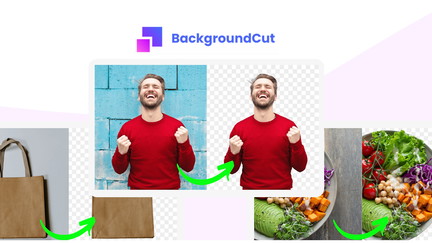 Lifetime Deal
BackgroundCut AI Background Remover
AI-powered background removal and photo editing at scale
Pros
- +Lifetime deal pricing
- +AI-powered background removal
- +Bulk processing
- +Photo editing tools
- +Flexible export options
Cons
- −Limited advanced editing features
- −Additional format support would be beneficial
- −User interface learning curve
Alternatives: Remove.bg Photoshop Canva
Best Lifetime Deal for AI Product Photography: LightX generates professional product shots without a studio.
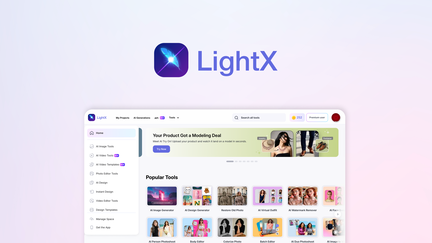 Lifetime Deal
−46%
Lifetime Deal
−46%
LightX
Generate product shots, packaging, logos, and marketing visuals with AI—no studio required
Pros
- +AI-generated product shots
- +Packaging design capabilities
- +Logo creation
- +Marketing visual generation
- +Lifetime deal pricing
Cons
- −Could offer more customization
- −Quality may vary
- −Limited for high-end professional use
Alternatives: General Design Tools Professional Design Services AI Design Platforms
Remember, the best tool is the one you’ll actually use. Start with a trial, understand your workflow, and invest in tools that solve your specific problems.