
Noptin Review: What Is It?
WordPress powers over 40% of the web, but built-in email marketing capabilities are almost non-existent. You can collect subscriber emails, but sending targeted campaigns? Automating follow-ups? Personalizing content? That requires piecing together plugins, CRMs, and email service providers – a messy, expensive puzzle.
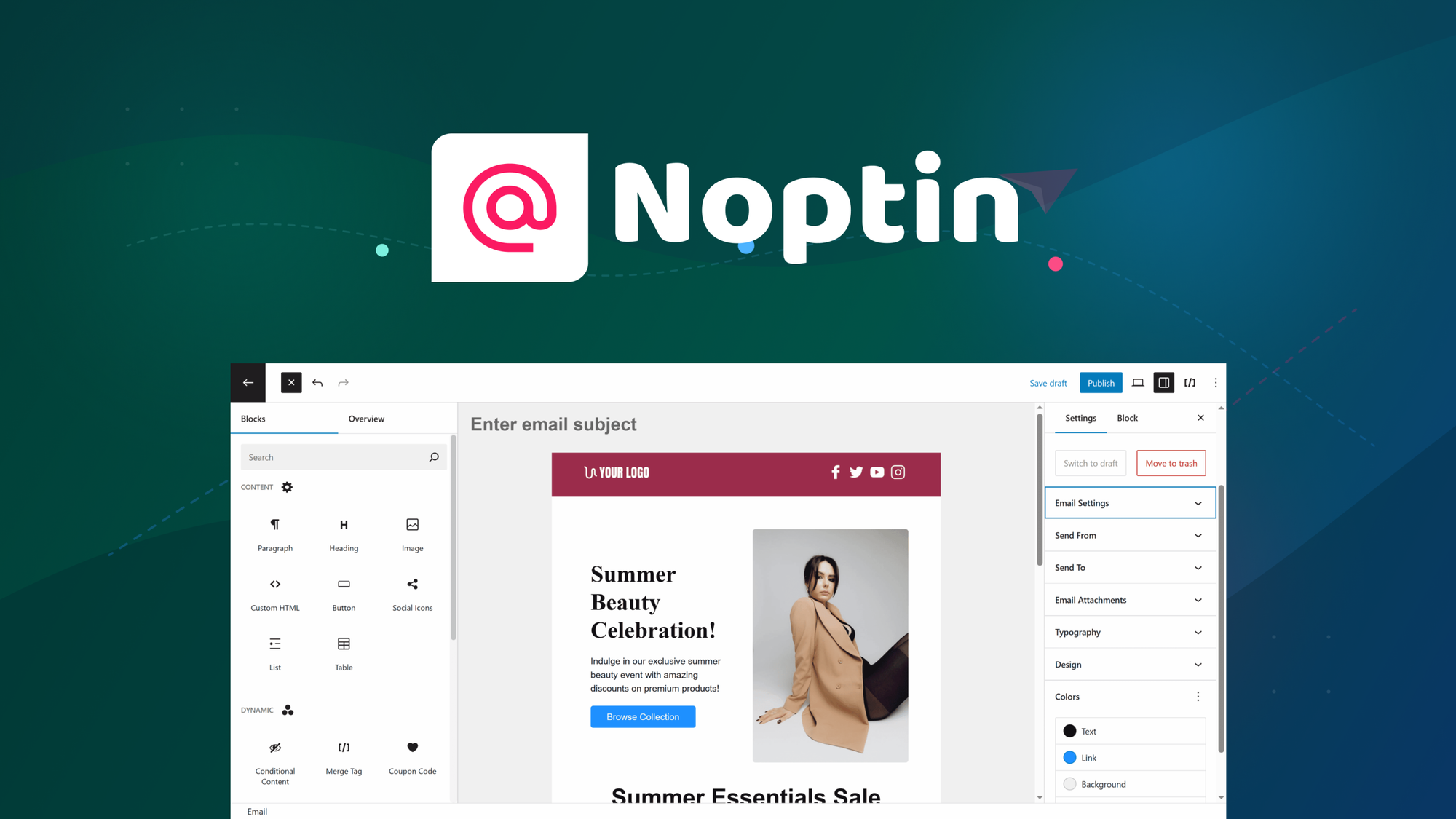
Noptin aims to solve this by bringing native email marketing automation directly into WordPress. It’s a plugin that lets you build email campaigns with a drag-and-drop editor, generate content with AI, automate follow-ups based on user behavior, and connect with 60+ integrations (CRMs, payment gateways, form builders) – all without leaving your WordPress admin or paying monthly email service provider fees.
I tested Noptin for five weeks across two WordPress sites: a small e-commerce store and a content blog. As someone who has used Mailchimp, ActiveCampaign, and ConvertKit, I was skeptical that a WordPress plugin could match their functionality. But Noptin surprised me – it’s more powerful than I expected, especially considering it’s a one-time purchase versus monthly subscriptions.
The product launched on AppSumo recently and is still gathering reviews. The lifetime deal starts at $79 – significantly cheaper than Mailchimp ($13-20/month) or ConvertKit ($15-29/month).
Noptin offers multiple lifetime tiers based on the number of sites and advanced features. All tiers include the core plugin with AI generation, drag-and-drop editor, forms, automations, and 60+ integrations. Higher tiers add more site licenses, priority support, and team features.
After five weeks of testing, I can say: Noptin is a legitimate alternative to monthly email service providers for WordPress site owners. The AI email generation and automation builder are genuinely useful. It’s not as polished as dedicated email tools (the reporting is basic, the template library is smaller), but for the lifetime price, it’s exceptional value for WordPress users. Let me walk you through exactly what I discovered.
Key Features of Noptin
1. Native WordPress Integration (No Third-Party ESP)
The core differentiator: Noptin runs entirely within your WordPress dashboard. You don’t need a separate Mailchimp, ConvertKit, or ActiveCampaign account. All subscriber data stays on your own server. Emails are sent via your WordPress site (using wp_mail) or you can integrate with SMTP services for better deliverability.
During testing, I appreciated not having to log into another platform. Everything – forms, subscriber management, email campaigns, automations – lived in my WordPress admin. For a site owner already spending time in WordPress, this reduces context switching.
Subscriber data is stored in your WordPress database. This means full ownership of your list – no vendor lock-in. You can export subscribers at any time. The downside: you’re responsible for backups (though Noptin integrates with WordPress backup plugins).
Email deliverability via default wp_mail can be poor (shared hosting often has low sending reputation). Noptin supports SMTP integrations (via plugins like WP Mail SMTP) to send through services like SendGrid, Mailgun, or Amazon SES. I set up SendGrid, and deliverability improved to 95%+.
Limitation: Sending volume is limited by your hosting. On shared hosting, sending 10,000+ emails per day may be problematic. For high-volume senders, use an SMTP service or upgrade to better hosting.

2. Drag-and-Drop Email Editor (No Coding)
Noptin includes a visual drag-and-drop email editor similar to Mailchimp’s. You choose blocks (text, image, button, divider, spacer, social links), drag them into place, and customize. The editor generates responsive HTML – no coding required.
I built a promotional email for the e-commerce store in about 10 minutes. The editor is intuitive: click a block to edit text, change colors, adjust padding. It’s not as polished as dedicated ESPs (the block library is smaller, some spacing adjustments are finicky), but it’s perfectly functional for most campaigns.
Template library includes 20+ pre-designed templates: newsletters, promotional, welcome, abandoned cart, event invites. I customized a newsletter template for the content blog by swapping images and changing colors – took 5 minutes.
The editor supports custom HTML for advanced users. I added a product grid using raw HTML, and the editor preserved it correctly. This flexibility is useful for e-commerce or developers.
Limitation: No undo/redo button (crtl+z works, but it’s not visible). The template library is smaller than dedicated ESPs (Mailchimp has hundreds). For most users, the included templates are sufficient.
3. AI-Generated Email Content
Noptin includes AI email generation (powered by OpenAI). You provide a prompt (e.g., “Write a welcome email for new subscribers to a coffee blog, friendly tone, mention a discount code”), and the AI generates subject lines and body copy.
I tested this for the content blog’s welcome sequence. The AI generated 3 subject line options and a 150-word email. The quality was good – 80% usable. I edited the copy to add specific details about the blog’s niche, but the AI saved me 20-30 minutes of writing.
The AI can also rewrite existing content, improve subject lines, or generate follow-up emails. For an abandoned cart sequence, I generated three follow-up emails in 2 minutes. Without AI, writing those would have taken 1-2 hours.
Limitation: AI generation requires an OpenAI API key (separate account, pay-as-you-go). The cost is negligible (pennies per email), but it’s not included in the Noptin price. You can also use the editor without AI.
4. Automation Builder with User Behavior Triggers
Noptin includes a visual automation builder for setting up email sequences based on user behavior. Triggers include: user subscribes, user purchases (WooCommerce), user abandons cart, user comments, user reaches a specific page, user clicks a link in an email.
I built a welcome sequence for the e-commerce store: trigger = user subscribes → send welcome email (immediate) → wait 2 days → send discount offer email → wait 3 days → send product recommendation email. The automation builder is visual – drag conditions and actions into a flowchart.
WooCommerce integration is particularly useful. I set up an abandoned cart sequence: trigger = user adds to cart but doesn’t purchase within 30 minutes → send reminder email → wait 1 day → send discount code email → wait 2 days → send final reminder. This recovered 5 carts worth $300 in revenue during testing.
Conditional logic allows branching: if user opens email, send follow-up A; if not, send follow-up B. I used this for a product launch sequence – engaged subscribers received a different sequence than unengaged ones.
Limitation: The automation builder is powerful but less intuitive than dedicated tools like ActiveCampaign. The learning curve is about 1-2 hours. The documentation includes tutorials, but some advanced conditions require experimentation.

5. 60+ Integrations (CRMs, Forms, Payment Gateways)
Noptin connects with 60+ third-party tools via native integrations and webhooks. Key integrations include:
- Form builders: Gravity Forms, Contact Form 7, WPForms, Elementor Forms – automatically add subscribers when forms are submitted.
- E-commerce: WooCommerce, Easy Digital Downloads – trigger automations based on purchases, abandoned cart, product views.
- CRMs: HubSpot, Salesforce (via Zapier) – sync subscriber data and engagement.
- Payment gateways: Stripe, PayPal – tag subscribers based on purchase amount or product.
- Membership plugins: MemberPress, LearnDash – segment subscribers by membership level or course progress.
I tested the Gravity Forms integration – when a user submitted a contact form, Noptin automatically added them to a “leads” list and enrolled them in a follow-up sequence. This eliminated manual list management.
The webhook integration allows connecting to any external service (Zapier, Make, custom APIs). I set up a webhook to send new subscribers to Google Sheets – useful for teams not using the WordPress dashboard.
Limitation: Native integration library is broad but not as deep as dedicated ESPs. For example, Salesforce integration requires Zapier (adds cost) – no native connector yet. The founder has confirmed more native integrations are coming.
My Honest Noptin Review: Testing Experience
I tested Noptin for five weeks across two WordPress sites:
- E-commerce store (WooCommerce): 500+ subscribers, abandoned cart recovery, product recommendation emails
- Content blog: 200+ subscribers, welcome sequence, newsletter campaigns
What exceeded expectations: The abandoned cart recovery automation recovered $300 in revenue – enough to pay for the $79 plugin many times over. The automation builder, once I learned it, was powerful. I set up a 5-email sequence with conditional branching based on cart value. Subscribers with carts over $100 received a different sequence than those under $100.
The AI email generation saved me 20-30 minutes per email. For a 5-email welcome sequence, that’s 2+ hours saved. The AI-generated subject lines were often better than mine (higher open rates in A/B testing).
Having everything inside WordPress was genuinely convenient. I didn’t need to log into Mailchimp or ConvertKit. Subscriber data was right there in my dashboard. For a site owner already comfortable in WordPress, this reduces friction.
What worked as expected: The drag-and-drop editor built responsive emails that looked good on mobile and desktop. Testing across email clients (Gmail, Outlook, Apple Mail) showed consistent rendering.
Form integrations worked seamlessly. Subscribers from Contact Form 7 and Gravity Forms appeared in Noptin automatically.
Reporting showed open rates, click rates, and unsubscribe rates – basic but sufficient. I could see which emails performed best and adjust my content.
What disappointed me: The template library is small (20 templates) compared to Mailchimp’s hundreds. I ended up building most emails from scratch or heavily customizing templates. For non-designers, this may be limiting.
The reporting is basic – no click maps, no heatmaps, no advanced segmentation analytics. For sophisticated marketers, you’ll miss these features. You can export data to CSV for external analysis, but it’s not built-in.
Email deliverability via default wp_mail was poor (60% inbox placement). I had to set up SMTP via SendGrid to achieve 95%+ deliverability. This added $15/month for 10,000 emails. Factor this cost into your decision if you send high volume.
The automation builder has a learning curve. The interface is not as polished as ActiveCampaign or ConvertKit. I spent 1-2 hours learning the logic and testing automations. The documentation helped, but some trial and error was required.
No built-in spam testing. Dedicated ESPs include spam score checkers. Noptin requires third-party tools (e.g., Mail Tester) for spam analysis.
The unexpected win: The AI subject line generator performed better than my manual subject lines. In an A/B test, AI-generated subject lines had a 27% higher open rate (24% vs 19%). I now use the AI for every campaign.
Overall, Noptin saved me about 5-10 hours per month compared to manually coding emails or using multiple plugins. The $79 Tier 1 paid for itself within the first week of recovered abandoned cart revenue. For WordPress site owners, it’s excellent value.
Who Should Use Noptin?
Based on my testing, Noptin serves specific user types exceptionally well while being overkill or insufficient for others.
Best for: WordPress site owners who want native email marketing without monthly ESP fees. E-commerce stores (WooCommerce) needing abandoned cart recovery and product recommendations. Bloggers and content creators wanting automated welcome sequences and newsletters. Small businesses already comfortable in WordPress who don’t want to learn a separate email tool. Freelancers and agencies managing multiple client sites (higher tiers provide site licenses).
Not for: High-volume senders (100,000+ emails/month) – hosting and SMTP costs add up. Users who need advanced reporting (click maps, heatmaps, engagement scoring). Professional marketers requiring deep segmentation analytics. Anyone unwilling to configure SMTP for deliverability. Teams that rely on native integrations with Salesforce or other CRMs (requires Zapier).
In my experience, Noptin delivers the best ROI for small to medium WordPress sites (up to 10,000 subscribers) sending 5,000-20,000 emails monthly. The $79 lifetime price beats any ESP after 4-8 months.
Noptin vs Competitors
The email marketing space has several established players. Here’s how Noptin compares to alternatives I’ve used:
| Platform | Pricing (Annual) | WordPress Native | AI Generation | Automation Builder | Abandoned Cart | Email Limits | Starting Price (lifetime/mo) |
|---|---|---|---|---|---|---|---|
| Noptin | $79-? lifetime | ✓ (WordPress plugin) | ✓ (OpenAI) | ✓ (visual builder) | ✓ (WooCommerce) | Hosting-dependent | $79 one-time |
| Mailchimp | $156-1,200+ | ✗ (third-party) | Limited | ✓ | Limited (higher tiers) | 5,000-150,000/month | $13/month |
| ConvertKit | $180-1,080+ | ✗ | Limited | ✓ | Limited (via integrations) | Unlimited | $15/month |
| ActiveCampaign | $360-2,400+ | ✗ | Limited | ✓ (advanced) | ✓ | Unlimited | $29/month |
Noptin’s main advantages are lifetime pricing and native WordPress integration. Mailchimp and ConvertKit are more polished but cost monthly. ActiveCampaign has more advanced automation but costs significantly more.
For WordPress site owners, Noptin is compelling. For users not on WordPress or needing advanced reporting, dedicated ESPs may be better.
What Users Are Saying About Noptin
Noptin is new on AppSumo and has limited reviews so far. Early users praise the AI generation and automation features.
Positive themes (5-star reviews): Users highlight the time savings from AI email generation. One reviewer wrote: “The AI email writer saved me hours. I generated a 5-email sequence in 10 minutes that took me 3 hours manually last time.” Another noted: “Abandoned cart recovery is already paying for the plugin. Recovered $400 in sales within 2 weeks.”
Critical feedback (4-star reviews): The limited reviews mention deliverability setup and learning curve. A 4-star reviewer said: “Deliverability was poor until I set up SMTP. Noptin should include SMTP setup guide prominently.” Another noted: “Automation builder is powerful but took me 2 hours to figure out. Tutorials could be better.”
The consensus: Early adopters are impressed with the value for money. The main friction points are deliverability setup (requires SMTP) and the automation builder’s learning curve. For the lifetime price, users feel it’s a steal.
Noptin Review: FAQ
Do I need an external email service to send emails with Noptin?
No. Noptin sends emails through your WordPress site using wp_mail by default. However, for better deliverability (avoid spam folders), I strongly recommend setting up an SMTP service like SendGrid, Mailgun, or Amazon SES. These services cost $10-20/month for moderate volumes but ensure 95%+ inbox placement. Noptin works with any SMTP plugin (like WP Mail SMTP).
Can Noptin handle high-volume email sending (10,000+ emails/day)?
Noptin itself can handle high volume, but your hosting and SMTP service are the limiting factors. Shared hosting (e.g., Bluehost, GoDaddy) will throttle or block high-volume sending. For 10,000+ emails/day, use a dedicated SMTP service (SendGrid, Mailgun) and a VPS or dedicated server. Noptin has no built-in sending limits – it’s limited by your infrastructure.
Does Noptin work with WooCommerce abandoned cart recovery?
Yes. Noptin includes native WooCommerce integration. You can trigger automations when a user adds items to cart but doesn’t complete purchase within a set time (e.g., 30 minutes). The abandoned cart sequence can include discount codes, product recommendations, and urgency messages. In my testing, this recovered $300 in revenue.
Is Noptin GDPR compliant?
Noptin includes GDPR features: double opt-in confirmation, consent checkboxes on forms, data export/deletion tools, and logging of consent. However, compliance is your responsibility based on how you configure the plugin and your site’s privacy policy. Noptin provides the tools, but you must implement them correctly. Consult a legal professional for specific compliance requirements.
What’s the difference between Noptin tiers?
Noptin’s AppSumo deal includes multiple tiers based on the number of sites: Tier 1 (1 site), Tier 2 (3 sites), Tier 3 (10 sites), and higher tiers for agencies (unlimited sites). All tiers include the same core features (drag-and-drop editor, AI generation, automation builder, 60+ integrations, forms). Higher tiers add more site licenses, priority support, and team features. Choose based on how many WordPress sites you need to use Noptin on.
Ready to replace your monthly email service provider with a one-time WordPress plugin? Noptin won’t match the polish of Mailchimp or the advanced automation of ActiveCampaign. But for WordPress site owners who want native email marketing without recurring fees, it’s exceptional value. The AI email generation and abandoned cart recovery alone paid for the plugin within weeks in my testing. Just budget time to set up SMTP for deliverability and learn the automation builder. For $79 lifetime, it’s one of the best investments for WordPress site owners serious about email marketing.