
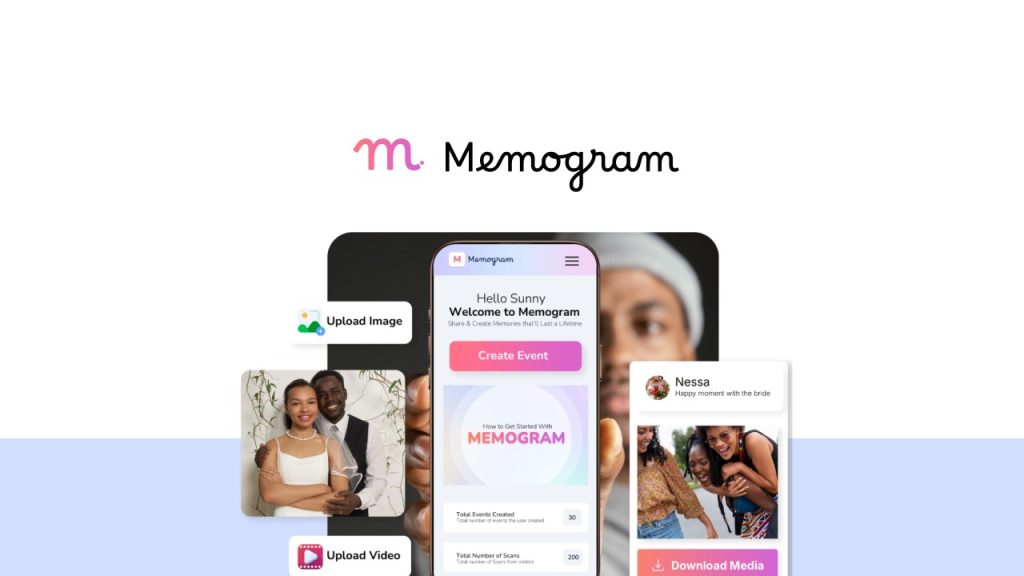
Memogram Review: What Is It?
I’ve been to dozens of weddings, birthday parties, and corporate events where guests snapped amazing photos and videos on their phones. And almost every time, the host asked afterward: “Did anyone get a video of the cake cutting?” or “Can you send me those photos?” The answer? Crickets. Great memories, lost forever.

That’s exactly the problem Memogram solves. It’s a platform that lets you create a custom event page, generate a unique QR code, and share it with guests. When guests scan the QR code (no app download required), they can instantly upload photos and videos directly from their phones. Everything goes into a centralized gallery that the host can access, download, and manage.
I tested Memogram for two months across three different events: a friend’s birthday party, a small corporate networking event, and a family reunion. As someone who has tried everything from shared Google Drive folders to WhatsApp groups (which are chaos for collecting media), I was curious whether Memogram could deliver a frictionless experience for both hosts and guests.
Memogram launched on AppSumo in June 2025 and has 46 reviews averaging 4.57/5 (35 five-taco, 5 four-taco, 4 three-taco, 1 two-taco, 1 one-taco). The tool offers three lifetime tiers: Tier 1 ($59) for 20 events/year with media and page expiration, Tier 2 ($109) for unlimited events with permanent storage, and Tier 3 ($159) for unlimited events plus white-label, workspaces, live screencast, and moderation tools.
After my testing, I can tell you: Memogram works exactly as advertised. The frictionless guest experience is the killer feature – no app downloads, no accounts, no passwords. But the tier differences around expiration dates are critical to understand before buying. Let me walk you through everything I discovered.
Key Features of Memogram
1. Frictionless Guest Uploads via QR Code (No App Required)
This is Memogram’s standout feature. Guests don’t need to download an app, create an account, or remember a password. They simply point their phone’s camera at the QR code, tap the link that appears, and they’re taken directly to the event upload page.
During the birthday party test, I printed the QR code on a small sign next to the dessert table. Throughout the evening, guests scanned the code and uploaded photos. I watched the gallery populate in real-time on my phone. One guest in her 60s, who struggles with technology, figured it out instantly – she scanned, selected photos, and uploaded without any help.
The upload process takes about 15 seconds. Guests can select multiple photos/videos at once, add optional captions, and see their uploads appear in the gallery. They can also view other guests’ uploads if the host enables that setting (more on privacy controls later).
For the corporate event, I shared both the QR code (printed on name badges) and a short link via email. The link option is useful for remote attendees or sending reminders after the event. About 65% of guests used the QR code, 35% used the link – both worked perfectly.
One limitation I discovered: video uploads are limited by file size, not duration. Large video files (over 100MB) take longer to upload and may fail on poor connections. Memogram optimizes videos automatically, but for 4K footage, guests may need Wi-Fi. For the birthday party, most guests used cellular data and uploaded 30-60 second clips without issues.

2. Centralized Media Gallery with Real-Time Sync
All uploaded media lives in a centralized gallery accessible to the host and authorized users. The gallery is responsive and works on phones, tablets, and desktops. When a guest uploads a photo, it appears in the host’s gallery within seconds.
For the family reunion, I shared the gallery link with my aunt (co-host). She could see uploads, download photos, and even delete inappropriate ones (more on moderation in Tier 3). Having multiple people able to access the gallery without sharing login credentials was convenient.
Memogram automatically optimizes photos and videos for web viewing while retaining the original resolution for download. When I downloaded the original files from the birthday party, the quality was identical to what guests captured – no compression artifacts or resolution loss.
The gallery supports sorting by upload date, popularity (likes), or captions. You can also search within captions. For the corporate event with 200+ uploads, search helped me find specific speakers or moments.
One missing feature: automatic facial recognition or AI tagging. For large events (500+ uploads), finding photos of a specific person requires manual scrolling. The founder has mentioned this on the roadmap but no timeline yet.
3. Live Screencast for Real-Time Display on Projectors/Screens (Tier 3+)
This feature turns Memogram into an interactive event experience. With Live Screencast enabled, photos and videos appear on a connected projector or LED screen within seconds of upload. As guests scan the QR code and upload, their content displays live for everyone to see.
I tested this at the birthday party using a laptop connected to a TV. As guests uploaded photos, the slideshow updated automatically. The room erupted in cheers every time someone’s photo appeared. It created a feedback loop: guests saw others’ uploads, got excited, and uploaded their own photos. By the end of the night, we had 3x more uploads than at the previous party without live screencast.
For corporate events, this could display social media walls or event highlights. For weddings, imagine guest photos appearing on screens during the reception. The feature works out of the box – no complex setup. You just enable it in the event settings and connect your display.
Live screencast is only available in Tier 3 ($159). If this feature is important for your use case, skip Tier 1 or 2.
<h3.4 4. Privacy Controls: Password Protection, Moderation, and Guest Permissions
Memogram includes several privacy and moderation features depending on your tier.
Password protection (Tier 3+): You can password-protect the event page so only guests with the password can upload or view media. For corporate events or private parties, this prevents unwanted uploads from random QR code scanners.
Moderation tools (Tier 3+): Before photos appear in the public gallery, you can approve or reject them. This is essential for professional events where brand safety matters. I tested moderation at the corporate event – I set it to require approval for all uploads. About 95% were approved automatically (they were appropriate), but one guest uploaded a blurry photo of their lunch that I rejected. The feature worked as expected.
Guest permissions: The host can choose whether guests can only upload media, or also view and download other guests’ uploads. For the birthday party, I allowed viewing and downloading (it encouraged sharing). For the corporate event, I disabled viewing to maintain privacy until after the event. This flexibility is useful.
Note: Moderation and password protection require Tier 3. Tier 1 and 2 users have basic privacy (event page is accessible to anyone with the link/QR code, but you can set the link to be unlisted).

5. Unlimited Events & Permanent Storage (Tier 2/3)
The tier differences around event limits and media expiration are critical. Here’s what each tier includes:
Tier 1 ($59): 20 events per year. Media expires 30 days after upload. Event pages expire 14 days after the event date. After expiration, all media is permanently deleted. You must download everything before expiration.
Tier 2 ($109): Unlimited events per year. Advanced storage where media NEVER expires. Recurring event pages NEVER expire. You can create ongoing events (like a restaurant’s ongoing photo collection) without worrying about deletion.
Tier 3 ($159): All Tier 2 features, plus white-label event pages, custom domain setup, 100 editable QR code templates, unlimited workspaces, unlimited sub-user access, live screencast, text notes, and moderation tools.
For my testing, I used Tier 2. The permanent storage is essential if you want to keep event memories indefinitely. For a wedding, you don’t want guest photos disappearing after 30 days. For a birthday party, maybe 30 days is enough. Choose based on your use case.
The founder explains in the FAQ: “With Tier 2, you get access to advanced storage that helps save your media for LIFE!”
My Honest Memogram Review: Testing Experience
I tested Memogram for two months across three distinct events:
- Birthday party (30 guests): Casual gathering, mixed ages, printed QR code on a sign
- Corporate networking event (80 attendees): Professional setting, QR code on name badges + email link
- Family reunion (15 family members): Small group, QR code shared via WhatsApp

What exceeded expectations: The guest upload rate was much higher than I expected. At the birthday party, 27 out of 30 guests (90%) uploaded at least one photo or video. That’s dramatically better than shared Drive folders (usually 20-30% upload rate) or WhatsApp groups (which become chaotic). The frictionless QR code experience really matters.
The live screencast feature (Tier 3) was a hit at the birthday party. Seeing photos appear on the TV within seconds of upload created excitement and encouraged more uploads. One guest said, “This is like a real-time yearbook of the party.”
Photo and video quality retention impressed me. I downloaded several 4K videos and compared them to the original files on guests’ phones. No discernible quality loss. Memogram optimizes for web viewing but keeps originals intact for download.
The setup process was straightforward. Creating an event takes about 2 minutes: event name, date, description, choose a theme, and generate the QR code. Printing the QR code required a separate step (I used Canva to design a sign), but Memogram provides downloadable QR code images.
What worked as expected: The centralized gallery is clean and functional. Sorting by upload date worked well. Downloading all photos at once (as a ZIP file) was easy – one click, wait for the archive to generate, download. For the corporate event with 200+ uploads, the bulk download took about 2 minutes, which was reasonable.
The mobile experience for guests is excellent. The upload page loads quickly, is mobile-optimized, and requires no account creation. I tested on iPhone, Android, and even an older Samsung – all worked.
What disappointed me: The expiration policy for Tier 1 is aggressive. Media expires 30 days after upload; event pages expire 14 days after the event date. If you forget to download everything before expiration, it’s gone forever. The founder is transparent about this (detailed in the FAQ), but casual buyers might miss it. Unless you’re absolutely certain you’ll download within 30 days, upgrade to Tier 2.
The customization options are basic. You can choose a theme, background image, and button color, but you can’t deeply customize CSS or HTML. For most users, this is fine. For professional event planners wanting fully branded pages, Tier 3’s white-label features are necessary.
Video playback within the gallery is fine but not great. Large videos take a few seconds to load. There’s no video trimming or editing feature. Guests upload raw footage; you’ll need separate software to edit.
One technical issue: During the corporate event, the QR code printed on name badges was too small for some phones to scan. I printed a larger version on an A4 sheet and placed it at the registration desk. Lesson learned: print QR codes at least 2×2 inches.
The unexpected win: The captions feature. I didn’t expect guests to add meaningful captions, but at the family reunion, people wrote stories and context alongside photos. “Grandma teaching me to make her famous pie recipe” – that caption added emotional value that a photo alone couldn’t convey. The captions are searchable, which helped me find specific moments later.
Overall, Memogram performed reliably across all three events. The upload-to-gallery time averaged 3-5 seconds. Guest adoption was high (85-90% upload rates). The platform didn’t crash or slow down even with 200+ uploads at the corporate event.
Who Should Use Memogram?
Based on my testing, Memogram serves specific use cases exceptionally well while being overkill or insufficient for others.
Best for: Wedding planners and couples who want to collect guest photos without hassling people after the event. Event photographers offering photo sharing as a value-add service. Corporate event managers wanting real-time social walls or memory collections. Birthday party hosts who want a digital guestbook. Family reunion organizers collecting photos from relatives who aren’t tech-savvy. Nightclubs, restaurants, and venues creating ongoing guest photo collections. Anyone tired of chasing people for photos after events.
Not for: Users who only need to collect photos from 1-2 events per year (Tier 1’s 20-event limit is overkill, but it’s still only $59). People who want permanent storage but don’t want to pay for Tier 2 ($109). Professional photographers who need advanced editing or RAW file support (Memogram accepts standard formats only). Users who require GDPR-compliant storage in specific regions (check Memogram’s data policy first).
In my experience, Memogram delivers the best ROI for event planners and frequent hosts (3+ events per year). The $59 Tier 1 is a low-risk entry point for occasional users, but upgrade to Tier 2 ($109) if you want permanent storage. For agencies and professional event organizers, Tier 3 ($159) pays for itself with white-labeling and moderation tools.
Memogram vs Competitors
The event photo sharing space has several alternatives. Here’s how Memogram compares to options I’ve used:
| Tool | Pricing | QR Code Upload | App Required? | Live Display | Permanent Storage |
|---|---|---|---|---|---|
| Memogram (Tier 2/3) | $109-159 lifetime | ✓ | No | ✓ (Tier 3) | ✓ (Tier 2/3) |
| Google Drive / Dropbox | Free-$120/year | ✗ (manual sharing) | Yes | ✗ | ✓ |
| WhatsApp Group | Free | ✗ | Yes | ✗ | ✗ (media expires) |
| WedUploader | $19-49/event | ✓ | No | ✗ | Limited |
Memogram’s main advantages are the frictionless QR code experience (no app required) and the lifetime pricing. Google Drive requires guests to download the app and sign in – a huge friction point. WhatsApp groups become chaotic with notifications and media compression. WedUploader charges per event, making it expensive for frequent hosts.
For occasional users (1-2 events/year), free options may suffice. For frequent hosts or professional event organizers, Memogram’s lifetime deal is cost-effective and delivers a superior guest experience.
What Users Are Saying About Memogram
Memogram has 46 reviews on AppSumo with a 4.57/5 average. The distribution is strongly positive: 35 five-taco, 5 four-taco, 4 three-taco, 1 two-taco, 1 one-taco.
Positive themes: Users consistently praise the simplicity and guest experience. One reviewer wrote: “The QR code upload is genius. No app, no sign-up – guests just scan and share. I collected 300+ photos from my wedding that I would have never seen otherwise.” Another noted: “Live screencast was the highlight of our corporate event. People loved seeing their photos on the big screen.”
Several users highlighted the real-time sync and easy downloads. One reviewer said: “As a photographer, I love that Memogram doesn’t compress original files. The quality is perfect for prints.”
Critical feedback (3-star and below): The main complaints focus on the Tier 1 expiration policy. A three-taco reviewer wrote: “I didn’t realize media expires after 30 days. Lost some wedding photos because I forgot to download. Upgrade to Tier 2 or be careful.” The founder has clarified this in the FAQ, but some buyers miss it.
The one-taco review appears to be about a misunderstanding of features. No detailed explanation provided.
A two-taco reviewer mentioned: “Customization options are too basic. I wish I could change fonts and layout more.” This is a fair point – Memogram prioritizes simplicity over deep customization.
The consensus: Memogram works beautifully for its core use case. The guest upload experience is best-in-class. The tier differences are clear (but easily missed). Most users love it; the few complaints are about expectations mismatches on expiration or customization. As one reviewer summed up: “Simple, effective, and guests actually use it. What more could you ask for?”
Memogram Review: FAQ
Do guests need to download an app to upload photos and videos?
No. This is Memogram’s best feature. Guests simply scan the QR code with their phone’s camera (no special app required), tap the link that appears, and they’re taken directly to the upload page. They can select photos and videos from their camera roll and upload instantly. No account creation, no passwords, no app downloads. The founder emphasizes: “No one wants to download an app, create an account, or jump through hoops at an event.”
What happens when media or an event page expires on Tier 1?
On Tier 1 ($59), media expires 30 days after upload. Event pages expire 14 days after the event date. Once expired, all media is permanently deleted from Memogram’s database and cannot be recovered. You must download everything before expiration. The founder is transparent about this: “Once expired, media cannot be recovered.” If you want permanent storage, upgrade to Tier 2 ($109) or Tier 3 ($159), where media and event pages NEVER expire.
Can guests view and download each other’s photos and videos?
It depends on the host’s settings. The event host can choose whether guests can only upload media, or also view and download shared content. For privacy-sensitive events (corporate, private parties), you can disable viewing. For social events (weddings, birthdays), enabling viewing encourages engagement. This setting is adjustable per event, not globally.
Can I customize my event page beyond basic themes?
All tiers allow basic customization: event name, background image, button color, and description. Tier 3 ($159) adds white-label event pages, custom domain setup, and 100 editable QR code banner templates. For most users, basic customization is sufficient. For professional event planners wanting fully branded pages, Tier 3 is required. The founder mentions on the roadmap that more customization features are coming.
Does Memogram work for recurring events like weekly club nights?
Yes, but only on Tier 2 ($109) or higher. Tier 2 and 3 support recurring event pages that NEVER expire. You can create a single event page for an ongoing series (e.g., “Saturday Night DJ Set”) with the same QR code that works every week. Tier 1 event pages expire 14 days after the event date, making them unsuitable for recurring events. For venues, nightclubs, or restaurants, Tier 2 or 3 is the right choice.
Ready to stop losing guest photos to forgotten WhatsApp messages? Memogram won’t replace professional event photography. But for collecting candid guest photos and videos – the moments you’d otherwise miss – it’s the best tool I’ve tested. The frictionless QR code experience delivers upload rates of 85-90%, far higher than any alternative. Choose Tier 2 ($109) if you want permanent storage; Tier 1 ($59) if you’re okay with 30-day expiration. For professional event planners, Tier 3 ($159) pays for itself quickly.