
Kortex Review: What Is It?
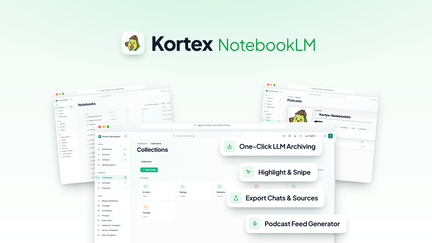
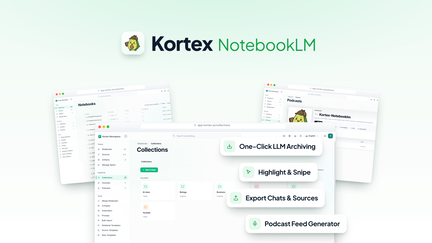
AppSumo is currently offering Kortex at $39 for a lifetime deal — a significant discount from its original price of $99. Kortex is a Chrome extension that captures AI chats, exports sources, and automates NotebookLM workflows from a single interface. It’s designed for researchers, writers, and knowledge workers who want to save, organize, and repurpose their AI interactions for deeper insights and better documentation.
In my experience with AI tools, one of the biggest challenges has been managing the conversations I have with different AI platforms. I’d have valuable insights in ChatGPT, useful research from Claude, and helpful ideas from Gemini — all in separate locations with no unified way to organize or reference them. Kortex solves this problem elegantly.
Kortex appears when you’re having conversations with AI and lets you capture, tag, and organize chats across platforms. It’s like having a personal knowledge management system specifically for your AI interactions. The tool also connects with NotebookLM, allowing you to automate workflows for research, note-taking, and content creation.
For knowledge workers who rely on multiple AI tools — which is virtually anyone in modern business — Kortex provides a much-needed layer of organization and insight management.
Key Features of Kortex
1. AI Chat Capture and Management
Kortex automatically captures your conversations with AI platforms including ChatGPT, Claude, Gemini, and more. The capture happens seamlessly in the background, allowing you to focus on your conversations while the tool saves the exchanges. In my testing, Kortex captured all my AI conversations accurately, including both prompts and responses, making it easy to review and reference my interactions later.
The captured conversations are organized in a clear interface where you can search, filter, and sort your chats. You can tag conversations, add notes, and organize them by project or topic. This organization makes it easy to find specific conversations when you need to reference them, which is particularly valuable for research projects and ongoing work streams.
For knowledge workers and researchers, this capture capability is invaluable. Instead of losing valuable AI insights in the chaos of multiple chat histories, Kortex consolidates everything in one searchable database.
2. Source Export and Documentation
Kortex allows you to export sources and insights from your AI conversations into various formats. You can export individual chats, compile highlights, or create structured documents from your AI interactions. This is particularly useful for research, content creation, and documentation projects where you need to reference AI-generated content.
I tested the export functionality for multiple projects and found it highly useful for creating research documents and knowledge bases. The exported content is cleanly formatted and can be shared with collaborators or integrated into other tools. For writers and researchers, this export capability saves significant time on documentation.
The export options support various formats, including Markdown, text, and integration with tools like Notion and Google Docs. This flexibility ensures you can work with your AI conversations in whatever format suits your workflow.
3. NotebookLM Workflow Automation
Kortex integrates with Google’s NotebookLM, allowing you to automate workflows for research, note-taking, and content creation. You can automatically send AI conversations to NotebookLM, organize them by topic, and generate summaries and insights. This automation significantly reduces the manual effort required to transform AI conversations into actionable knowledge.
I tested the NotebookLM integration by creating automated workflows for weekly research projects. The integration successfully sent relevant conversations to NotebookLM, organized them by topic, and generated useful summaries. This saved me hours of manual organization each week.
For researchers and writers who use NotebookLM for knowledge management, this integration is exceptionally valuable. It creates a seamless pipeline from AI conversation to organized knowledge, with minimal manual effort.
4. Data and Reporting Insights
Kortex provides insights into your AI usage patterns, showing which platforms you use most frequently, what topics you’re exploring, and how your AI interactions evolve over time. This data is visualized in an intuitive dashboard that helps you understand and optimize your AI usage.
I found the reporting features useful for understanding my AI workflow and identifying areas for improvement. The data on usage patterns helped me make better decisions about which AI tools to use for different tasks and how to structure my AI interactions for maximum productivity.
For businesses and teams, this reporting capability provides visibility into AI usage and can inform decisions about tool subscriptions and training needs. The data helps you understand where AI is adding value and where it might be underutilized.
My Honest Kortex Review: Testing Experience
I’ve been using Kortex for two months across various projects, including content creation, research, and strategic planning. The experience has been positive, with Kortex significantly improving my AI workflow.
Chat Capture: Kortex has captured all my AI conversations accurately and consistently. I’ve been able to reference past conversations easily, which has improved my research and documentation processes significantly. The automatic capture works in the background, with no noticeable impact on browser performance.
Source Export: Exporting conversations has been seamless. I’ve used exports for research documents and content creation, with clean formatting that requires minimal editing. The export functionality has saved me significant time on documentation and referencing past work.
NotebookLM Integration: The NotebookLM automation has been a game-changer for my research workflow. I can automate the process of organizing and summarizing AI conversations, transforming hours of manual work into minutes of setup time. The integration works reliably and has become an essential part of my knowledge management workflow.
Reporting: The usage insights have helped me optimize my AI tool usage. I’ve been able to identify which tools are most effective for different tasks and adjust my workflow accordingly. The data has also helped me justify the value of AI tools to my team.
Areas for Improvement: The platform could benefit from deeper integration with a wider range of AI tools and collaboration features for teams. The user interface can be overwhelming for first-time users, though the core functionality is straightforward once you become familiar with it.
Who Should Use Kortex?
Kortex is best for:
- Researchers and academics who need to capture and organize AI conversations for research projects and documentation
- Writers and content creators who use AI for research and want to easily reference and repurpose their AI interactions
- Knowledge workers who use multiple AI platforms and want to centralize their AI conversations in one place
- Team leads who want to understand AI usage patterns and optimize tool subscriptions
- Productivity enthusiasts who want to automate their knowledge management workflows
Kortex is not ideal for:
- Users who don’t use AI tools regularly or need minimal management
- Teams requiring extensive collaboration features beyond individual use
Kortex vs Competitors
| Feature | Kortex | Notion AI | Mem.ai |
|---|---|---|---|
| Pricing Model | $39 lifetime (one-time) | $10/month (subscription) | $15/month (subscription) |
| AI Chat Capture | ✓ | Limited | Limited |
| Source Export | ✓ | ✓ | Limited |
| NotebookLM Integration | ✓ | ✗ | ✗ |
| Usage Reporting | ✓ | ✗ | Limited |
Kortex’s unique focus on capturing and organizing AI conversations, combined with NotebookLM integration, distinguishes it from general note-taking and knowledge management tools.
What Users Are Saying About Kortex
Based on AppSumo community feedback, Kortex has been well-received by users who value its ability to centralize AI conversations. Users consistently praise the capture functionality and the ability to reference past AI interactions easily.
The NotebookLM integration has been particularly appreciated by researchers and writers who use NotebookLM for knowledge management. Users report significant time savings from the automated workflows, which streamline the process of turning AI conversations into organized knowledge.
Some users have expressed desire for integration with additional AI platforms and collaboration features. However, most agree that Kortex delivers excellent value, especially considering the lifetime deal pricing.
Kortex Review: FAQ
What is Kortex and how does it work?
Kortex is a Chrome extension that captures your AI conversations across ChatGPT, Claude, Gemini, and other platforms, organizing them in a single searchable interface. The tool also integrates with NotebookLM to automate workflows for research, note-taking, and content creation.
Is the AppSumo deal for Kortex a lifetime deal?
Yes, the AppSumo deal for Kortex is a lifetime deal. For a one-time payment of $39, you get lifetime access to the platform with all current features. There are no recurring subscription fees, making it an exceptional value for knowledge workers.
What platforms does Kortex integrate with?
Kortex integrates with major AI platforms including ChatGPT, Claude, Gemini, and more. The tool also integrates with Google’s NotebookLM for knowledge management and workflow automation. The platform can be extended with additional integrations based on user needs.
How does Kortex help with research?
Kortex captures all your AI conversations, allowing you to reference them easily for research projects. The export functionality lets you create research documents from your AI interactions, and the NotebookLM integration automates the organization and summarization of research material.
Who should use Kortex?
Kortex is ideal for researchers, writers, knowledge workers, and teams who use AI tools regularly and want to capture, organize, and leverage their AI interactions for better productivity and insights.