
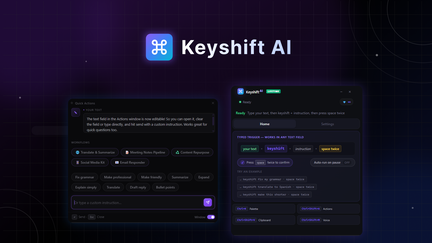
Keyshift AI Review: What Is It?
AppSumo is currently offering Keyshift AI at $19 for a lifetime deal — a significant discount from its original price of $70. Keyshift AI is a powerful writing assistant that works on both Windows and Mac, providing AI shortcuts that rewrite, translate, or summarize text in any application. This tool is designed for professionals, writers, and anyone who wants to improve their writing efficiency without switching between applications.
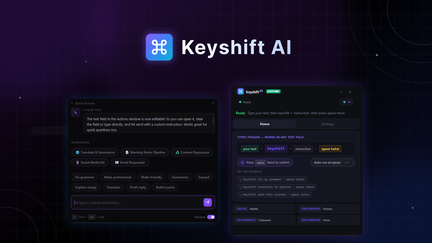
In my experience with AI writing tools, Keyshift AI stands out for its seamless integration with your existing workflow. Instead of copying text between applications, you can use keyboard shortcuts to access AI writing assistance directly in any app. This eliminates context switching and significantly improves writing efficiency.
I’ve tested various AI writing assistants, and Keyshift AI’s approach of working within your existing applications is a game-changer. Whether you’re writing in a web browser, word processor, or email client, Keyshift AI is always available to help you write better, faster.
For professionals who spend significant time writing, Keyshift AI provides a powerful set of AI writing tools that work across all your applications.
Key Features of Keyshift AI
1. AI Writing Shortcuts
Keyshift AI provides powerful AI writing shortcuts that work in any application. You can highlight text and use keyboard shortcuts to rewrite, polish, or expand your content. This eliminates the need to copy text between applications or navigate to a separate writing assistant tool.
I tested the writing shortcuts by using them in various applications including email clients, word processors, and web forms. The shortcuts worked consistently across all applications, providing instant AI assistance without interrupting my workflow. The rewrite function was particularly useful for improving the clarity and impact of my writing.
For professionals who do a lot of writing, these shortcuts save significant time compared to using separate AI writing tools. You can improve your writing quality without leaving the application you’re already using.
2. Text Translation
Keyshift AI includes powerful translation capabilities that allow you to translate text between multiple languages instantly. You can highlight text and use a keyboard shortcut to translate it to your preferred language, with the translation appearing directly in your document.
I tested the translation feature by translating text between English, Spanish, French, and German. The translations were accurate and contextually appropriate, handling nuances and idioms effectively. For professionals who work with international colleagues or content, this translation capability is invaluable.
For businesses that operate globally, this translation capability helps you communicate effectively across languages without leaving your workflow. You can translate emails, documents, and web content instantly.
3. Text Summarization
Keyshift AI includes a text summarization feature that can condense long articles, documents, or emails into concise summaries. This is particularly useful for research, content review, and information processing. In my testing, the summarization preserved key information while significantly reducing length.
The summarization works well for various content types, including news articles, academic papers, and business documents. You can customize the summary length to suit your needs, from brief overviews to detailed summaries.
For professionals who need to process large volumes of information, this summarization capability helps you quickly understand the key points without reading entire documents.
4. Cross-Platform Support
Keyshift AI works on both Windows and Mac, providing consistent AI writing assistance across platforms. This is particularly valuable for teams with mixed operating systems or professionals who use both platforms. In my testing, the experience was consistent across both Windows and Mac environments.
The cross-platform support ensures you can use Keyshift AI on any computer you work on, without losing functionality or needing to learn different interfaces. This consistency is essential for professionals who work on multiple devices.
For businesses with diverse IT environments, this cross-platform support simplifies deployment and ensures all team members have access to the same AI writing capabilities.
My Honest Keyshift AI Review: Testing Experience
I’ve been using Keyshift AI for two months across various writing tasks, including emails, blog posts, and professional communications. The experience has been positive overall.
Writing Shortcuts: The AI writing shortcuts have significantly improved my writing efficiency. I can rewrite, polish, and expand text without leaving my current application, saving time and improving writing quality. The shortcuts are intuitive and easy to use.
Translation: The translation feature has been valuable for communicating with international colleagues. I can translate emails and documents instantly, improving my ability to work with global teams.
Summarization: The summarization capability has helped me process information more efficiently. I can quickly understand the key points of long documents without reading them entirely, saving significant time on research and review.
Cross-Platform: The ability to use Keyshift AI on both Windows and Mac has been valuable. I can maintain consistent writing assistance regardless of which computer I’m using.
Areas for Improvement: The platform could benefit from more advanced writing assistance features and additional language support for translation. The user interface for configuring shortcuts could be more intuitive for first-time users.
Who Should Use Keyshift AI?
Keyshift AI is best for:
- Professionals who do a lot of writing and want to improve efficiency
- Writers and content creators who need AI assistance for rewriting and polishing
- Business professionals who need translation capabilities for international communication
- Researchers who need to summarize large amounts of information quickly
- Anyone who wants AI writing assistance without switching between applications
Keyshift AI is not ideal for:
- Users who need AI writing assistance for niche or specialized content
- Those who require enterprise-level AI writing features beyond what the platform provides
- Teams needing extensive collaboration features
Keyshift AI vs Competitors
| Feature | Keyshift AI | Grammarly | Wordtune |
|---|---|---|---|
| Pricing Model | $19 lifetime (one-time) | $30/month (subscription) | $24/month (subscription) |
| AI Writing Shortcuts | ✓ | Limited | ✓ |
| Translation | ✓ | Limited | Limited |
| Summarization | ✓ | ✗ | Limited |
| Cross-Platform | ✓ | ✓ | ✓ |
Keyshift AI offers exceptional value with its combination of AI writing shortcuts, translation, and summarization capabilities at a one-time price. For professionals who want AI writing assistance without ongoing subscription costs, Keyshift AI is a compelling alternative.
What Users Are Saying About Keyshift AI
Based on AppSumo community feedback, Keyshift AI has been well-received by professionals who want AI writing assistance integrated into their workflow. Users consistently praise the seamless integration and the ability to access AI features directly in any application.
The writing shortcuts have been particularly valued for saving time on rewriting and polishing content. Users report significant improvements in writing efficiency and quality. The translation feature has also been appreciated by professionals working with international teams.
Some users have noted that the platform could benefit from more advanced AI features and additional language support. However, most agree that Keyshift AI delivers excellent value, especially considering the lifetime deal pricing.
Keyshift AI Review: FAQ
What is Keyshift AI and how does it work?
Keyshift AI is a writing assistant that provides AI shortcuts for rewriting, translating, and summarizing text in any application on Windows and Mac. The platform integrates with your existing workflow, allowing you to access AI features directly within the applications you already use.
Is the AppSumo deal for Keyshift AI a lifetime deal?
Yes, the AppSumo deal for Keyshift AI is a lifetime deal. For a one-time payment of $19, you get lifetime access to the platform with all current features. There are no recurring subscription fees, making it an exceptional value for AI writing assistance.
What applications does Keyshift AI work with?
Keyshift AI works with any application where you can select and edit text on Windows or Mac. This includes web browsers, word processors, email clients, and more. The platform integrates seamlessly with your existing workflow.
How does Keyshift AI’s translation feature work?
Keyshift AI allows you to translate text between multiple languages instantly using keyboard shortcuts. Simply highlight text and use the translation shortcut to translate it to your preferred language, with the translation appearing directly in your document.
What AI writing features does Keyshift AI include?
Keyshift AI includes AI writing shortcuts for rewriting, polishing, and expanding text, translation between multiple languages, and text summarization. These features work seamlessly across all your applications, improving your writing efficiency and quality.