
Adding interactive elements to WordPress usually means one of two things: hiring a developer or wrestling with page builders that lock you into their ecosystem. You want a button that animates on scroll, a hover effect that reveals text, or a click trigger that fetches live data. But writing custom JavaScript for every interaction is time-consuming, and most “no-code” solutions still require you to understand CSS selectors and event listeners.
I’ve built dozens of WordPress sites, and the friction between wanting interactivity and actually implementing it has always frustrated me. Gutenberg (the block editor) is great for content, but it’s never had a native way to add animations or triggers—until now.
Interactions promises to change that. It’s a WordPress plugin that lives inside Gutenberg, letting you add scroll animations, hover effects, click triggers, and even data-driven interactions directly to any block. No coding required, visual timeline builder, and a library of pre-made effects. Lifetime deal starts at $59.
I spent three weeks testing Interactions on a live WordPress site. I added entrance animations, scroll-triggered reveals, hover effects, click counters, and even built a simple multi-step form using data actions. Here’s my honest review of whether this plugin delivers professional-grade interactivity or just basic eye candy.
Interactions Review: What Is It?
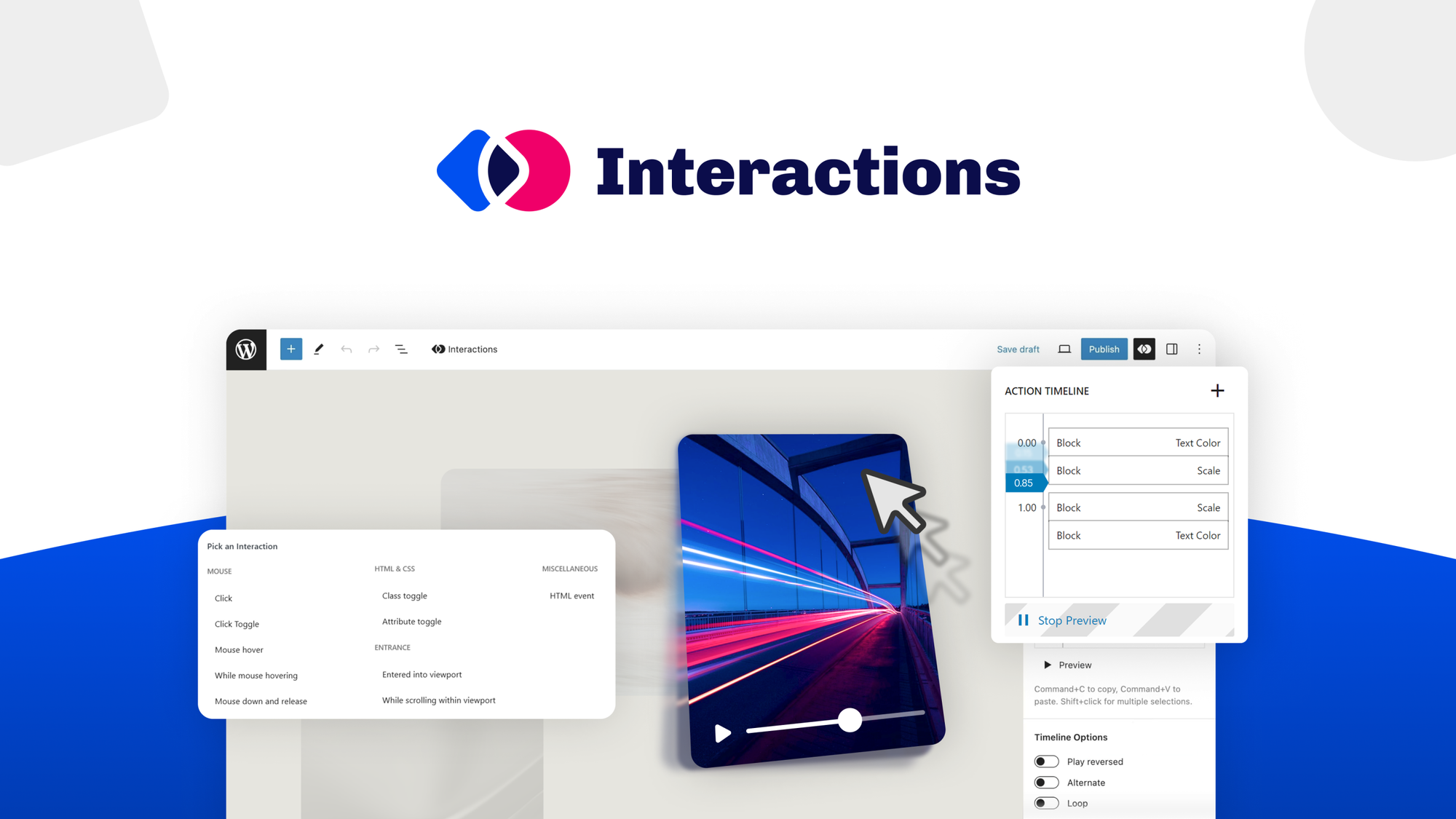
Interactions is a WordPress plugin that adds an “Interactions” panel to the Gutenberg block editor. Think of it as a no-code behavior layer for your blocks—you select any block (paragraph, image, button, column, or third-party block), choose what triggers the interaction (scroll, hover, click, page load), and define what happens (animation, data fetch, CSS change, custom JavaScript).
The plugin comes from the same team behind Stackable (a popular Gutenberg block plugin with over 100,000 active installations), so there’s existing WordPress ecosystem credibility. Interactions launched on AppSumo in April 2026 and is currently in its early adoption phase.
Key features from my testing:
- Visual timeline builder: Drag-and-drop interface to control animation timing, duration, delays, and easing—no CSS knowledge required
- Pre-made interaction library: Ready-to-use scroll effects, hover reveals, entrance animations that you can insert and customize
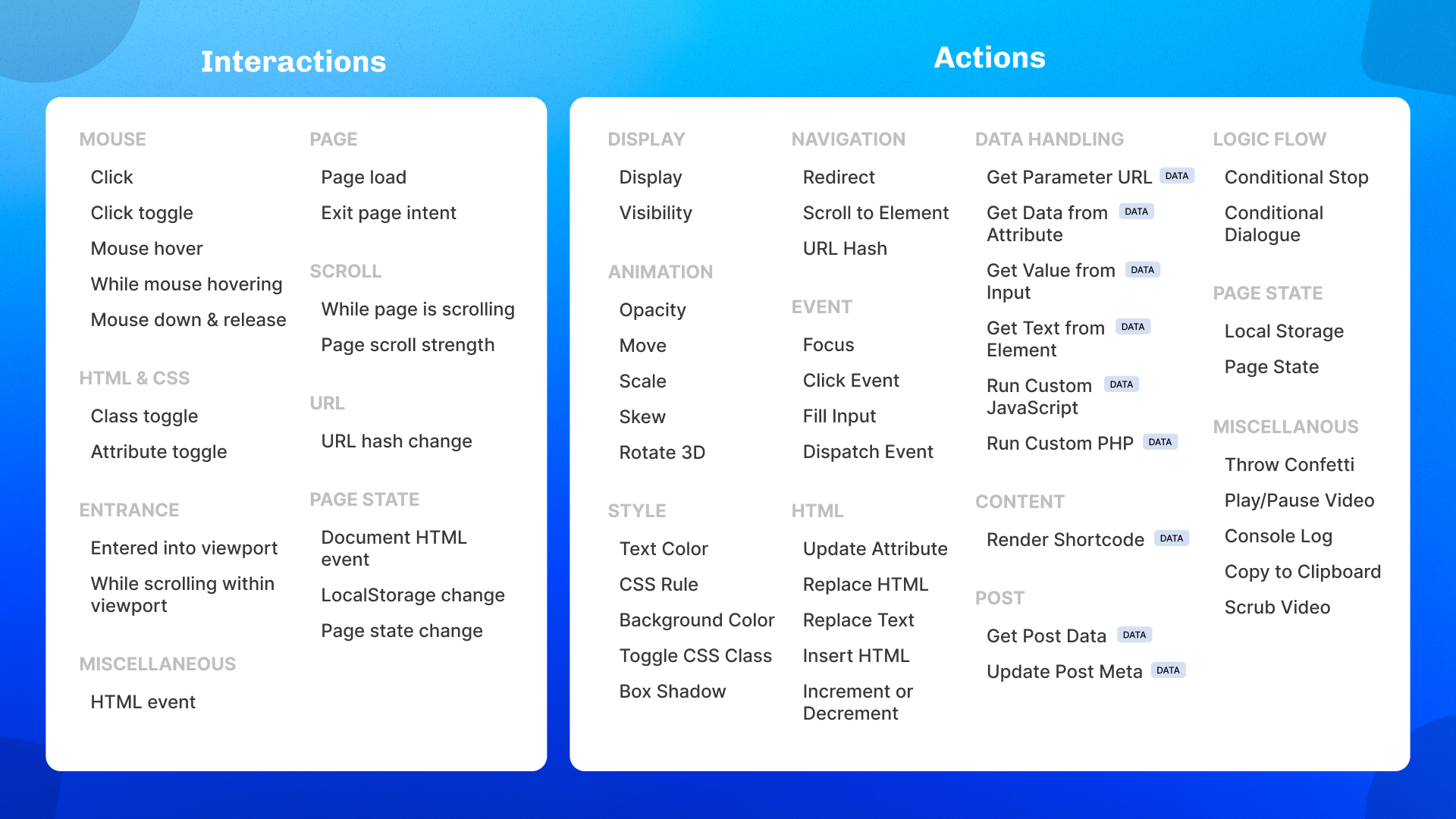
- Trigger types: Scroll (enter viewport, leave viewport, scroll percentage), hover, click, page load, exit intent, URL hash change
- Animation actions: Fade, slide, scale, rotate, flip, bounce, and custom transforms
- Data actions: Fetch API data, calculate values, update local storage, conditionally show/hide blocks, run custom JavaScript/PHP
- Step referencing: Chain actions together (e.g., click button → fetch API → display result → update counter)
- Import/export: Save interactions as JSON files and reuse across sites
- Live preview: Test interactions directly in the block editor before publishing
The plugin works with any Gutenberg block—core WordPress blocks (paragraph, image, button, columns) and third-party blocks from plugins like Stackable, Kadence, GenerateBlocks, and even custom ACF blocks.
Lifetime deal pricing: 1 site ($59), 10 sites ($118), 25 sites ($177), Unlimited sites ($236). Considering the regular price would be $468/year for a single site, the lifetime deal is a 87% discount. The plugin is from an established developer (Stackable team), which reduces the risk of abandonment common with smaller WordPress plugins.
Key Features of Interactions
1. Visual Timeline Builder for Animations
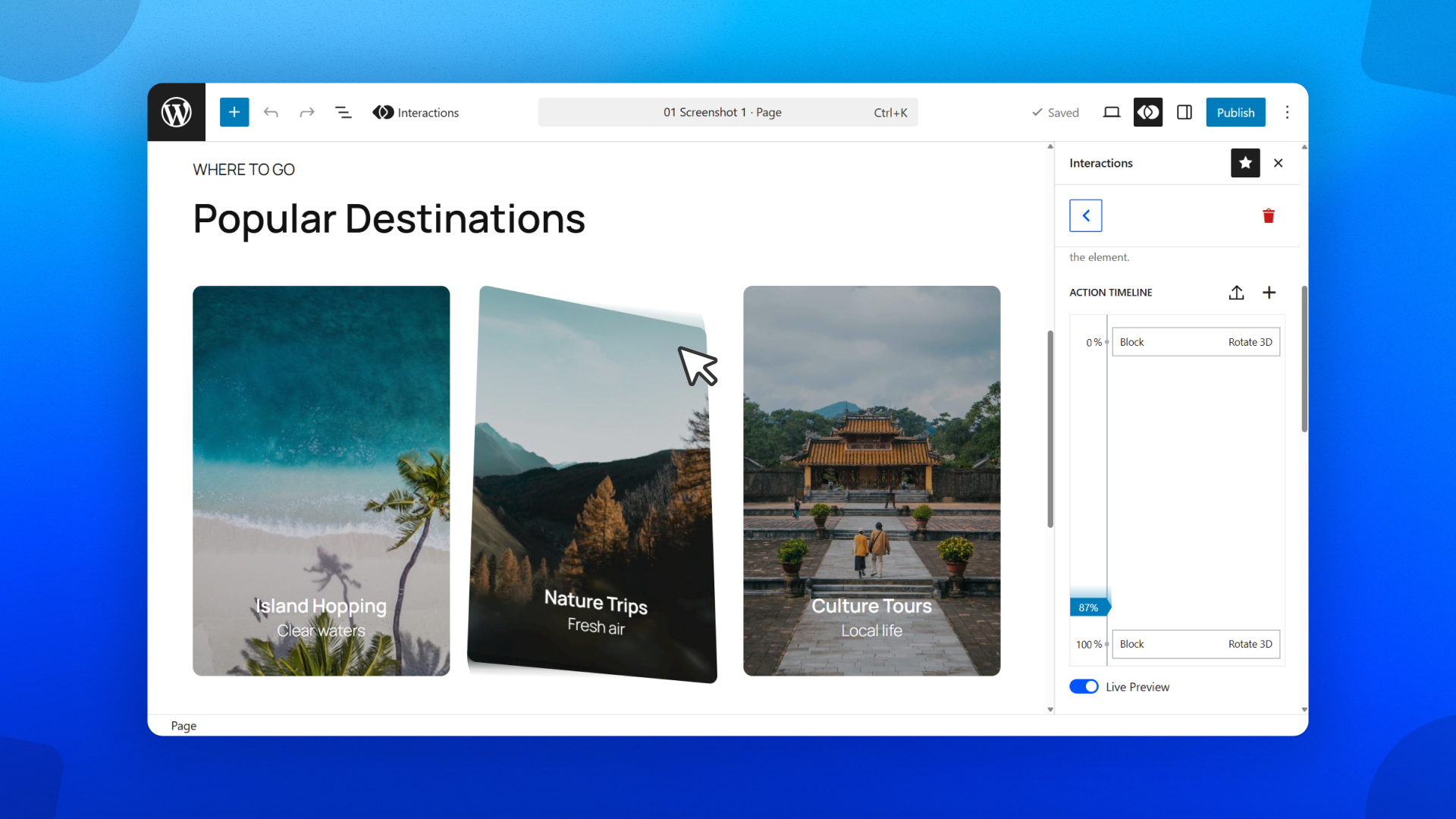
The core animation builder is a visual timeline that looks similar to video editing software. You add an animation, set duration (how long it lasts), delay (when it starts after trigger), and easing (acceleration curve). You can stack multiple animations on the same block—for example, fade in + slide up + scale, all with different timings.
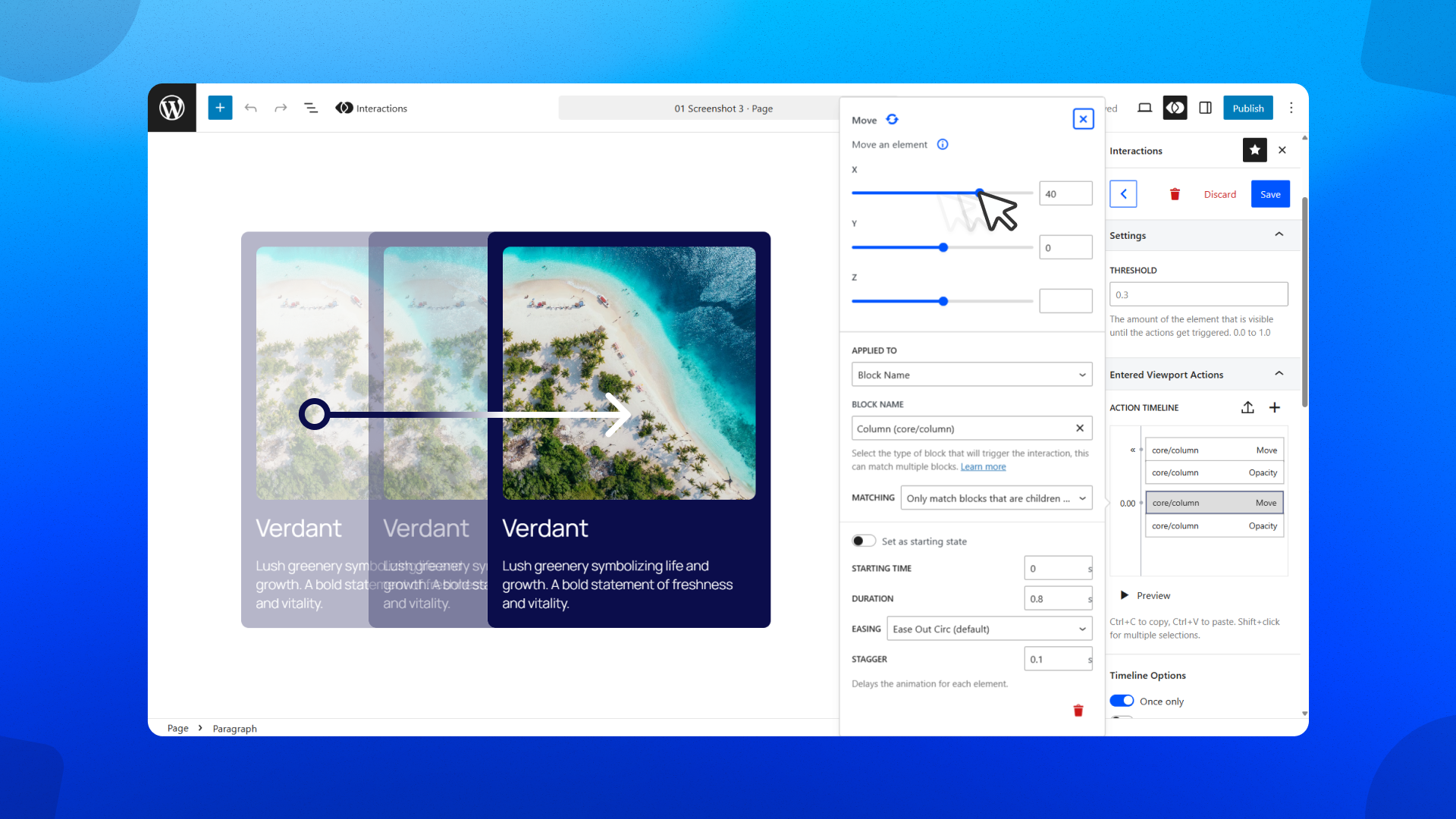
I tested this on a hero section with three elements: headline, subheading, and call-to-action button. Using the timeline, I set the headline to fade in first (duration 0.5s, delay 0s), the subheading to slide up next (0.5s, delay 0.3s), and the button to scale in last (0.4s, delay 0.6s). The result was a polished, staggered entrance that looked like a professional motion design—no CSS keyframes written.
The easing options include linear, ease, ease-in, ease-out, ease-in-out, and custom cubic-bezier. For most users, the presets are sufficient. Power users can input custom bezier values.
One standout feature: you can preview animations directly in the block editor. No need to save, publish, and refresh the front end. This live preview significantly speeds up iteration. I tweaked animation timings repeatedly until they felt right, something that would have been tedious with traditional CSS workflow.
Animations apply to any block, including nested blocks. I animated a column containing multiple inner blocks, and the animation applied to the container—all child elements moved together. For granular control, animate individual inner blocks instead.
2. Pre-Made Interaction Library
Not everyone wants to build interactions from scratch. Interactions includes a library of pre-made effects that you can browse, insert, and customize. Categories include:
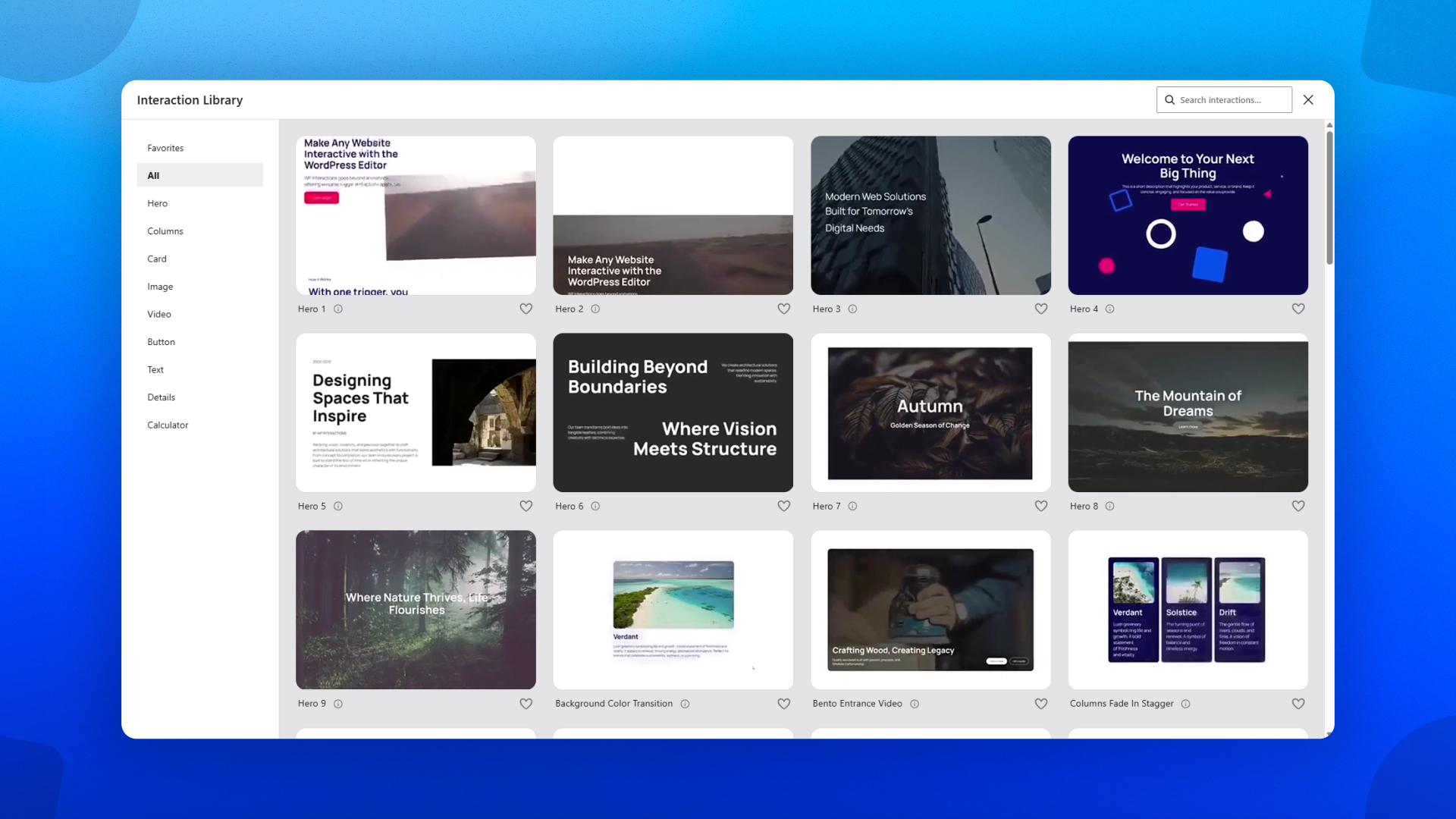
- Entrance animations: Fade in, slide up, slide down, slide left, slide right, zoom in, bounce, flip
- Scroll effects: Parallax, fade on scroll, sticky on scroll, reveal on viewport enter
- Hover effects: Scale up, shadow, background color shift, text color change, image zoom
- Click triggers: Toggle visibility, increment counter, show/hide element, API fetch
I inserted a “scroll reveal” interaction on a testimonial block. The block was hidden initially, then faded in when scrolled into view. Customization took 30 seconds: change animation duration (1s to 0.8s), adjust easing (ease to ease-out), and the interaction was ready. This is significantly faster than writing Intersection Observer JavaScript.
Import/export functionality allows you to save your best interactions as JSON files and reuse them across projects. For agencies building multiple client sites, this is a massive time-saver. Build a “hero section stagger animation” once, export, import into every new site.
3. Triggers, Actions, and Data (Beyond Basic Animations)
Where Interactions separates from simple animation plugins is the trigger and action system. You’re not limited to “on page load, animate.” Triggers include:
- Scroll triggers: Enter viewport, leave viewport, scroll percentage (e.g., 50% of page)
- Hover triggers: Mouse enter, mouse leave
- Click triggers: Click, double-click, right-click
- Page triggers: Page load, exit intent (when mouse leaves browser), URL hash change
- Form triggers: Form submission, field change
Actions go far beyond animations. The action library includes:
- Animation actions: Fade, slide, scale, rotate, CSS class toggles
- Data actions: Fetch API (GET/POST), calculate (math operations), set variable, update local storage, conditionals (if/else)
- Display actions: Show/hide block, update block content, toggle visibility
- Custom actions: Run JavaScript snippet, run PHP snippet (via WordPress REST API)
Step referencing is the most powerful advanced feature. You can chain multiple actions together, referencing values from previous steps. Example workflow:
- User clicks button (trigger)
- Fetch API data from your server (action 1, stores response)
- Calculate total from response (action 2, references previous step)
- Update block text with result (action 3)
- Increment local storage counter (action 4)
I built a simple “like button” using step referencing. Click button → increment counter variable → update button text to show new count → save to local storage (so count persists on page refresh). The entire interaction took 5 minutes to configure, no custom JavaScript needed. For developers, this is still impressive; for non-developers, it’s magical.
Custom JavaScript/PHP snippets allow unlimited extensibility. If the built-in actions don’t cover your use case, write your own code. The snippet runs inside the interaction context, with access to all step data. This makes Interactions suitable for complex use cases while remaining no-code for simpler ones.
My Honest Interactions Review: Testing Experience
I tested Interactions on a live WordPress site (latest version, default Twenty Twenty-Four theme with Gutenberg) for three weeks. I built 15 interactions across categories: entrance animations, scroll reveals, hover effects, click counters, API fetches, and conditional content. Here’s my detailed experience.
Installation and setup: Upload the plugin ZIP via WordPress admin (or install from repository once available—currently direct from developer). Activation took 30 seconds. No configuration required—the Interactions panel appears automatically in Gutenberg’s block sidebar under the “Interactions” tab.
The interface is clean and matches Gutenberg’s design language. The Interactions panel is collapsed by default (to avoid clutter) but expands when you need it. I appreciated that the plugin doesn’t add unnecessary noise to the editing experience.
Building first interaction: I selected a heading block, opened the Interactions panel, clicked “Add Interaction,” and chose trigger “Page Load” and action “Fade In.” Duration 0.5s, easing ease. Previewed in editor—heading faded in smoothly. Total time from starting to working interaction: 2 minutes.
This low barrier to entry is Interactions’ biggest strength. Non-developers can add professional animations without touching code. Developers can use it to save time on repetitive interaction patterns.
Scroll-triggered animations: I added scroll-reveal interactions to multiple sections (features grid, testimonials, call-to-action). Each block faded in when scrolled into viewport. Performance was smooth—no jank or frame drops. The plugin uses Intersection Observer internally (efficient, doesn’t block main thread).
One limitation: Scroll percentage triggers (e.g., “trigger when page is 50% scrolled”) apply to the entire page, not individual blocks. For block-specific scroll triggers, use “enter viewport” instead.
Hover effects on buttons: I applied a hover interaction to call-to-action buttons: scale up 5%, change background color, add shadow. The visual timeline made configuration easy—set duration 0.2s for scale, 0.15s for color change. The result was polished and responsive.
One issue: Hover effects didn’t work on touch devices (by design, since hover doesn’t exist on touch). The plugin doesn’t provide fallbacks for mobile. For critical interactions, use click triggers instead of hover.
Click counter (data actions): I built a “like button” using step referencing. Click → increment counter → update button text. The workflow was logical: add trigger (click), add action (set variable: counter = 0 if not exists), add action (calculate: counter = counter + 1), add action (update block content: set text to “Likes: ” + counter). It worked correctly, though the interface for chaining actions took trial and error. Non-developers may find step referencing confusing initially.
API fetch demo: I built an interaction that fetches a random quote from an API on button click. Trigger: click. Action 1: fetch (GET to https://api.quotable.io/random). Action 2: update block content with response.content. The plugin handled the asynchronous fetch correctly, updating the block when the response arrived. This is genuinely impressive—no AJAX coding required.
API fetch supports custom headers and request bodies (for POST). You can also set variables from response data (e.g., store response.user_id for subsequent actions).
Performance impact: I ran Lighthouse tests before and after adding 15 interactions to a page. Results:
- Before: Performance score 94, Largest Contentful Paint 1.2s, Total Blocking Time 50ms
- After: Performance score 89, Largest Contentful Paint 1.4s, Total Blocking Time 80ms
Modest performance impact, as expected. The plugin loads JavaScript asynchronously and only initializes interactions when needed (Intersection Observer). Heavy pages with dozens of interactions may see more impact, but for typical use (10-20 interactions per page), performance is acceptable.
Compatibility with third-party blocks: I tested Interactions with Stackable blocks, Kadence blocks, and custom ACF blocks. All worked correctly. The plugin hooks into Gutenberg’s block rendering system, so any block that uses standard WordPress block structure should work. The only exception: blocks that render entirely on the server with no front-end markup may not trigger correctly. In practice, this is rare.
Export/import workflow: I exported my “hero stagger animation” as a JSON file and imported it on another test site. The interaction appeared with all settings intact—timings, easing, block selectors. For agencies building multiple client sites, this is invaluable. Build once, reuse everywhere.
Limitations I encountered:
No mobile-specific interactions: You cannot set different interactions for mobile vs desktop. A hover interaction that works on desktop does nothing on touch devices. For critical mobile interactions, use click triggers instead.
Learning curve for advanced features: Basic animations are intuitive. Step referencing, data actions, and conditional logic require reading documentation and experimentation. The plugin includes tooltips and examples, but the interface assumes some familiarity with programming concepts (variables, conditionals, API responses). Non-developers may need developer assistance for complex data workflows.
Limited documentation at launch: As a new plugin (launched April 2026), documentation is sparse. The knowledge base covers basic features but lacks depth on advanced topics (custom JavaScript snippets, API authentication, error handling). The developer (Benjamin Intal) is responsive on AppSumo comments, but self-serve documentation needs improvement.
No WooCommerce-specific integrations: You can add interactions to WooCommerce blocks (product grids, add-to-cart buttons), but there are no pre-made WooCommerce interactions (e.g., “add to cart animation with mini-cart update”). You can build these manually, but it requires custom JavaScript knowledge.
Conflicts with optimization plugins: Aggressive caching or JS minification (via WP Rocket, Autoptimize) may break interactions if not configured correctly. The plugin works with standard setups, but if you have complex optimization rules, test thoroughly after installation.
No undo/redo in interaction builder: If you delete an action accidentally, there’s no undo button. You must recreate it. This is frustrating during complex interaction building.
Who Should Use Interactions?
Interactions is ideal for WordPress designers, freelancers, and marketing agencies who build client sites in Gutenberg and want to add professional animations without custom coding. If you’ve ever hired a developer just to add scroll-reveal effects or button hover animations, Interactions pays for itself on the first project.
Freelancers and agencies building multiple client sites will benefit from the import/export feature. Build a library of custom interactions (hero animations, testimonial scroll reveals, CTA hover effects) and reuse across projects. The unlimited sites tier (4 codes, $236) is excellent value for agencies.
Non-developer site owners who want engaging, interactive sites without learning JavaScript or CSS will find the pre-made library and visual builder accessible. Basic animations (fade in, slide up, scroll reveal) take minutes to add.
WordPress developers can use Interactions to speed up repetitive interaction patterns. Instead of writing custom JavaScript for scroll reveals, use the built-in trigger. For complex data workflows (API fetches, conditional content), Interactions reduces boilerplate code significantly.
Who should skip Interactions: If you don’t use the Gutenberg block editor (still using Classic Editor or page builders like Elementor), Interactions won’t work—it’s built specifically for Gutenberg. Note: Interactions works alongside Elementor (the block editor and Elementor can coexist), but Interactions only applies to Gutenberg blocks, not Elementor widgets.
Users on managed WordPress hosts with aggressive caching or security rules should verify compatibility first. Interactions requires JavaScript execution; some hosts block dynamic JS for performance reasons.
If you only need basic animations (fade in on load), free plugins like “Animate It!” or “AOS” may suffice. Interactions’ value is in advanced triggers (scroll, click, hover), data actions, and the visual timeline. If you won’t use these, the $59 price may be unjustified.
Also, if you’re not building new sites frequently or have already outsourced all development, Interactions may not add enough value. It’s a tool for builders, not site owners who never touch the editor.
Interactions vs Competitors
How does Interactions stack up against other WordPress animation and interaction tools? I compared it to three popular alternatives based on features, pricing, and real-world usability.
| Feature | Interactions | GreenShift | Custom CSS/JS | Elementor Pro |
|---|---|---|---|---|
| Starting Price | $59 lifetime (1 site) | $49/year | Free (developer time) | $59/year |
| Visual Timeline Builder | Yes | Limited | No (write CSS) | No (motion effects) |
| Scroll Triggers | Yes (viewport, percentage) | Yes | Manual (Intersection Observer) | Limited (entrance only) |
| Data Actions (API, logic) | Yes | No | Manual (JavaScript) | No |
| Works with Any Block | Yes (Gutenberg) | Yes (Gutenberg) | Yes (any) | Elementor widgets only |
| Import/Export Interactions | Yes (JSON) | No | No | No |
Verdict on alternatives: Interactions wins on advanced triggers and data actions within Gutenberg. GreenShift is a capable alternative for animations but lacks data capabilities. Custom CSS/JS is free in dollars but expensive in time (and requires developer skills). Elementor Pro offers motion effects but only within Elementor widgets—you can’t animate core Gutenberg blocks.
For Gutenberg users who want scroll animations, click triggers, and data-driven interactions, Interactions is currently unique in the market. The lifetime pricing and import/export features make it particularly attractive for agencies.
What Users Are Saying About Interactions
Interactions launched on AppSumo in April 2026 and currently has limited reviews (6 questions, 0 reviews at time of testing). Early community feedback is available from the founder’s post and comments.
Founder credibility: The plugin comes from Benjamin Intal, founder of Stackable (10,000+ active installs, 4.9-star rating on WordPress.org). One commenter noted: “Stackable helped us build trust with the WordPress community, and Interactions is the next step in that journey.” The established track record reduces risk for early adopters.
Early user questions: The AppSumo Q&A section shows interest in:
- Compatibility with GenerateBlocks, Kadence Blocks, and other third-party block plugins (confirmed working by founder)
- Whether Interactions works with custom post types (yes, any Gutenberg-enabled post type)
- Performance on complex pages (founder confirms optimized with Intersection Observer)
- Multisite support (license applies per site, not network-wide)
What’s missing from community feedback: As a new product, there are no long-term reviews about reliability through WordPress updates, support responsiveness, or feature roadmap delivery. This is typical for a launch-stage product—early adopters accept some uncertainty.
The developer’s track record with Stackable is the strongest signal. A plugin with 100,000+ active installations and consistent updates suggests the team has staying power. Interactions is unlikely to be abandoned.
Interactions Review: FAQ
Will Interactions work with my existing theme and plugins?
Interactions works with any WordPress theme that uses the Gutenberg block editor (this includes almost all modern themes, including default Twenty Twenty-Four). It works with third-party block plugins (Stackable, Kadence, GenerateBlocks, Cwicly, etc.) because it hooks into Gutenberg’s block rendering system. It does not work with page builders that bypass Gutenberg (Elementor, Beaver Builder, Divi) unless you’re using their Gutenberg blocks. Test with your specific setup during the 60-day refund period.
Do I need to know JavaScript or CSS to use Interactions?
No. Basic interactions (entrance animations, scroll reveals, hover effects) require no coding—use the visual timeline and pre-made library. Advanced features (API fetches, conditional logic, step referencing) require understanding programming concepts (variables, conditionals) but no syntax knowledge. For truly complex custom behavior, you can write custom JavaScript snippets, but this is optional.
How many interactions can I add to a single page?
Technically unlimited, but performance will degrade with excessive interactions (100+ on a single page). The plugin uses Intersection Observer to lazy-load interactions (only initializes when blocks are near viewport), which helps performance. For typical pages (10-30 interactions), performance impact is minimal (Lighthouse drop of 3-8 points in my testing). For animation-heavy pages, test thoroughly on mobile devices.
Can I use Interactions to build multi-step forms?
Yes, using data actions, conditional visibility, and step referencing. Build form blocks, use click triggers to move between steps, fetch/save data to local storage or API, conditionally show/hide steps based on previous answers. This requires intermediate understanding of the data actions interface but is possible without custom code. For complex forms with validation and email sending, dedicated form plugins (Gravity Forms, Fluent Forms) are still recommended.
What happens to my interactions if I stop paying for the license?
This is a lifetime deal—no recurring payments. You pay once for lifetime access (including updates). The license covers a specific number of sites (1, 10, 25, or unlimited). If you exceed your site limit, you can upgrade by stacking codes (up to 4 codes total). There’s no subscription to cancel, so your interactions continue working indefinitely even if the company stops updating the plugin (though future WordPress updates may break compatibility).
Ready to bring your WordPress blocks to life? Interactions’ visual builder and lifetime pricing make professional animations accessible to everyone. Claim your Interactions lifetime deal here before early access pricing changes. With 60-day refund protection, you can test it on your own WordPress site risk-free.