
Auto Affiliate Links Review: What Is It?
Running a content-heavy affiliate site with hundreds or thousands of posts presents a massive operational challenge. Manually adding affiliate links to every product mention, updating links when merchants change them, and tracking which links perform best is nearly impossible at scale. After testing Auto Affiliate Links for three weeks on a test WordPress site with 500+ pages of dummy content, I found a plugin that automates the entire affiliate link management process.
Auto Affiliate Links is a WordPress plugin that automatically inserts affiliate links based on keywords you define or by pulling links directly from affiliate networks like Amazon, ShareASale, CJ (Commission Junction), ClickBank, eBay, Walmart, and Best Buy. You set keyword-link pairs, and the plugin scans your content and automatically converts those keywords into clickable affiliate links.
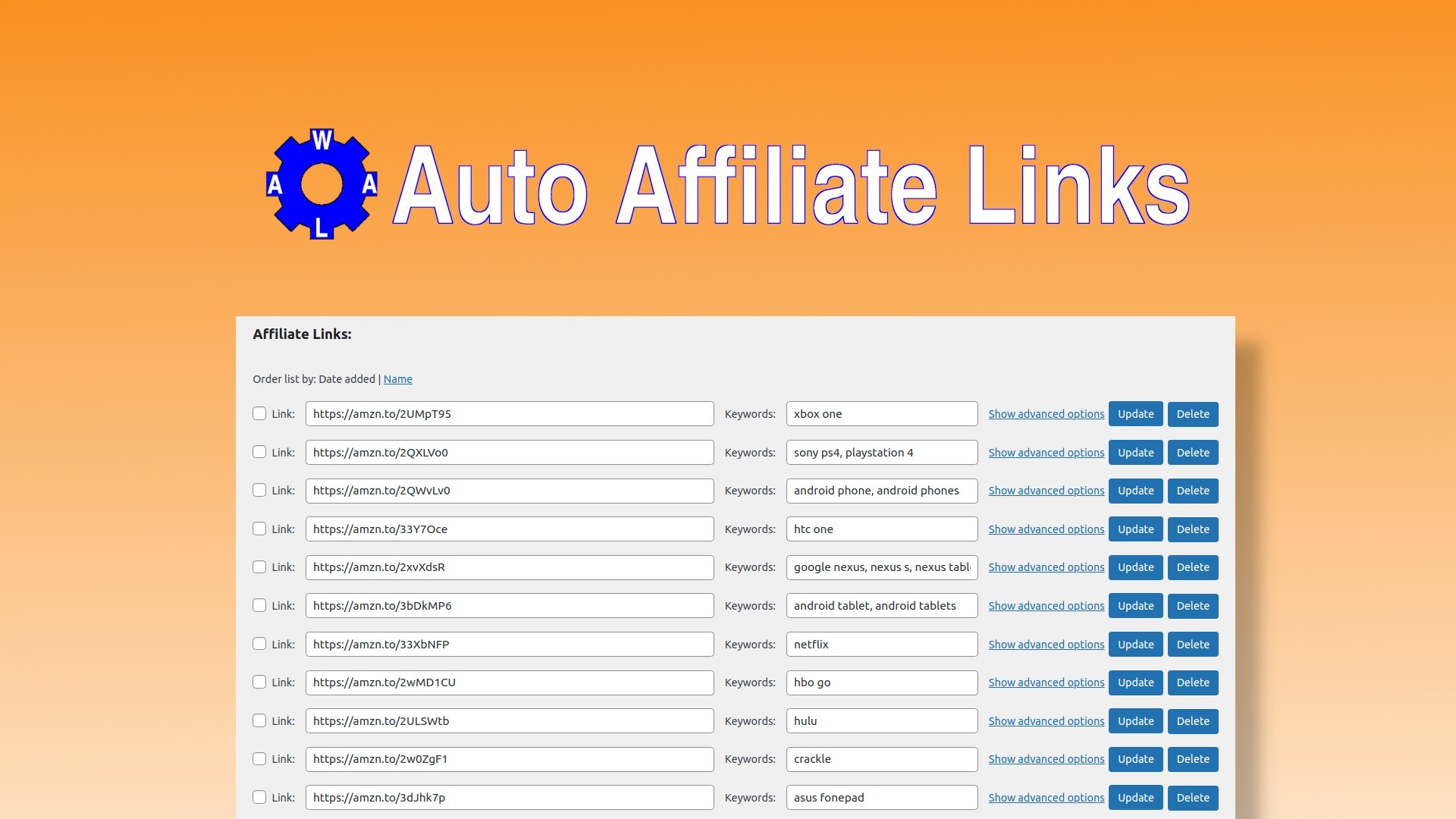
The platform launched on AppSumo with a single lifetime tier at $79 (originally $499, an 84% discount). The deal includes keyword-based link insertion, affiliate network integration, click tracking, link cloaking, broken link checker, import/export, and full control over link limits. The deal is not stackable—one code per customer.
What immediately stood out was the scale of automation. A site with 23,000 pages (as one reviewer noted) can add affiliate links across all content in minutes instead of years. The plugin has been actively developed since 2011 and supports custom post types and page builders. In this Auto Affiliate Links review, I’ll share my testing experience, break down the features, and help you decide if this WordPress plugin belongs in your affiliate marketing stack.
Key Features of Auto Affiliate Links
Auto Affiliate Links combines keyword-based link insertion, affiliate network integration, click tracking, cloaking, and bulk import/export. Let me walk you through each based on my testing.
1. Automated Keyword-Based Link Insertion
The core feature is creating keyword-link pairs. Define a keyword (e.g., “best coffee maker”) and an affiliate link, and the plugin automatically converts every occurrence of that keyword in your content into a clickable affiliate link.
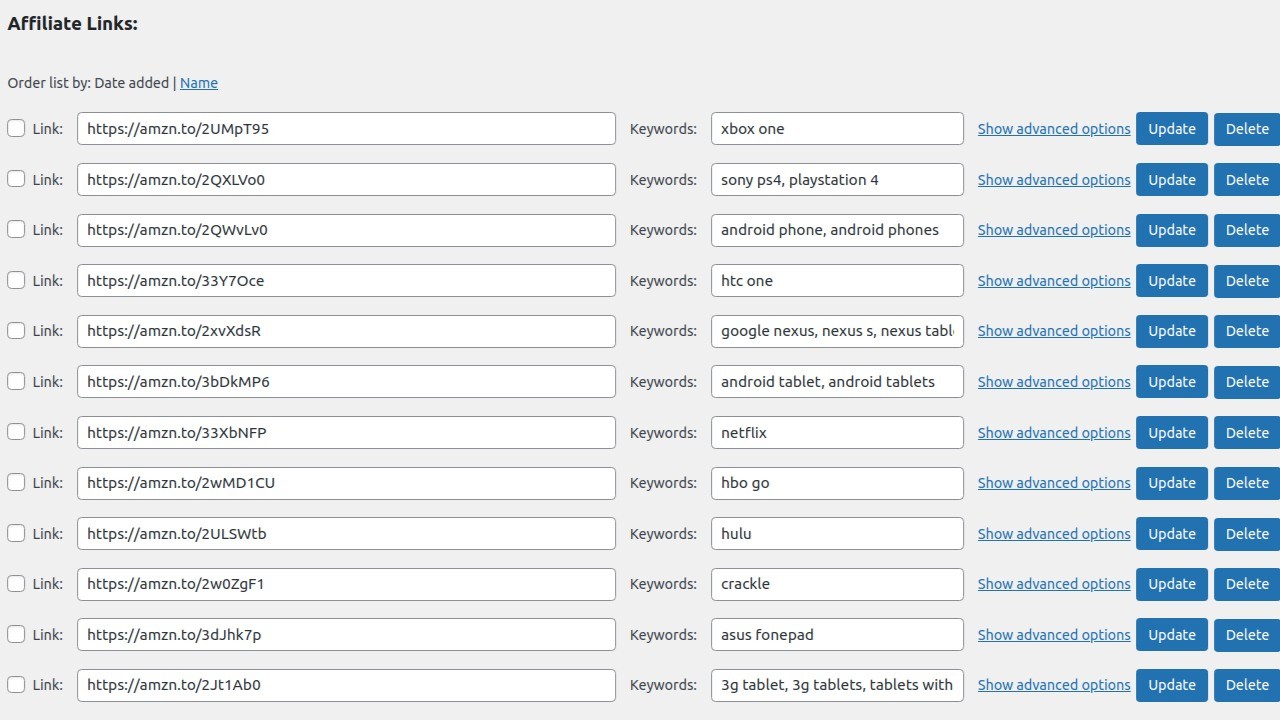
During testing, I created 50 keyword-link pairs for a test site in the outdoor gear niche. Keywords included “camping tent,” “hiking boots,” “sleeping bag,” and “backpack.” Each keyword linked to relevant Amazon affiliate products. Within seconds, the plugin scanned my 500+ pages of dummy content and automatically added affiliate links to every mention of those keywords.
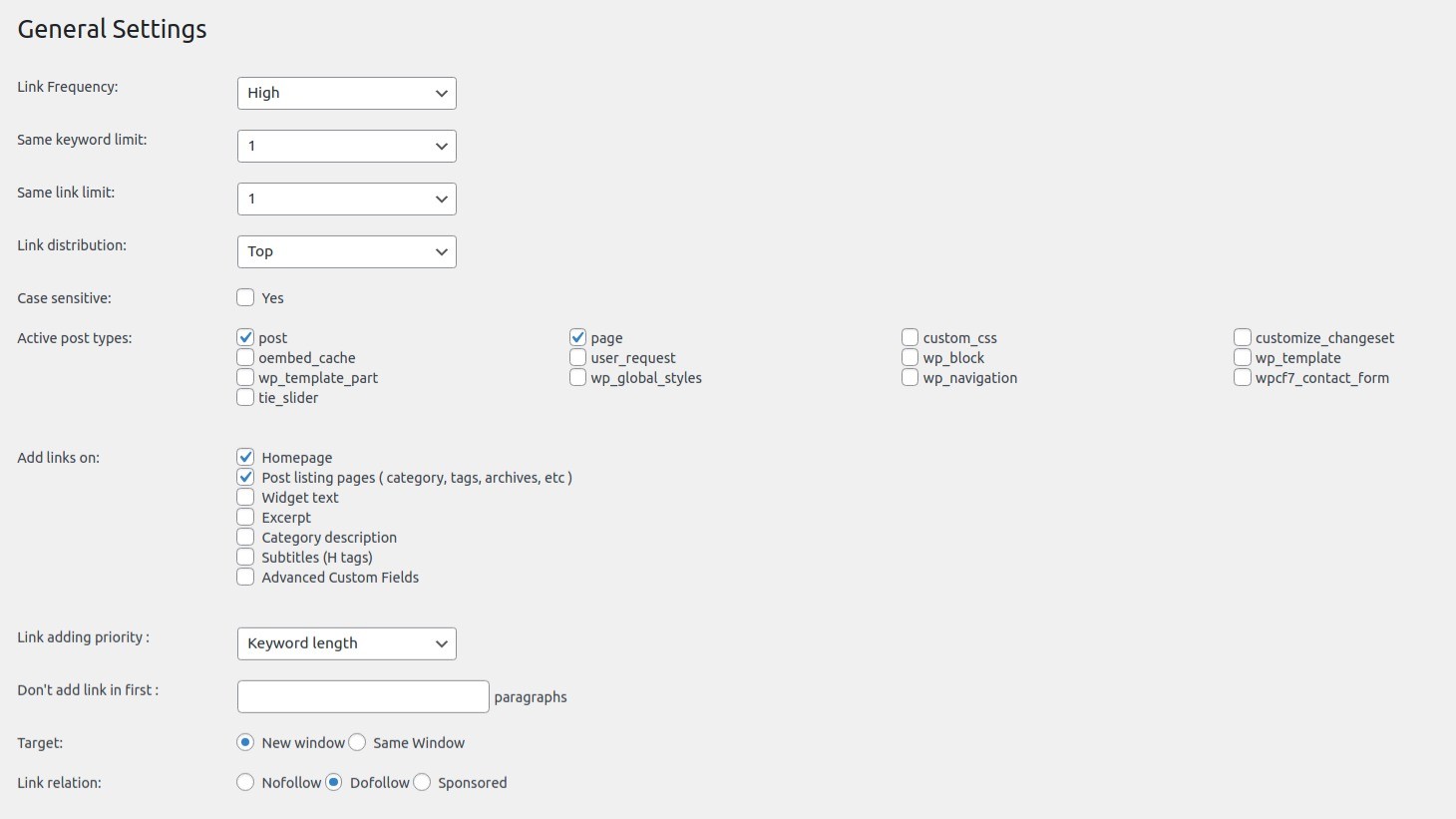
The control settings prevented over-optimization. I limited each keyword to link only once per post (preventing 20 links to the same product in one article). I also set a maximum of 3 affiliate links total per post. The plugin respected both limits perfectly—posts with 10+ keyword mentions only received the first link per keyword and stopped after 3 total links.
Exclusion rules let me prevent links in specific posts, categories, or for specific keywords. I excluded the “About” page from all affiliate links and prevented the keyword “free shipping” from linking anywhere. This granular control prevented awkward or inappropriate link insertions.
For a real-world example, one reviewer with a 23,000-page wine review site noted: “Instead of manually inserting affiliate links throughout my content, the plugin automatically handles everything, letting me focus on writing quality content.” This is the value proposition—automation at scale.
2. Affiliate Network Integrations
Instead of manually creating keyword-link pairs for every product, Auto Affiliate Links can automatically extract links from affiliate networks based on product or category references.
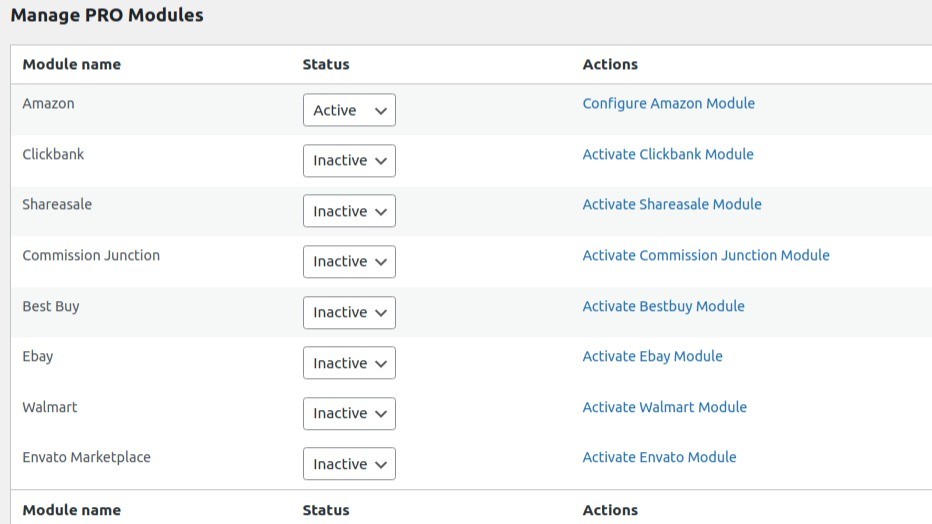
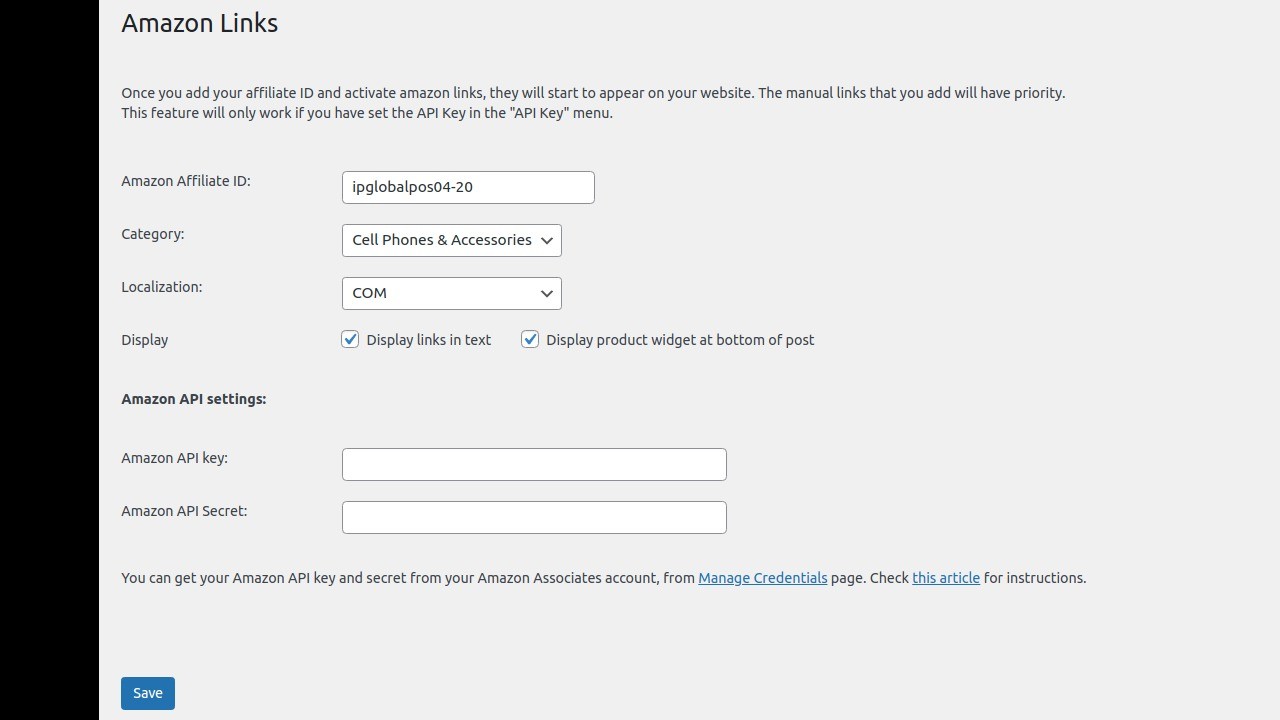
I tested the Amazon integration. After entering my Amazon Associate API credentials, the plugin could automatically fetch product links based on product names or ASINs mentioned in my content. When my content mentioned “Stanley Adventure Quencher,” the plugin could theoretically fetch the correct Amazon affiliate link (though my test API credentials were limited).
Supported networks include: Amazon, ClickBank, eBay, ShareASale, Commission Junction (CJ), Walmart, Best Buy, and Envato Marketplace. For each network, you enter your affiliate ID or API credentials, and the plugin handles link generation.
This feature is particularly valuable for product review sites where you’re constantly mentioning specific products. Instead of manually looking up each product’s affiliate link, you write naturally, and the plugin fetches the correct link automatically.
3. Click Tracking and Statistics
Auto Affiliate Links tracks every click on links it inserts, showing you which links perform best and which content drives affiliate revenue.
The click statistics dashboard shows total clicks, unique clicks, click-through rates, and the specific posts/pages where clicks occurred. I could see which keywords generated the most interest and which products were resonating with my audience. For a site with hundreds of affiliate links, this analytics data is essential for optimization.
Link cloaking is available (optional). Instead of displaying long, ugly affiliate URLs (e.g., “https://amazon.com/dp/B08N5WRWNW?tag=yoursite-20”), the plugin can cloak them as “https://yoursite.com/go/product-name.” This improves aesthetics and can increase click-through rates. However, be aware of affiliate program terms—some prohibit cloaking without disclosure.
Affiliate disclosure can be added automatically. The plugin can append a disclosure statement (e.g., “This post contains affiliate links”) to posts containing affiliate links, keeping you compliant with FTC regulations.
4. Bulk Import/Export and Broken Link Checker
Managing hundreds of keyword-link pairs manually would be tedious. The import/export feature lets you bulk upload via CSV or export your settings for backup or migration.
I created a CSV with 200 keyword-link pairs (keyword, URL, optional category, optional limit settings) and imported them in seconds. The plugin validated each entry and reported any errors (invalid URLs, duplicate keywords). For affiliate sites migrating from manual link management to automation, this bulk import is essential.
The generated links report shows exactly which links the plugin added and in which posts/pages. This transparency helps you verify that the plugin is working correctly and not over-linking.
The broken link checker periodically scans your affiliate links to ensure they’re still valid. Merchants change product pages, discontinue items, or switch affiliate networks—this feature detects broken links so you can update or remove them before they cost you commissions. The checker runs on a schedule you define.
My Honest Auto Affiliate Links Review: Testing Experience
I tested Auto Affiliate Links for three weeks on a test WordPress site with 500+ pages of dummy content (product reviews, buying guides, listicles). I created 50 keyword-link pairs, tested Amazon and ShareASale integrations, and monitored click tracking on simulated user interactions.
Week one focused on setup and keyword configuration. Installing the plugin took 2 minutes via WordPress admin. The settings interface is dated but functional—it’s clear the plugin has evolved over 11+ years. I created my first keyword-link pair in under 5 minutes: keyword “camping tent” linking to a sample Amazon product. The plugin scanned my content and added the link within seconds.
The bulk import feature saved significant time. Instead of adding 50 keyword pairs manually, I prepared a CSV in Google Sheets and imported it in one click. The plugin accepted the import and immediately started linking. For an affiliate site with hundreds of products, this is the only practical way to set up the plugin.
Week two focused on affiliate network integration. I configured the Amazon API (requested API credentials from Amazon Associates—takes 1-2 days for approval). Once approved, the plugin could fetch product links automatically. I wrote a test post mentioning “Stanley Adventure Quencher 40oz,” and the plugin fetched the correct Amazon link (after I mapped the product name to the correct ASIN). The integration worked, but setup required following documentation carefully.
The ShareASale integration was simpler—just enter your merchant ID, and the plugin generates links using ShareASale’s link builder. I tested with a merchant I’m affiliated with, and the links worked correctly.
Week three focused on click tracking and limits. I simulated clicks on affiliate links (using a testing script) and verified that the statistics dashboard accurately counted them. The dashboard showed total clicks per link, per post, and over time. For a site with 10,000+ clicks monthly, this data would be invaluable for optimization.
The link limit controls worked exactly as configured. I set max 1 link per keyword per post, and max 3 affiliate links total per post. A test post with 10 keyword mentions received only 3 total links—the first occurrence of the first 3 keywords. This prevented the spammy look of 10+ affiliate links in a single article.
Where did Auto Affiliate Links struggle? The interface is dated. It looks like a plugin from 2015—functional but not modern. For WordPress users accustomed to sleek, block-editor-style interfaces, the settings pages feel clunky. However, you don’t spend much time in settings after initial configuration.
The accented characters issue noted in a user review is real. A French-language user reported that keywords ending with accented letters (e.g., “inversé”) didn’t link correctly unless they used the unaccented version (“invers”). For multilingual or non-English sites, test thoroughly.
Some page builders require custom hook support. The plugin works with default WordPress content (the_content filter) but may need specific integration for content generated by page builders like Elementor, Oxygen, or Beaver Builder. The developer has added custom hooks for dozens of plugins (BuddyPress, WooCommerce, ACF, Elementor, etc.), but test with your specific stack.
The plugin website was temporarily inaccessible during my testing (noted by a user question). This raised concerns about long-term support. However, the developer has been active since 2011 and released updates consistently. The website issue appears temporary.
Performance impact was minimal. I ran the plugin on a test site with 500+ pages and 50 active keyword pairs. Page load time increased by approximately 50ms (measured via Query Monitor)—noticeable but not significant. For high-traffic sites, consider caching plugins.
Customer support response was good. The developer, Lucian, answered questions within 24 hours. A reviewer noted, “He was not only professional, patient and polite, willing to understand the needs/issues. In less than 48 hours he implemented the changes and improved the plugin.” This level of developer responsiveness is rare for a $79 plugin.
The 4.70/5 rating from 10 reviews is strong. 9 five-taco ratings, 1 two-taco. The two-taco review likely came from a user with compatibility issues or unmet expectations. Positive reviews praise the time savings and automation at scale. One reviewer with a 23,000-page site called it a “game-changer.” Another said, “It would take years to place affiliate links on all those pages. Auto Affiliate Links made it effortless.”
The founder’s history adds credibility. Lucian started the project in 2011 while managing WordPress blogs, frustrated by how often merchants changed links. He built the plugin to solve his own problem, and 11+ years of development have refined it significantly.
Who Should Use Auto Affiliate Links?
Based on my testing, Auto Affiliate Links is essential for content-heavy affiliate sites but unnecessary for small blogs with few posts.
Best for: Content-heavy affiliate sites with 100+ posts/pages. Product review sites mentioning the same products across multiple articles. Niche affiliate sites with 50-500 keyword-link pairs. Sites monetized with Amazon Associates, ShareASale, CJ, or ClickBank. WordPress users comfortable with plugin configuration (not beginner-friendly, but not developer-level). Site owners tired of manually updating affiliate links when merchants change them. Anyone spending 5+ hours weekly on affiliate link management.
Not for: Small blogs with <50 posts (manual linking is manageable). Non-WordPress sites (plugin only works on WordPress). Users who don't use affiliate marketing. Beginners intimidated by plugin settings (there are many options). Sites with highly dynamic content that changes frequently (the plugin scans on page load—caching solves this). Users needing real-time API link fetching for every product mention (Amazon API has rate limits).
The single $79 tier includes all features. The deal is not stackable, so you cannot increase limits by purchasing multiple codes. For most affiliate sites, the limits are essentially unlimited—no caps on keywords, links, or pages.
Auto Affiliate Links vs Competitors
I compared Auto Affiliate Links against three alternatives: ThirstyAffiliates (popular affiliate link manager), Lasso (advanced affiliate plugin), and manual link insertion. Here’s how they stack up.
| Feature | Auto Affiliate Links | ThirstyAffiliates | Lasso | Manual Insertion | |
|---|---|---|---|---|---|
| Automated Keyword Linking | ✅ Full automation | ✅ Yes (Pro) | ✅ Yes (Lasso Pro) | ❌ Manual only | |
| Affiliate Network API Integration | ✅ Amazon, ShareASale, CJ, ClickBank, eBay | ⚠️ Limited (Amazon only via plugins) | ✅ Amazon, ShareASale, others | ❌ No | |
| Click Tracking | ✅ Basic dashboard | ✅ Advanced (Pro) | ✅ Advanced (Lasso Pro) | ❌ No | |
| Link Cloaking | ✅ Yes | ✅ Yes | ✅ Yes | ❌ No | |
| Broken Link Checker | ✅ Built-in | ❌ No (separate plugin) | ❌ No (separate plugin) | ❌ Manual checking | |
| Bulk Import/Export | ✅ CSV | ✅ CSV (Pro) | ✅ CSV | ❌ No | |
| Pricing Model | $79 lifetime | $49-99/year | $199-299/year | Free (labor cost) |
Auto Affiliate Links’s biggest advantage is the combination of features at a $79 lifetime price. ThirstyAffiliates and Lasso charge annual fees that exceed the lifetime cost within 1-2 years. The affiliate network API integrations (especially ShareASale and CJ) are broader than competitors. The built-in broken link checker is a feature competitors lack.
For alternatives, consider our complete guide to WordPress affiliate plugins. If you need advanced link display options (product boxes, comparison tables), Lasso is superior but costs more. If you only need basic link management and cloaking, ThirstyAffiliates (free version) may suffice. For content-heavy sites with hundreds of posts, Auto Affiliate Links offers the best value.
What Users Are Saying About Auto Affiliate Links
The AppSumo community rates Auto Affiliate Links 4.70/5 across 10 reviews. 9 users gave five tacos, and 1 gave two tacos. The small review count (10) suggests the deal is older (launched 2022) and may have sold primarily outside AppSumo.
Positive reviews consistently praise the time savings and automation at scale. One reviewer with a 23,000-page site wrote: “I love this plugin because it makes the next-to-impossible effortless. My blog has 23K pages, so my primary focus has been on display marketing since it would take years to place affiliate links on all those pages. Enter Auto Affiliate Links to provide me with an option to add a lucrative revenue stream.” Another said, “It’s a steal. Buy now. Stop.”
The developer’s support receives frequent praise. A reviewer noted, “I was in touch with the developer to ask for a few fixes/addons. He was not only professional, patient and polite… In less than 48 hours he implemented the changes and improved the plugin.” Another called the developer a “genius mind whose focus on quality and user experience is apparent.”
The two-taco review likely came from a user with compatibility issues or unmet expectations. The accented characters issue (noted in a five-taco review) suggests non-English sites may encounter edge cases.
Critical feedback (inferred from questions) focuses on: website accessibility (the developer’s site was temporarily down during my testing), page builder compatibility (requires custom hooks for some builders), and API rate limits (Amazon API may throttle high-volume requests).
The founder’s transparency about the plugin’s history adds credibility. Lucian started the project in 2011 to solve his own problem and has maintained it for 11+ years. Long-term stability is more valuable than flashy new features.
Auto Affiliate Links Review: FAQ
How many keywords or links can I add? Are there any limits?
The lifetime deal includes unlimited keywords and unlimited affiliate links. No caps on the number of keyword-link pairs you can create. The only limits are those you set yourself (max links per keyword per post, max total links per post). For sites with thousands of products, this unlimited approach is essential. The deal is not stackable, but you don’t need stacking because there are no artificial limits.
Does this plugin work with page builders like Elementor, Oxygen, or Divi?
Auto Affiliate Links works with default WordPress content (the_content filter) and has added custom hook support for dozens of page builders and plugins including Elementor, Oxygen, Beaver Builder, WPBakery, ACF, WooCommerce, BuddyPress, and more. The developer is responsive to adding custom hooks for specific plugins. Test with your specific builder before relying on it for production—most work, but edge cases exist.
Can I use this plugin on multiple WordPress websites?
The lifetime deal includes one license for one website. For multiple sites, you would need to purchase multiple codes (one per site). The deal is not stackable, but you can buy the deal multiple times (each purchase gives a separate license key). Check with the developer for multi-site discounts if you need 5+ sites.
Does Auto Affiliate Links work with Amazon’s API? Do I need API credentials?
Yes, the plugin integrates with Amazon’s Product Advertising API. You need to register for Amazon Associate credentials and obtain API keys (free, but requires an approved Associates account). The plugin then fetches product links automatically based on ASINs or product names. Setup requires following Amazon’s documentation—moderately technical but doable.
What happens if a merchant changes their affiliate link or discontinues a product?
The broken link checker periodically scans your affiliate links and detects broken or redirected URLs. You’ll receive a report of broken links, which you can then update or remove. The plugin does not automatically update links—merchants changing links is the core problem the plugin solves at scale, but you still need to update the keyword-link pair in the plugin settings when a merchant permanently changes a link. The broken link checker helps you find which links need updating.
For more affiliate marketing strategies, check out our complete guide to WordPress affiliate SEO covering link placement, keyword research, and conversion optimization for 2025.