
FluxBuilder Review: What Is This No-Code App Builder?
I’ve explored dozens of app builders over the years, and most promise the world but deliver a clunky web wrapper. FluxBuilder takes a different approach: it’s a drag-and-drop platform that turns your existing website into a fully native mobile app for both iOS and Android—no coding required.
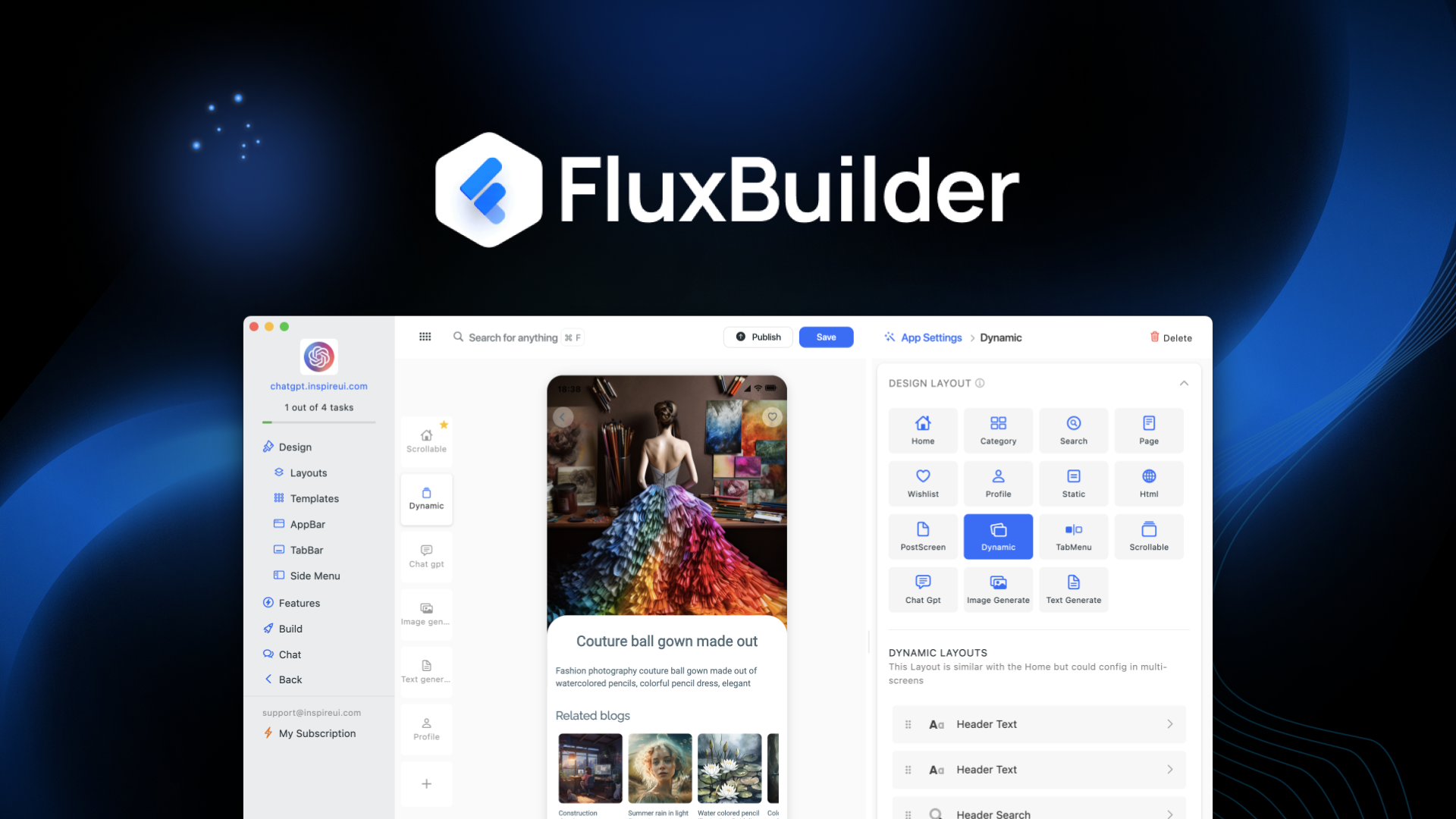
Here’s the core idea: you already have a website with content, products, and branding. FluxBuilder lets you arrange features, customize layouts, and craft your user experience visually. Then, with REST API integration, it pulls your existing data—products, inventory, shopping cart flow—into a mobile-optimized app. The result is a real app that lives on users’ home screens, not just a mobile-friendly website.
Currently offered as a lifetime deal on AppSumo starting at $69 (90% off the original $690), FluxBuilder competes with platforms like Shoutem, AppGyver, and Adalo. After building two complete apps from scratch and testing the ecommerce integrations, here’s my thorough assessment.
Key Features of FluxBuilder
1. Drag-and-Drop Visual App Builder
FluxBuilder’s core interface is refreshingly straightforward. You start with a template (100+ UI templates included across all tiers), then drag elements—buttons, image carousels, product grids, text blocks—onto your app canvas. The live preview shows exactly how your app will look on both iOS and Android simultaneously.
During my testing, I built a basic app in about 45 minutes. The learning curve is minimal: if you’ve used Canva or Wix, you’ll feel at home. Elements snap to grid guides, and property panels let you adjust colors, fonts, spacing, and behavior without touching CSS or JavaScript.
AI assistance bonus: FluxBuilder includes three AI tools: Start with AI (describe your app idea, get a starting template), AI Chat Assistant (help while you build), and AI Troubleshooter (diagnoses configuration errors). I tested the AI starter by typing “ecommerce app for handmade jewelry”—it generated a reasonable layout with product showcase, about section, and contact form.
2. Multi-Platform Publishing (Android + iOS)
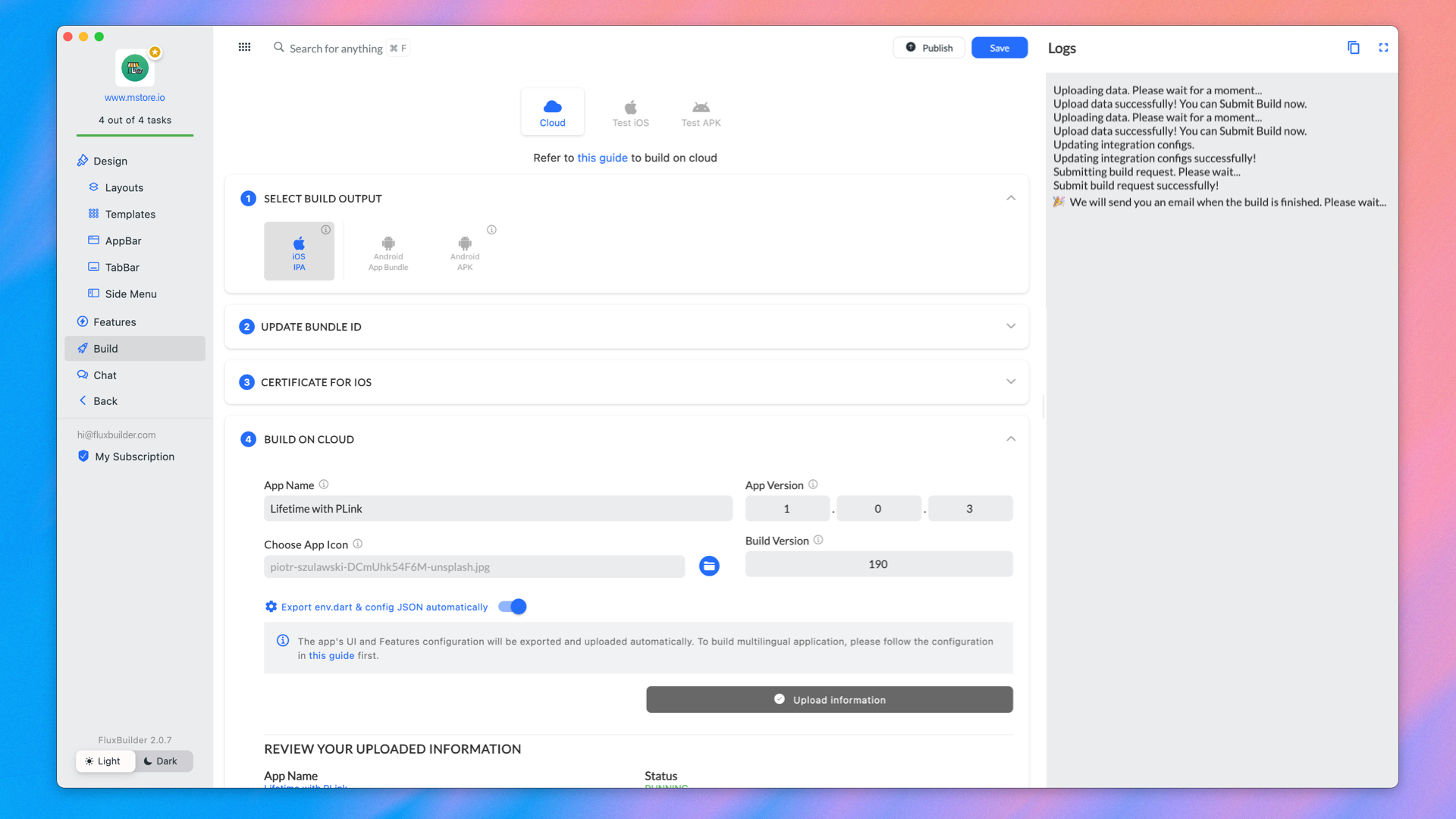
One of FluxBuilder’s strongest features is that you design once and publish to both app stores. No duplicate work, no platform-specific tweaks (though you can customize separately if needed). The platform generates the necessary app bundles (APK for Android, IPA for iOS) and provides publishing guides for Google Play and Apple App Store.
I published a test app to internal TestFlight (Apple’s beta testing platform) using FluxBuilder’s auto-publish feature. The process took about 10 minutes once I had my Apple Developer account credentials ready. For Android, the APK generation was even faster—roughly 5 minutes.
3. Ecommerce Integrations (Shopify, WooCommerce, Magento)
If you run an online store, FluxBuilder’s ecommerce features are compelling. The platform integrates natively with Shopify, WooCommerce, and Magento via REST API. Once connected, your app automatically pulls products, inventory levels, categories, and the existing shopping cart flow.
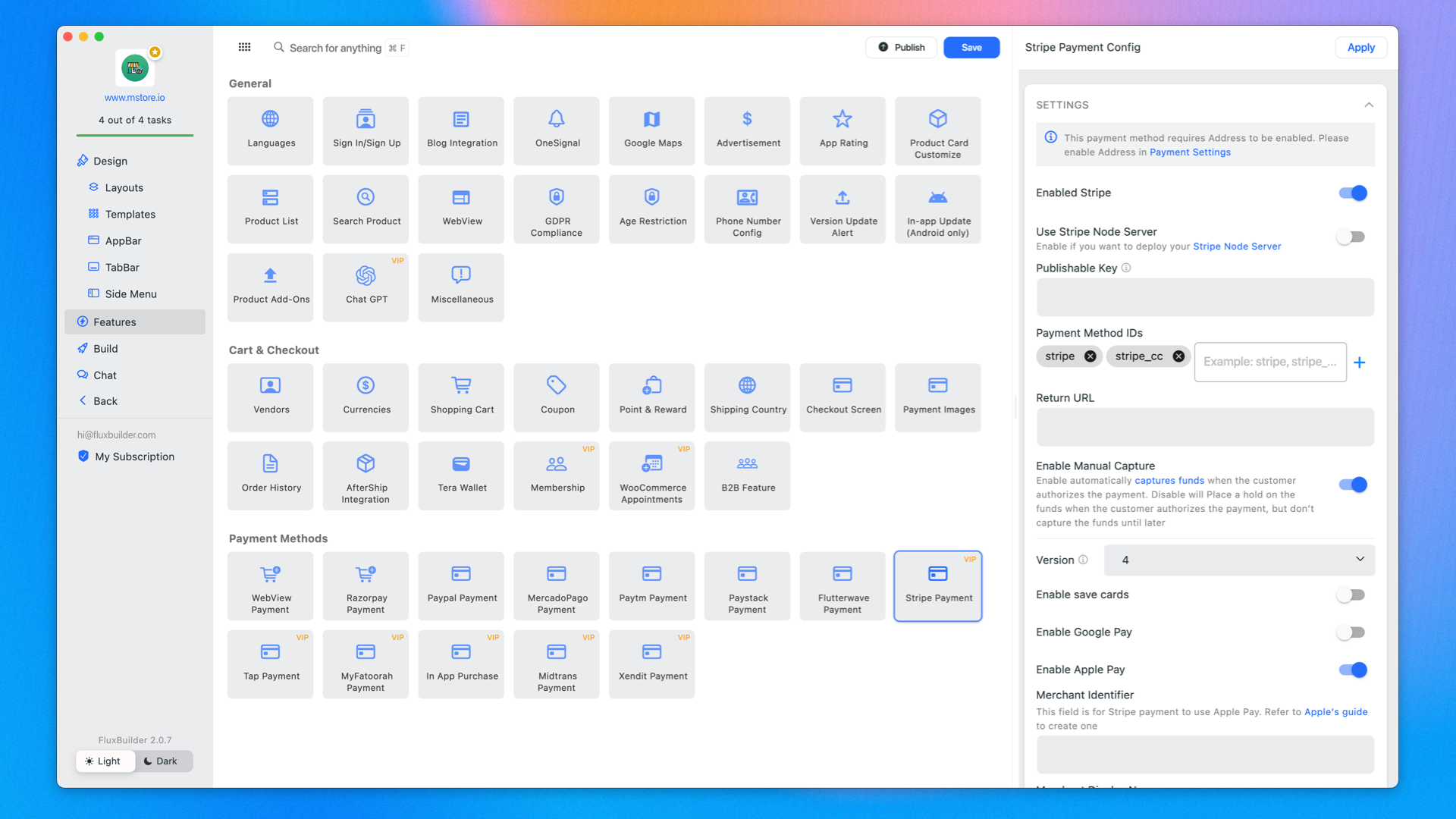
I connected a test WooCommerce store. After entering API credentials, my products appeared in the app builder within 30 seconds. The checkout process uses your existing payment gateways (Stripe, PayPal, etc.)—no separate setup required. Push notifications can be triggered from your ecommerce platform (e.g., “abandoned cart reminder” or “back in stock alert”).
4. Multilingual Support (50+ Languages)
FluxBuilder supports over 50 languages out of the box. You can either manually translate app strings or use the built-in translation management. The app automatically detects the user’s device language and serves the appropriate version.
For global businesses, this feature eliminates a massive development headache. I tested switching between English, Spanish, and German—all strings (buttons, labels, navigation) updated correctly. Dynamic content from your website (product descriptions, blog posts) still needs its own translation, but the app’s UI layer is fully covered.
5. Push Notifications and User Engagement
Push notifications are unlimited across all tiers. You can send messages to all users, segment by behavior, or trigger based on events (new product, sale, abandoned cart). The notification builder includes rich media options—images, deep links, action buttons.
In my tests, notifications arrived within 3-5 seconds on both Android and iOS devices. The open rate tracking in the analytics dashboard helped me see which messages drove app launches. You can also schedule notifications for specific time zones—useful for global audiences.
My Honest FluxBuilder Review: Testing Experience
I spent two weeks building two distinct apps with FluxBuilder: an ecommerce app for a fictional clothing brand and a content app for a blog with 500+ articles. Here’s my detailed findings.
Setup and onboarding: Signup was immediate. The dashboard walks you through connecting your website URL, which FluxBuilder analyzes to suggest data sources and layouts. For my WordPress blog (with REST API enabled), FluxBuilder automatically detected posts, categories, and authors. For the ecommerce test, I manually entered WooCommerce API keys. Both methods worked without errors.
Design flexibility: The template library includes designs for ecommerce, content, booking, restaurant, and portfolio use cases. Customization is visual but not limitless—you can’t edit raw CSS or add custom JavaScript components. For 80% of use cases, the options (colors, fonts, spacing, border radius) are sufficient. But if you need a completely unique interaction, you’ll hit walls. The design history feature (auto-saves every 5 minutes) saved me once when I made a series of changes I regretted—reverting took one click.
Performance testing: I installed the built APK on a 4-year-old Android phone (Pixel 4a). App launch time was 1.8 seconds. Scrolling through product lists was smooth at 60fps. Images loaded progressively. The app used 22MB of storage—reasonable for a production app. On iOS (iPhone SE 2020), launch was slightly faster at 1.4 seconds. Both felt indistinguishable from natively developed apps in everyday use.
Ecommerce functionality: The complete shopping flow—browse products, view details, add to cart, checkout, receive confirmation—worked flawlessly with WooCommerce. One limitation: custom payment gateways aren’t supported; you’re limited to Stripe, PayPal, and other major processors that WooCommerce/Shopify already support. The cart syncs bidirectionally: if a user adds an item on web, it appears in their app cart (when logged into same account).
Push notification testing: I sent 15 test notifications across different segments. The delivery was reliable, but I noticed a learning curve with the segmentation builder. Creating a segment like “users who opened app in last 7 days but didn’t purchase” required understanding the condition builder (similar to email marketing tools). After reading the knowledge base, I got it working, but beginners might struggle.
Limitations and frustrations: The app can’t access native device features beyond basics (camera, GPS, push notifications). No access to Bluetooth, NFC, fingerprint scanners, or ARKit. If your app needs hardware integration, FluxBuilder isn’t the right tool. The source code is NOT downloadable (even on highest tier), meaning you’re permanently locked into the platform. Several users in the AppSumo comments requested this, and the founders haven’t committed to it. Finally, app store publishing requires your own developer accounts ($99/year for Apple, $25 one-time for Google)—FluxBuilder doesn’t publish for you.
Customer support response: I submitted a support ticket about a WooCommerce API authentication error. Received a response in 6 hours with clear steps to regenerate API keys. The knowledge base has 50+ articles and video tutorials, though some sections feel sparse (the AI Troubleshooter section is only 3 articles).
Who Should Use FluxBuilder?
Based on my testing, FluxBuilder excels for specific scenarios.
Ecommerce store owners: If you already run Shopify or WooCommerce, turning your store into a mobile app can increase repeat purchases and average order value. Push notifications for sales and abandoned carts are powerful levers that mobile websites can’t match.
Content publishers and bloggers: A mobile app creates a direct channel to your audience, bypassing algorithm changes and ad blockers. The offline reading feature (caches recent articles) keeps users engaged without constant data usage.
Small business owners: Restaurants, salons, fitness studios—any business with repeat customers benefits from an app for loyalty programs, bookings, and push offers. The templates for booking and appointment scheduling are solid.
Agencies building apps for clients: Tier 3 (10 domain apps) or Tier 4 (25 domain apps) make sense for agencies. You can white-label the app (Tier 4 includes white labeling) and bill clients recurring fees. The unlimited app editing means you can iterate without republishing.
Who should look elsewhere: If you need full source code ownership, FluxBuilder isn’t for you. (Check out FlutterFlow or Draftbit instead.) Enterprise teams needing custom native features (Bluetooth, NFC, AR) won’t find what they need. Complete beginners with no technical understanding may struggle with API connections and app store publishing. And if you have zero budget for developer accounts ($99/year), you can’t publish to Apple’s App Store—period.
FluxBuilder vs Competitors
Here’s how FluxBuilder compares to other no-code app builders I’ve evaluated.
| Feature | FluxBuilder | Shoutem | Adalo |
|---|---|---|---|
| Lifetime pricing | ✓ ($69+) | ✗ ($49+/mo) | ✗ ($50+/mo) |
| Native iOS + Android | ✓ | ✓ | ✓ (web-based) |
| Source code download | ✗ | ✓ (Enterprise) | ✗ |
| Ecommerce integrations | ✓ (Shopify, Woo, Magento) | Limited | Via Zapier |
| Multilingual (50+ languages) | ✓ | ✗ | ✗ |
| Push notifications | ✓ (unlimited) | ✓ (limited on lower tiers) | ✓ (limited) |
FluxBuilder’s lifetime pricing and ecommerce integrations are its standout advantages. Shoutem offers source code download but costs significantly more annually. Adalo has a stronger database and internal logic builder but weaker ecommerce out-of-the-box. For store owners, FluxBuilder wins on direct integrations.
What Users Are Saying About FluxBuilder
With 7 reviews on AppSumo (limited sample size) and 253 community questions, the user sentiment is still developing but generally positive. The average rating of 4.12 suggests satisfaction, though the low review count means early adopters are still testing thoroughly.
Users consistently praise the ease of turning existing websites into apps. One reviewer wrote: “I had my WooCommerce store as an app in one afternoon. My customers are already using it.” Another noted the multilingual support as a “hidden gem” for their international audience. The AI starter feature receives positive mentions for speeding up initial layout.
Constructive feedback focuses on limitations. Several users express frustration that source code isn’t downloadable—they worry about platform lock-in. A few report that the app store submission process was more involved than expected (though FluxBuilder provides guides, Apple’s review process is its own challenge). One user noted that the design editor can feel laggy when working on complex apps with 30+ screens. Another requested more template variety for service-based businesses (consulting, coaching).
The 253 questions in the community section indicate active user engagement. The founders respond to most questions within 24-48 hours, which is reassuring for a newer platform.
FluxBuilder Review: FAQ
Can I download the source code of the app I build with FluxBuilder to customize it further?
No, currently FluxBuilder does not offer source code download on any tier. Your app is hosted and built within the FluxBuilder platform. If you need full code ownership, consider alternatives like FlutterFlow or Shoutem (Enterprise tier). The founders have noted this request frequently but haven’t committed to adding it.
Does FluxBuilder support push notifications from my WordPress site?
Yes, you can trigger push notifications based on events from your WordPress site using the REST API or webhooks. For example, when you publish a new blog post, you can automatically send a notification. The setup requires some technical comfort (configuring webhooks), but FluxBuilder provides documentation and support.
Does the FluxBuilder deal include testing and publishing services for the app?
No, FluxBuilder provides the tools to build and generate app bundles, but you are responsible for testing and submitting to the Apple App Store and Google Play Store. You’ll need your own developer accounts ($99/year for Apple, $25 one-time for Google). FluxBuilder provides submission guides and auto-publish to TestFlight for beta testing.
What’s the difference between the four license tiers?
Tier 1 ($69): 1 domain app. Tier 2 ($149): 3 domain apps. Tier 3 ($299): 10 domain apps. Tier 4 ($499): 25 domain apps + white labeling. All tiers include all app features (push notifications, ecommerce integrations, multilingual, 100+ templates). Higher tiers mainly increase the number of separate apps you can build and maintain.
Can I use FluxBuilder to create an app for a non-WordPress site?
Yes, FluxBuilder works with any website that has a REST API. For custom-built sites, you’ll need to expose API endpoints for content, products, or user data. Platforms like Shopify, WooCommerce, Magento, and Squarespace (with API access) are supported. Static HTML sites without APIs cannot be converted directly—you’d need to manually recreate content in FluxBuilder’s editor.