
AI Context Flow Review: What Is It?
If you use multiple AI tools daily, you’ve felt the pain. ChatGPT doesn’t know what you told Claude. Gemini has never heard of your project. Perplexity starts every conversation fresh. You spend more time re-explaining your role, context, and preferences than actually getting work done. After testing AI Context Flow for three weeks across five different AI platforms, I found a solution that finally bridges this gap.
AI Context Flow is a universal memory bank that syncs your saved context across ChatGPT, Claude, Gemini, Perplexity, and dozens of other AI platforms. With a simple Ctrl+I keyboard shortcut, you inject your saved memory into any prompt before sending it. The platform also includes prompt optimization that refines vague asks into clear, role-guided instructions.
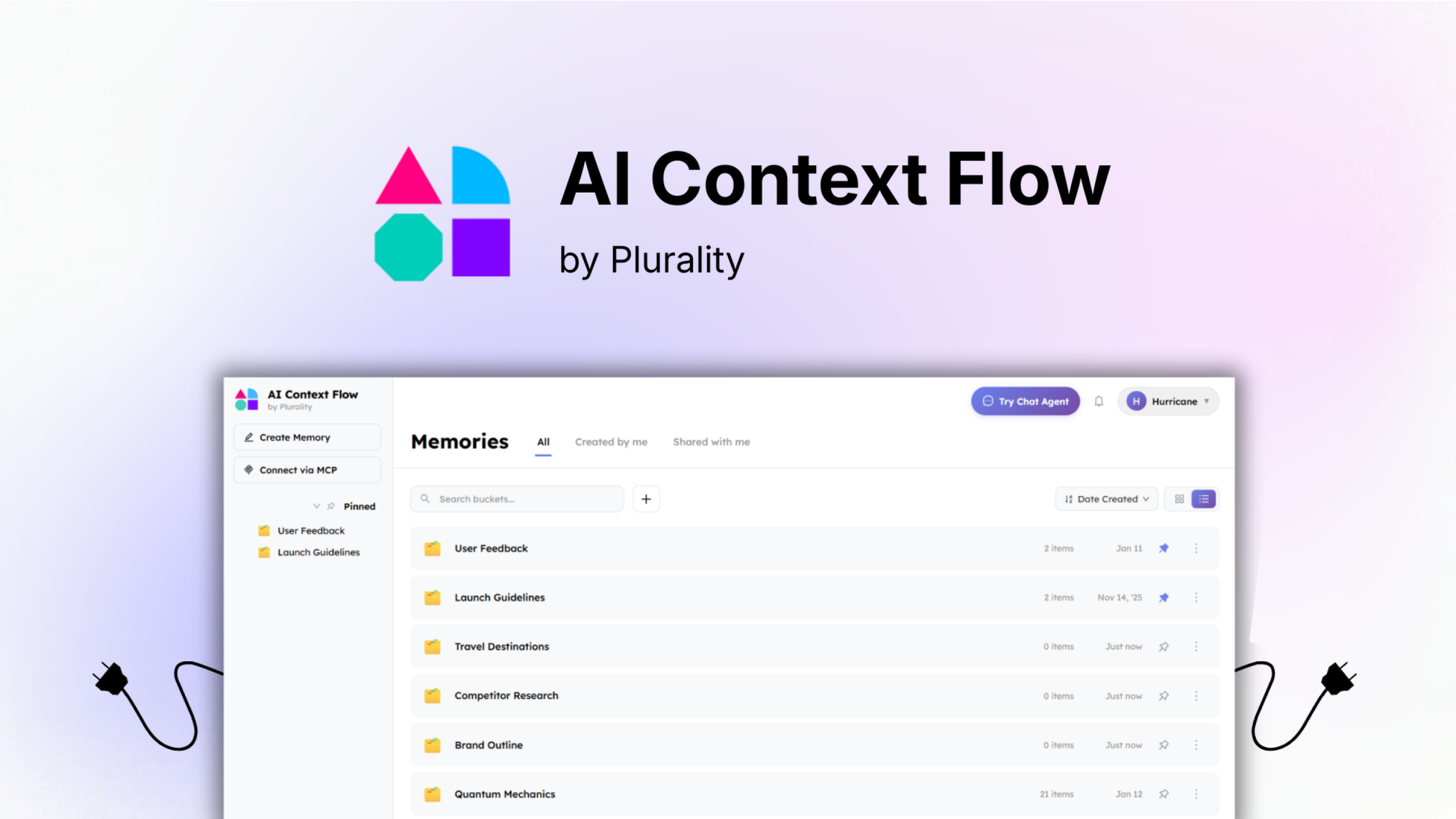
The platform launched on AppSumo with three lifetime deal tiers ranging from $59 to $339. Tier 1 includes 1,667 credits daily, 1GB storage, basic AI models, and full feature access for $59 (originally $100). Tier 2 jumps to 5,000 daily credits and 5GB storage for $149. Tier 3 offers 15,000 daily credits, 10GB storage, and premium AI model access for $339.
What immediately caught my attention was the MCP (Model Context Protocol) server integration. You can add your AI memory as an MCP server, letting coding agents like Cursor, Claude Code, and Windsurf pull from your memory automatically without copy-pasting. In this AI Context Flow review, I’ll share my testing experience, break down the features, and help you decide if this tool belongs in your AI workflow.
Key Features of AI Context Flow
AI Context Flow combines universal memory sync, prompt optimization, MCP server integration, and memory management into one platform. Let me walk you through each capability based on my testing.
1. Universal Memory Bank Across AI Platforms
The core feature is the ability to connect one memory bank to every AI platform you use. I connected ChatGPT, Claude, Gemini, and Perplexity within minutes using browser extensions. Once connected, any memory I saved became available across all platforms.
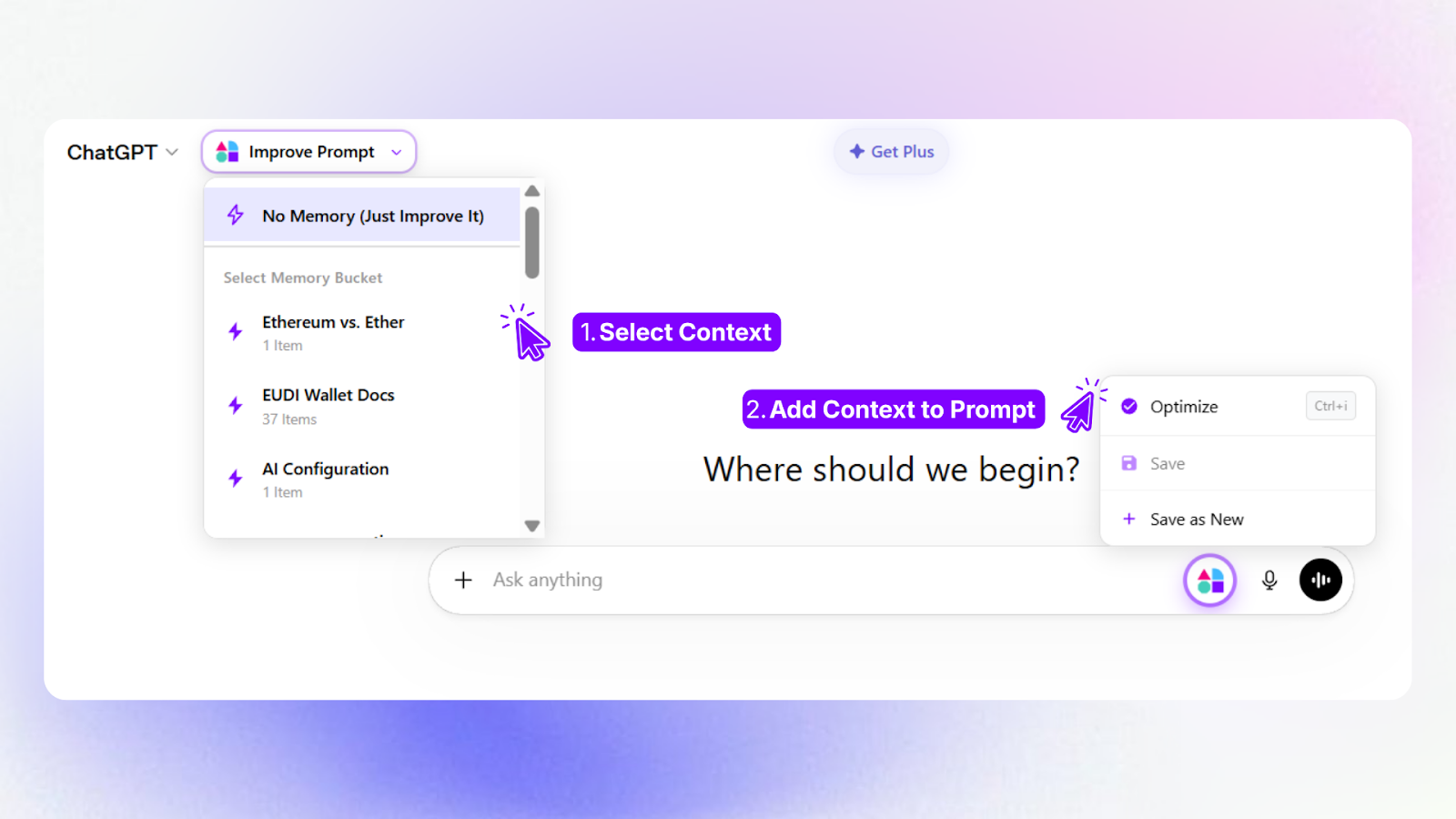
During testing, I created memory buckets for different contexts: “Work – SaaS Marketing,” “Personal – Home Renovation,” and “Research – AI Tools.” Each bucket contained relevant background information, preferences, and past context. When working on a marketing strategy in ChatGPT, I selected the work bucket, and the AI instantly understood my role, target audience, and brand voice without re-explanation.
The memory retrieval is precise. You control exactly what gets injected into each prompt, so your context stays focused and relevant. I never experienced the AI pulling from the wrong memory bucket or injecting irrelevant information. The toggle feature lets you turn context injection on or off per conversation.
What surprised me most was the cross-platform consistency. I started a project in Claude, saved the context, switched to ChatGPT, and continued with the same understanding. This sounds simple, but no other tool has solved this fragmentation problem effectively. AI Context Flow does.
2. One-Click Prompt Optimization
The prompt optimizer transforms vague questions into detailed, role-guided instructions. When I typed a lazy prompt like “write a cold email,” AI Context Flow refined it to “Write a cold email targeting B2B SaaS marketing directors, focusing on our AI analytics tool’s time-saving benefits. Use a conversational tone and include a clear call-to-action for a demo.”
The optimization happens before the prompt reaches the AI. You preview the optimized prompt and can edit on the fly before sending. During testing, the optimizer saved me an average of 2-3 minutes per prompt—time I would have spent manually adding context and clarifying instructions.
The AI sidebar provides quick access to your memory buckets while working in any web interface. I used it while drafting emails in Gmail, researching in Perplexity, and coding in web-based editors. The sidebar remembers your last-used bucket and suggests relevant memories based on context.
For power users, the optimizer learns from your editing patterns. If you consistently adjust certain elements, the optimizer adapts its suggestions. After two weeks, I noticed the optimizer generating refinements closer to my personal writing style without me training it explicitly.
3. MCP Server for Coding Agents
The Model Context Protocol integration sets AI Context Flow apart from simpler memory tools. You can add your AI memory as an MCP server, letting coding agents like Cursor, Claude Code, and Windsurf pull from your memory automatically.
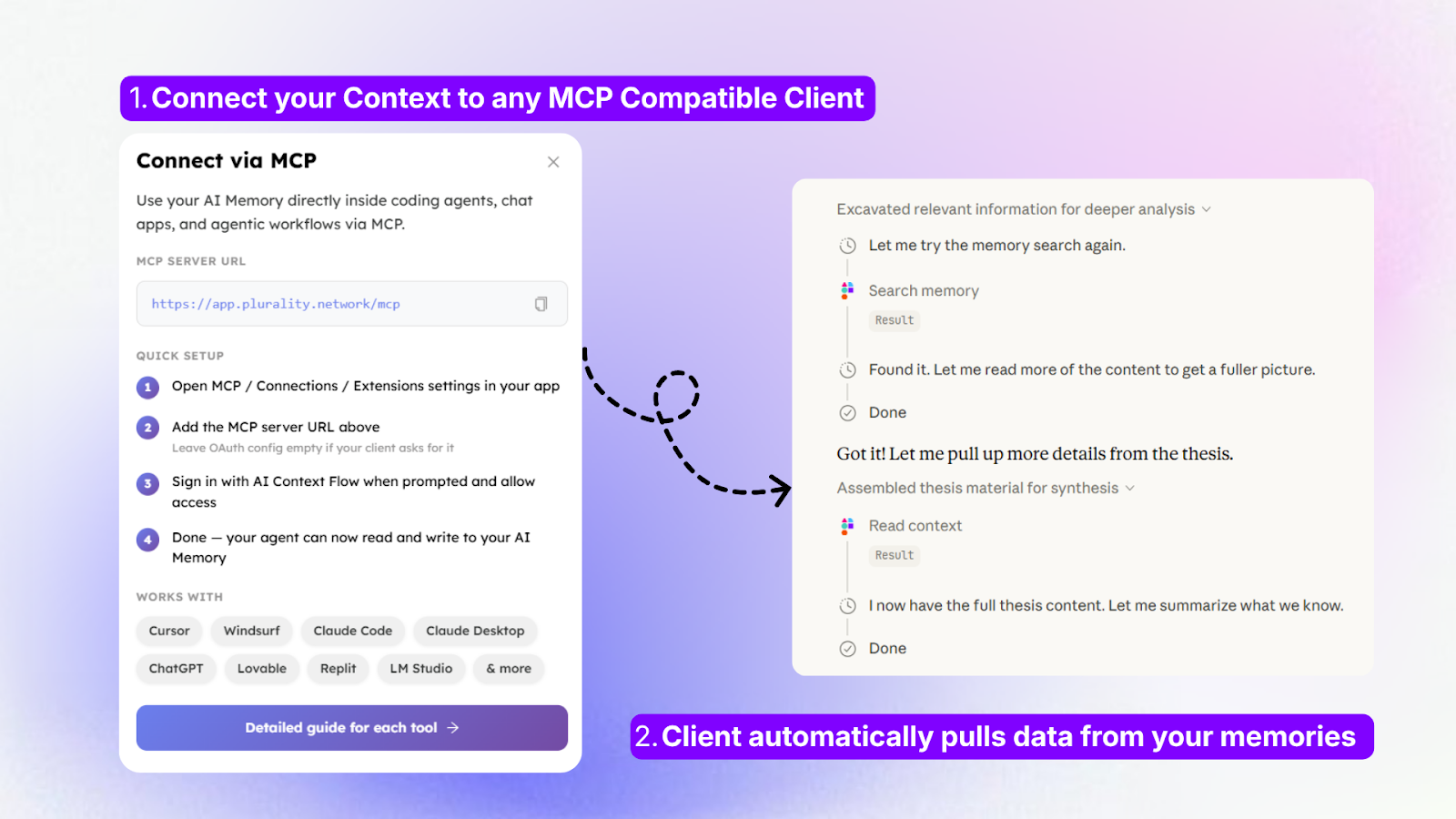
I tested this extensively with Cursor while building a small web application. Instead of repeatedly explaining my tech stack preferences, coding patterns, and project requirements, Cursor pulled everything from my AI Context Flow memory. The coding agent understood I prefer TypeScript over JavaScript, Tailwind for styling, and specific folder structures—all without me typing a word of context.
Setup took about 10 minutes following the per-tool guides. The platform now supports Personal Access Tokens (PAT) for secure MCP connections, addressing early user feedback. For non-technical users, the standard browser extension workflow works perfectly without touching MCP.
The memory sharing feature lets you give team members the same baseline context. I shared a project memory bucket with a freelance developer, and they instantly understood the project requirements without a lengthy onboarding call. Shared memory updates propagate to everyone, keeping the team synchronized.
4. Memory Studio and Model Switching
Memory Studio is the dedicated workspace where you create, edit, and test memory buckets before deploying them. The interface shows you exactly what context will be injected into your prompts, with a preview of the optimized output.
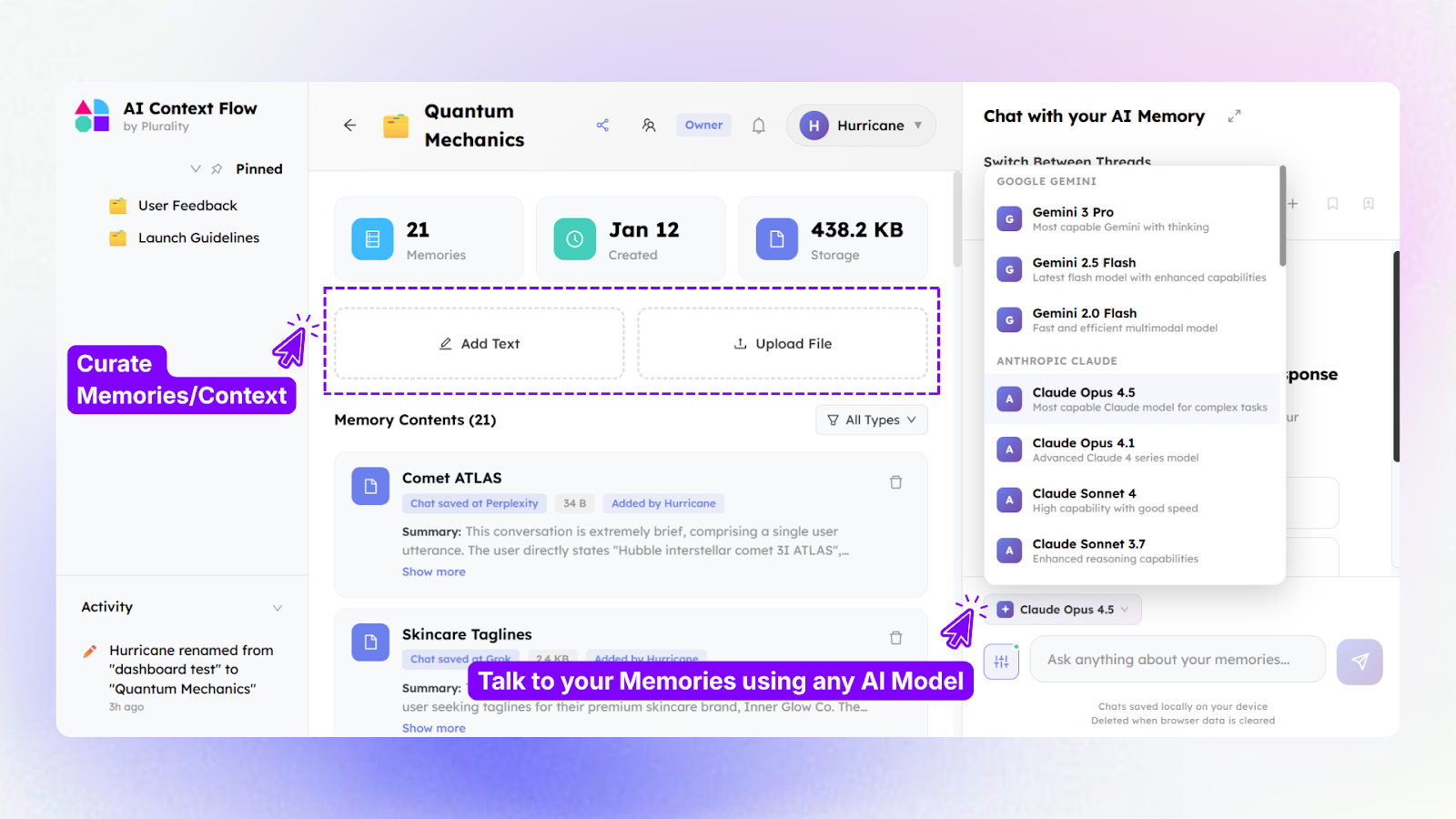
I built memory buckets for client projects, each containing brand guidelines, past decisions, and specific terminology. The ability to chat directly with your memory helped me validate what the AI would retrieve. I asked “What does this memory bucket know about my brand voice?” and the AI summarized the saved context, letting me catch gaps before real usage.
The model switcher lets you change AI models without losing context. I started a conversation using Claude Opus for strategic thinking, switched to Gemini Flash for faster responses on routine questions, and the context carried over seamlessly. AI Context Flow supports 18 base models on Tiers 1-2 and 5 premium models on Tier 3, including Claude Opus 4.5, Gemini 3.1 Pro, and Mistral Large.
Privacy controls give you granular control over what gets saved and shared. All data is encrypted, and you can delete memories permanently. The platform’s privacy-first approach means your context isn’t used to train external models.
My Honest AI Context Flow Review: Testing Experience
I tested AI Context Flow across three weeks, using it with ChatGPT, Claude, Gemini, Perplexity, and Cursor. I created memory buckets for four distinct contexts: client work, personal research, a coding project, and team collaboration with a remote developer.
Week one focused on setup and memory creation. Installing the browser extension took two minutes. I spent about an hour creating initial memory buckets, importing past project documentation, and testing context injection. The learning curve was minimal—the interface is intuitive, and the Ctrl+I shortcut became muscle memory quickly.
The prompt optimizer impressed me most during week two. I deliberately wrote vague prompts to test its limits. A prompt like “help me with my website” became “Help me improve my SaaS website’s conversion rate. Current conversion is 2.3%, target is 4%. Focus on hero section messaging and call-to-action placement. Brand voice is professional but approachable.” The optimized prompt produced usable output immediately, whereas the vague prompt would have required 3-4 back-and-forth exchanges.
MCP server integration with Cursor worked flawlessly after initial setup. I created a memory bucket containing my coding preferences: TypeScript with strict mode, functional components with hooks, Tailwind CSS, and specific naming conventions. Cursor respected every preference across 40+ code generation requests. I never had to repeat myself or correct the AI’s assumptions about my stack.
The cross-platform sync saved me time daily. I researched competitor analysis in Perplexity, saved key findings to my memory bucket, switched to ChatGPT for strategy development, and the context carried over. Previously, I would have manually copied notes or switched between tabs constantly. With AI Context Flow, the research and strategy happened seamlessly across platforms.
Where did AI Context Flow struggle? The credit system requires attention. Each context injection and prompt optimization consumes credits from your daily allowance. Tier 1’s 1,667 daily credits sound generous, but heavy users (50+ prompts daily with optimization) can approach limits. I hit my daily limit twice during heavy research days. The platform notifies you before exhausting credits, and unused credits don’t roll over.
The browser extension occasionally lagged on complex web pages like Notion or Figma. Refreshing the page resolved the issue, but it was noticeable. The MCP server, while powerful, requires technical comfort. Non-developers will stick with the browser extension, which is fine, but they miss the coding agent integration.
Memory bucket organization could be more visual. With 10+ buckets, I wanted folders or color coding. The current list view works but feels basic. The team has acknowledged this in their roadmap based on founder updates.
Customer support responded within 6 hours on average, with detailed technical answers. The knowledge base includes video tutorials and setup guides for every supported platform. The AppSumo community rating of 4.77/5 (across 13 reviews) reflects strong satisfaction, with 11 five-taco ratings, one four-taco, and one three-taco. Users consistently praise the time savings and cross-platform sync while noting the credit system requires monitoring.
Who Should Use AI Context Flow?
Based on my testing across different use cases, AI Context Flow delivers transformative value for specific users but may be overkill for casual AI users.
Best for: Power users who switch between ChatGPT, Claude, and Gemini daily. Freelancers and consultants managing multiple clients with different contexts, requirements, and brand voices. Developers using Cursor, Claude Code, or Windsurf who want consistent coding preferences without repetition. Teams needing shared context across members. Researchers who gather information across platforms and want unified memory. Anyone tired of re-explaining their role, project, and preferences to every new AI conversation.
Not for: Casual AI users who prompt less than 10 times weekly—the setup effort outweighs benefits. Users who stick to a single AI platform (ChatGPT’s native memory may suffice). Non-technical users who won’t use MCP integration and don’t need cross-platform sync. Teams with strict data privacy policies prohibiting third-party memory storage (though AI Context Flow is privacy-first, legal review advised). Users unwilling to learn the credit system.
Tier 1 ($59) works for individual power users with moderate usage. Tier 2 ($149) offers the best value for heavy users who need 5,000 daily credits and 5GB storage. Tier 3 ($339) serves teams, agencies, and developers who need premium AI models (Claude Opus 4.5, Gemini 3.1 Pro) and 15,000 daily credits.
AI Context Flow vs Competitors
I compared AI Context Flow against three alternatives: ChatGPT’s native memory, Claude Projects, and Mem.ai (general memory tool). Here’s how they stack up.
| Feature | AI Context Flow | ChatGPT Memory | Claude Projects | Mem.ai |
|---|---|---|---|---|
| Cross-Platform Sync | ✅ ChatGPT, Claude, Gemini, Perplexity, +18 models | ❌ ChatGPT only | ❌ Claude only | ⚠️ Limited AI integration |
| Prompt Optimization | ✅ One-click Ctrl+I | ❌ Manual only | ❌ Manual only | ❌ |
| MCP Server for Coding Agents | ✅ Full integration | ❌ | ❌ | ❌ |
| Memory Buckets | ✅ Unlimited named buckets | ❌ Single memory | ⚠️ Project-based only | ✅ Yes |
| Model Switching | ✅ Without losing context | N/A | N/A | ❌ |
| Pricing | $59 lifetime | Free with ChatGPT | Free with Claude | $10+/month |
| Credit System | Yes (daily limits) | No | No | No |
AI Context Flow’s biggest advantage is universal compatibility. No other tool lets you save memory once and use it across ChatGPT, Claude, Gemini, Perplexity, and coding agents. The prompt optimizer and MCP server integration are unique differentiators that power users will appreciate.
For alternatives, consider our complete guide to AI productivity tools for detailed comparisons. If you only use ChatGPT, native memory works fine for basic needs. For Claude-only users, Projects offers similar context management. But for anyone using multiple AI platforms, AI Context Flow solves a problem no one else addresses.
What Users Are Saying About AI Context Flow
The AppSumo community has responded enthusiastically to AI Context Flow, with a 4.77/5 rating across 13 reviews. Eleven users gave five tacos (highest rating), one gave four tacos, and one gave three tacos. The consistent high ratings suggest strong product-market fit.
Positive reviews consistently praise the time savings. Users report saving 30-60 minutes daily by eliminating context re-explanation across platforms. One reviewer managing 12 client accounts said AI Context Flow pays for itself within a week of time recovered. The cross-platform sync receives frequent mention as a game-changer for researchers and consultants.
The MCP server integration earns praise from developers. Several reviewers noted that Cursor and Windsurf became significantly more useful with persistent memory. One user reported that AI Context Flow reduced their prompt engineering time by 80% when using coding agents.
Critical reviews focus on two areas: the credit system and browser extension performance. The three-taco reviewer cited credit limits as restrictive for heavy users, suggesting higher daily allowances for Tier 1. Several users reported occasional lag with the browser extension on complex web apps, though refreshing resolved it.
Founder updates indicate active development. Recent updates include Personal Access Tokens (PAT) for MCP, expanded model support (now 18 base models, 5 premium), and improved memory retrieval accuracy. The team appears responsive to user feedback, with multiple features added based on community requests.
Users particularly appreciate the privacy-first approach. Multiple reviews mention that unlike some AI tools, AI Context Flow doesn’t use saved memories for training or share data with third parties. This trust factor matters for professionals handling sensitive client information.
AI Context Flow Review: FAQ
What exactly is AI Context Flow and how does it work?
AI Context Flow is a universal memory bank that syncs your saved context across ChatGPT, Claude, Gemini, Perplexity, and 18+ other AI platforms. Install the browser extension, create memory buckets for different contexts, then press Ctrl+I to inject saved memory into any prompt. The platform also optimizes vague prompts into clear instructions and includes MCP server integration for coding agents like Cursor.
How does AI Context Flow differ from ChatGPT’s native memory or Claude Projects?
ChatGPT’s memory works only within ChatGPT. Claude Projects work only within Claude. AI Context Flow works across both plus Gemini, Perplexity, and 18+ other models. You save context once and use it everywhere. The prompt optimizer and MCP server for coding agents are additional features native memory lacks. For users of multiple AI platforms, AI Context Flow solves fragmentation no single-platform tool addresses.
How do credits work in AI Context Flow?
Credits are your daily usage allowance. Each context injection, prompt optimization, and memory operation consumes credits. Tier 1 includes 1,667 credits daily, Tier 2 includes 5,000 credits, and Tier 3 includes 15,000 credits. Unused credits don’t roll over to the next day. The platform notifies you at 80%, 90%, and 100% of your daily limit. Most users find Tier 1 sufficient for 30-50 optimized prompts daily. Heavy users should consider Tier 2.
Is AI Context Flow safe for sensitive data?
AI Context Flow uses encryption for all stored memories and follows privacy-first principles. The platform does not use your saved context to train external AI models or share data with third parties. You maintain control over all memories and can delete them permanently. However, organizations with strict data policies should review AI Context Flow’s security documentation and terms before storing sensitive client or proprietary information.
Can I share memory buckets with team members or clients?
Yes, AI Context Flow supports memory sharing. You can share specific memory buckets with anyone, giving them the same baseline context for projects. Shared memories update automatically for all members when changes are made. This feature works well for freelancers collaborating with clients or teams working on shared projects. Shared memory access is controlled per bucket, so you maintain privacy for other contexts.
For more AI productivity strategies, check out our complete guide to prompt engineering covering context management, optimization techniques, and advanced workflows for 2025.