
Online privacy is more important than ever in today’s digital world. From VPNs to password managers and secure browsers, the right online privacy tools can protect your personal data and browsing activity from prying eyes.
This comprehensive guide compares the best online privacy tools for 2026, helping you build a robust privacy protection strategy.
At a Glance: The Best Online Privacy Tools for 2026
- Best VPN: NordVPN – Strong encryption and no-logs policy.
- Best Password Manager: 1Password – Secure and user-friendly.
- Best Private Browser: Brave – Built-in ad and tracker blocking.
- Best Lifetime Deals: OysterVPN, TransferChain Pass – One-time payment privacy tools.
What to Look For in Online Privacy Tools
Before diving into specific tools, let’s establish what makes great online privacy tools:
Key Privacy Features to Evaluate
- Encryption: Strong data encryption for privacy protection.
- No-Logs Policy: No tracking or storing of your activity.
- Tracker Blocking: Block third-party trackers and ads.
- Password Security: Secure password generation and storage.
- Data Control: Full ownership of your data.
- Ease of Use: Simple setup and use.
Comparing the Best Online Privacy Tools
| Tool | Category | Ease of Use | Pricing | Best For | Weakness |
|---|---|---|---|---|---|
| NordVPN | VPN | Easy | $3.99/mo | Privacy protection | Subscription required |
| 1Password | Password Manager | Easy | $2.99/mo | Password security | Subscription required |
| Brave | Browser | Very Easy | Free | Private browsing | Limited to browser |
| OysterVPN | VPN | Very Easy | $29 (Lifetime) | Budget VPN | Limited server locations |
| TransferChain Pass | Password Manager | Easy | $49 (Lifetime) | Blockchain password mgmt | Newer solution |
Detailed Breakdown of the Best Online Privacy Tools
1. NordVPN: The Privacy Champion
Pros: Strong encryption, no-logs policy, fast speeds, large server network.
Cons: Subscription required, can be slower on some servers.
Best For: Privacy-conscious individuals and businesses needing secure browsing.
2. 1Password: The Password Manager Leader
Pros: Excellent security, cross-platform support, user-friendly, strong family sharing.
Cons: Subscription-based, no free tier beyond trial.
Best For: Anyone wanting a secure, easy-to-use password manager.
3. Brave: The Private Browser
Pros: Built-in ad and tracker blocking, faster than Chrome, free.
Cons: Limited to browsing, some websites may break with aggressive blocking.
Best For: Users wanting a private browsing experience.
💡 The AppSumo Advantage
Affiliate Disclosure: Some links are affiliate links.
OysterVPN and TransferChain Pass offer exceptional lifetime value for privacy tools with one-time payments.
4. OysterVPN: Lifetime VPN
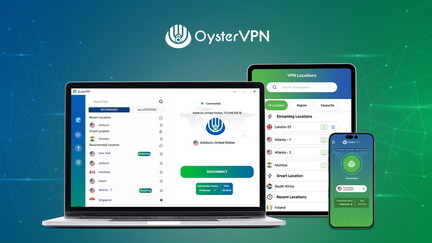
OysterVPN offers secure browsing and global content access with a one-time payment.
OysterVPN Pros
- Secure browsing on public Wi-Fi.
- Global content access.
- Complete online privacy.
- Lifetime deal: $29 one-time.
OysterVPN Cons
- Limited server locations.
- Basic feature set.
Who Should Choose OysterVPN?
OysterVPN is perfect for budget-conscious individuals who want VPN protection without monthly fees.
5. TransferChain Pass: Blockchain-Secured Password Manager
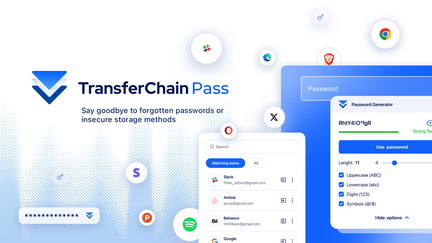
TransferChain Pass uses zero-knowledge architecture and blockchain-secured access for password management.
TransferChain Pass Pros
- Zero-knowledge architecture.
- Multi-layered encryption.
- Blockchain-secured access.
- Lifetime deal: $49 one-time.
TransferChain Pass Cons
- Newer solution.
- Limited advanced features.
Who Should Choose TransferChain Pass?
TransferChain Pass is ideal for security-conscious users who want next-generation password protection.
5-Year Cost Comparison
| Tool | Pricing Model | 5-Year Cost |
|---|---|---|
| NordVPN | Subscription ($3.99/mo) | $239.40 |
| 1Password | Subscription ($2.99/mo) | $179.40 |
| Brave | Free | $0 |
| OysterVPN | One-Time ($29) | $29 |
| TransferChain Pass | One-Time ($49) | $49 |
Decision Framework
What’s your primary privacy need?
- VPN protection: Choose NordVPN or OysterVPN.
- Password management: Choose 1Password or TransferChain Pass.
- Private browsing: Choose Brave.
- Lifetime value: Choose OysterVPN or TransferChain Pass.
Final Verdict
NordVPN is the best overall VPN for privacy. 1Password is the top password manager. Brave is the best private browser.
For lifetime value, OysterVPN and TransferChain Pass offer exceptional one-time payment deals.
Our Top Recommendations
Best VPN: NordVPN – Strong encryption and no-logs policy.
Best Lifetime Deal for VPN: OysterVPN provides secure browsing with a one-time payment.
 Lifetime Deal
−26%
Lifetime Deal
−26%
OysterVPN
Secure browsing, global content access, and complete online privacy in one VPN
Pros
- +Secure browsing
- +Global content access
- +Complete online privacy
- +Lifetime deal pricing
- +Easy-to-use interface
Cons
- −Limited server locations
- −Could have faster speeds
- −Basic feature set
Alternatives: General VPN Services Premium VPNs Privacy Tools
Best Lifetime Deal for Password Management: TransferChain Pass offers blockchain-secured password protection.
 Lifetime Deal
−80%
Lifetime Deal
−80%
TransferChain Pass
Private, zero-knowledge password manager with multi-layered encryption and blockchain-secured access
Pros
- +Lifetime deal pricing (saving $201)
- +Zero-knowledge architecture
- +Multi-layered encryption
- +Blockchain-secured access
- +Password management
Cons
- −Limited advanced password features
- −Additional integration options would be beneficial
- −User interface learning curve
Alternatives: LastPass 1Password Bitwarden
Choose the online privacy tools that fit your needs and budget.