
Scheduling software doesn’t have to be expensive. Cheap scheduling solutions offer essential features like online booking, calendar integration, and automated reminders at prices that fit small business budgets.
From free tools to lifetime deals, this comprehensive guide compares the best cheap scheduling software for 2026, helping you find the perfect tool for your budget.
At a Glance: The Best Cheap Scheduling Software for 2026
- Best Free Option: Calendly – Free plan with basic scheduling.
- Best Budget Subscription: Doodle – $6.95/mo for team scheduling.
- Best Lifetime Deal: Kiwilaunch – $59 one-time for online booking.
- Best for Meeting Reminders: Meeting Reminders – $9 one-time for notifications.
- Best for Service Businesses: Acuity Scheduling – $14/mo with comprehensive features.
What to Look For in Cheap Scheduling Software
Before diving into specific tools, let’s establish what makes great cheap scheduling software:
Key Value Factors
- Free or Low-Cost: No expensive subscriptions.
- Essential Features: Online booking, calendar integration, reminders.
- One-Time Payment Options: Lifetime deals that eliminate recurring costs.
- No Hidden Fees: Transparent pricing.
- Scalability: Can grow with your business.
Comparing the Best Cheap Scheduling Software
| Tool | Ease of Use | Pricing | Best For | Value Proposition | Weakness |
|---|---|---|---|---|---|
| Calendly | Very Easy | Free / $8/mo | Simple scheduling | Great free plan | Limited features on free plan |
| Doodle | Very Easy | Free / $6.95/mo | Team scheduling | Affordable | Limited booking features |
| Kiwilaunch | Easy | $59 (Lifetime) | Service businesses | Exceptional lifetime value | Limited advanced features |
| Meeting Reminders | Very Easy | $9 (Lifetime) | Meeting notifications | Unbeatable price | Basic functionality |
| Acuity Scheduling | Easy | $14/mo | Service businesses | Comprehensive features | More expensive |
Detailed Breakdown of the Best Cheap Scheduling Software
1. Calendly: The Free Leader
Pros: Very easy to use, free plan available, integrates with popular calendars.
Cons: Limited features on free plan.
Best For: Solopreneurs and small teams needing simple scheduling.
5-Year Cost: $0-$480
2. Doodle: The Team Choice
Pros: Very easy to use, free plan available, good for team scheduling.
Cons: Limited appointment booking features.
Best For: Teams needing to schedule meetings.
5-Year Cost: $0-$417
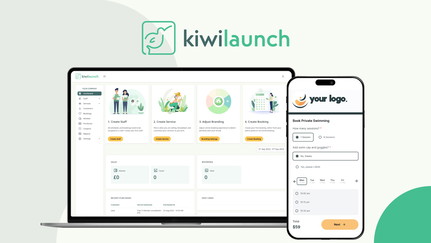
3. Kiwilaunch: Lifetime Online Booking
Kiwilaunch allows service businesses to accept online appointments, manage bookings, and collect payments.
Kiwilaunch Pros
- Online booking system for clients.
- Calendar integration for availability.
- Client management features.
- Lifetime deal: $59 one-time.
Kiwilaunch Cons
- Limited advanced features.
- Best for small service businesses.
Who Should Choose Kiwilaunch?
Kiwilaunch is perfect for service businesses like salons, consultants, and practitioners who need online booking without recurring fees.
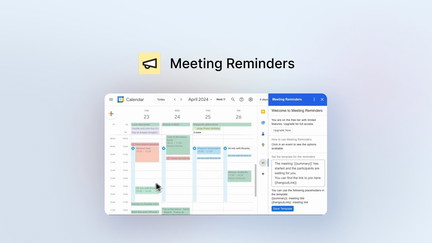
4. Meeting Reminders: Lifetime Notifications
Meeting Reminders provides one-click notifications for email, SMS, and WhatsApp.
Meeting Reminders Pros
- Simple and easy to use.
- Multi-channel delivery.
- One-click notifications.
- Lifetime deal: $9 one-time.
Meeting Reminders Cons
- Limited advanced features.
- Best for notification-only needs.
Who Should Choose Meeting Reminders?
Meeting Reminders is ideal for busy professionals who need reliable meeting notifications.
5. Acuity Scheduling: Comprehensive Value
Pros: Comprehensive appointment management, payment processing, team support.
Cons: More expensive than other options.
Best For: Service businesses needing comprehensive features.
💡 The AppSumo Advantage
Affiliate Disclosure: Some links are affiliate links.
Kiwilaunch and Meeting Reminders offer exceptional lifetime value for scheduling with one-time payments.
5-Year Cost Comparison
| Tool | Pricing Model | 5-Year Cost |
|---|---|---|
| Calendly | Subscription ($8/mo) | $480 |
| Doodle | Subscription ($6.95/mo) | $417 |
| Acuity Scheduling | Subscription ($14/mo) | $840 |
| Kiwilaunch | One-Time ($59) | $59 |
| Meeting Reminders | One-Time ($9) | $9 |
Decision Framework
What’s your budget and need?
- $0 budget: Choose Calendly or Doodle (free plans).
- One-time payment ($9-59): Choose Meeting Reminders or Kiwilaunch.
- Low monthly ($6-14/mo): Choose Doodle or Acuity Scheduling.
Final Verdict
Calendly is the best free scheduling tool. For lifetime value, Kiwilaunch and Meeting Reminders offer exceptional one-time payment deals. For service businesses, Acuity Scheduling provides comprehensive features.
Our Top Recommendations
Best Free Option: Calendly – Free plan with basic scheduling.
Best Lifetime Deal: Kiwilaunch offers online bookings with a one-time payment.
 Lifetime Deal
−94%
Lifetime Deal
−94%
kiwilaunch
Get online bookings from your website (for practitioners, home services, salons, course providers)
Pros
- +Lifetime deal pricing (saving $877)
- +Online booking system
- +Calendar integration
- +Client management
- +Payment processing
Cons
- −Limited advanced booking features
- −Additional integration options would be beneficial
- −User interface learning curve
Alternatives: Calendly Acuity Scheduling Booksy
Best Lifetime Deal for Meeting Reminders: Meeting Reminders provides multi-channel notifications.
 Lifetime Deal
−78%
Lifetime Deal
−78%
Meeting Reminders
One-click notifications for email, SMS and WhatsApp. And now schedule reminders ahead of time.
Pros
- +Simple and easy to use
- +Multi-channel delivery
- +One-click notifications
- +Advance scheduling
- +Lifetime deal pricing
Cons
- −Limited advanced features
- −Basic calendar integration
- −May not suit complex needs
Alternatives: Calendar Apps Task Management Tools Reminder Apps
Choose the cheap scheduling software that fits your budget and needs.