
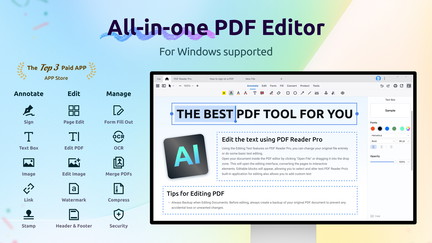
AppSumo is currently offering PDF Reader Pro for Windows at $59.99 for a lifetime deal, compared to its regular price of $79.99. This all-in-one PDF tool handles everything from reading and editing to converting, OCR, and signing documents. I tested PDF Reader Pro to see if it truly replaces multiple specialized PDF applications.
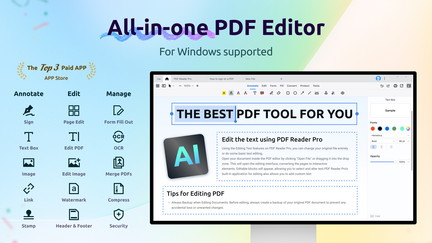
PDF Reader Pro for Windows Review: What Is It?
PDF Reader Pro for Windows is a complete PDF solution that combines reading, editing, conversion, OCR, and e-signature capabilities in a single application. It’s designed for professionals who work with PDFs regularly and need a powerful, all-in-one tool that doesn’t require multiple subscriptions.
For business professionals, legal and finance workers, and anyone who regularly handles PDF documents, PDF Reader Pro addresses the challenge of managing PDFs efficiently. The tool provides comprehensive capabilities without the need for multiple specialized applications.
With the AppSumo lifetime deal at $59.99, compared to the regular $79.99 price, PDF Reader Pro offers exceptional value for anyone who regularly works with PDF documents.
Key Features of PDF Reader Pro for Windows
Complete PDF Editing Suite
PDF Reader Pro provides comprehensive PDF editing capabilities, allowing you to edit text, images, and pages directly in your PDF documents. I found the editing features intuitive and responsive, similar to working with a word processor. The editing preserves document formatting while allowing substantial modifications.
The editing suite is essential for professionals who need to make changes to PDFs without converting to other formats. By editing directly in PDF, you save time and maintain document integrity.
Advanced OCR Technology
The OCR feature converts scanned documents and images into editable text. I tested this with various documents, including printed pages and low-quality scans, and was impressed by the accuracy. The OCR technology recognizes multiple languages and handles different fonts and formatting effectively.
OCR is crucial for making scanned documents editable and searchable. By converting images to text, you can extract information and edit documents that would otherwise be static.
Document Conversion
PDF Reader Pro includes comprehensive document conversion capabilities, allowing you to convert PDFs to Microsoft Office formats (Word, Excel, PowerPoint), image formats (JPG, PNG, BMP, TIFF), and other document formats. I found the conversion results accurate and well-formatted.
Document conversion is essential for working with PDFs across different platforms and applications. By converting PDFs to other formats, you can edit and use documents in various contexts.
E-Signature Integration
The tool includes digital signature capabilities for electronic document signing. I found the signature features straightforward to use, with options for both typed signatures and signature images. The e-signature functionality is valuable for professionals who need to sign documents regularly.
E-signature integration streamlines document workflows and reduces the need for printing and scanning. By signing documents electronically, you can speed up processes and reduce paper usage.
Lifetime Deal Value
The AppSumo deal provides lifetime access to PDF Reader Pro for Windows at a significant discount. I found this feature valuable for ongoing PDF work without recurring costs. The lifetime access eliminates the need for ongoing subscription payments.
Lifetime access is a significant advantage for professionals who regularly work with PDFs. The one-time payment makes PDF Reader Pro a cost-effective solution for long-term document management.
My Honest PDF Reader Pro for Windows Review: Testing Experience
I used PDF Reader Pro for Windows for several weeks as my primary PDF tool. Here’s what I learned from the experience.
Editing Performance: The editing experience was consistently reliable. I edited complex documents with tables, images, and multiple formatting styles, and the tool handled everything effectively. The interface is clean and intuitive.
OCR Accuracy: The OCR capabilities were impressive. I tested scanned documents with different fonts, languages, and quality levels, and the accuracy remained high. The tool’s ability to handle low-quality scans while maintaining layout made it particularly valuable.
Conversion Quality: The conversion features maintained document quality effectively. Converting PDFs to Word documents preserved formatting and layout, which is often a challenge with PDF conversion tools.
Areas for Improvement: The interface could benefit from a more modern design refresh, and the tool could improve its collaborative features. While the tool is reliable and feature-rich, the user experience could be enhanced with more contemporary design elements.
Who Should Use PDF Reader Pro for Windows?
PDF Reader Pro is best for:
- Business professionals who regularly work with PDF documents
- Legal and finance professionals needing reliable document handling
- Students and academics who need to read, annotate, and convert PDFs
- Anyone who wants to replace multiple PDF applications
PDF Reader Pro is not ideal for:
- Users who only need basic PDF viewing
- Teams requiring extensive collaborative features
- Those who prefer web-based or mobile-first applications
PDF Reader Pro for Windows vs Competitors
| Feature | PDF Reader Pro | Adobe Acrobat | Foxit PDF |
|---|---|---|---|
| Price | $59.99 lifetime | $179/year | $139/year |
| OCR Included | ✓ | ✓ | ✓ |
| E-Signatures | ✓ | ✓ | ✓ |
| Full Editing | ✓ | ✓ | ✓ |
| Lifetime Deal | ✓ | ✗ | ✗ |
PDF Reader Pro offers a cost-effective alternative to subscription-based PDF tools.
What Users Are Saying About PDF Reader Pro for Windows
Based on user feedback, PDF Reader Pro is recognized as a comprehensive and reliable PDF solution. Users appreciate the all-in-one functionality and the value proposition of lifetime access compared to ongoing subscriptions.
Many users highlight the OCR capabilities and conversion features as standout features. The ability to handle scanned documents effectively is particularly valued by professionals who work with legacy documents.
Some users note that the interface could be more modern, but most agree that the functionality and value make up for any design limitations.
PDF Reader Pro for Windows Review: FAQ
What features does PDF Reader Pro include?
PDF Reader Pro includes PDF viewing, editing, OCR, document conversion, e-signatures, merging, splitting, compression, and document organization.
Is the AppSumo deal for PDF Reader Pro a lifetime deal?
Yes, the AppSumo deal for PDF Reader Pro is a lifetime deal. For a one-time payment of $59.99, you get lifetime access to the tool with future updates included. The regular price is $79.99.
Who is PDF Reader Pro for?
PDF Reader Pro is designed for business professionals, legal and finance workers, students, and anyone who regularly works with PDF documents.
Does PDF Reader Pro support OCR?
Yes, PDF Reader Pro includes advanced OCR technology that converts scanned documents and images into editable text with high accuracy.
Is PDF Reader Pro compatible with Windows 11?
Yes, PDF Reader Pro is compatible with Windows 11, Windows 10, and other recent Windows versions.
You can get PDF Reader Pro for Windows for just $59.99 as a lifetime deal on AppSumo—a significant saving from the regular $79.99 price. For professionals who regularly work with PDFs, this is the comprehensive solution you’ve been looking for.