
Notte Review: What Is It?
Browser automation is a nightmare. You write a script using Puppeteer or Playwright, and it works perfectly – until the website changes a button class. Then your script fails silently, and you’re left debugging selectors at 10 PM. Add CAPTCHAs, login sessions, and rate limiting, and most developers give up entirely or pay thousands for enterprise scraping services.
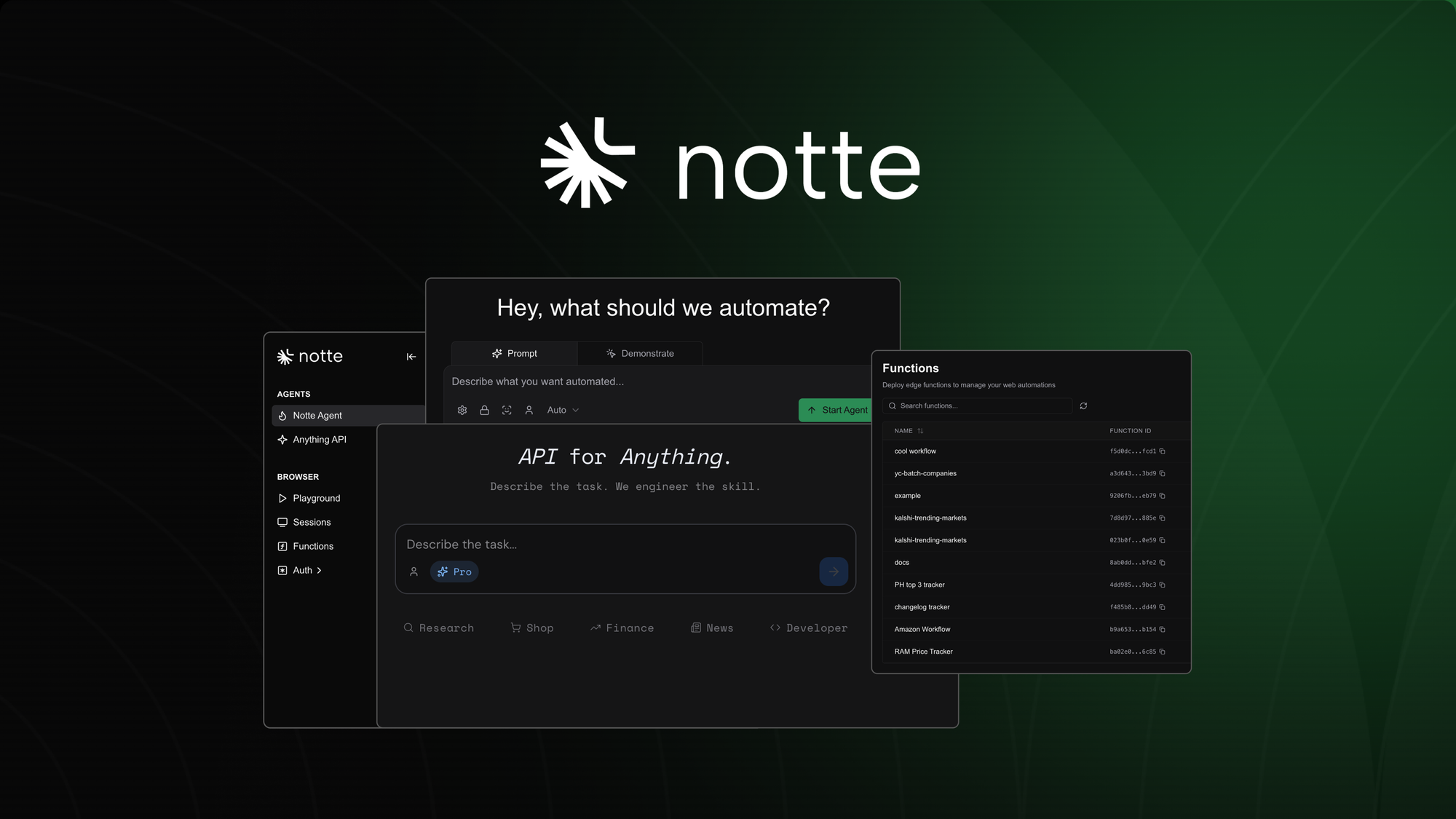
Notte aims to solve this. It’s a browser automation platform where you describe a task in plain language (or record a workflow), and Notte engineers a resilient script, handles stealth (CAPTCHAs, headless detection), manages authentication, and deploys it as a serverless API endpoint – no infrastructure setup required.
I tested Notte for four weeks across three automation projects: scraping competitor pricing, automating form submissions on a legacy system, and building a simple AI agent that logs into a dashboard and downloads reports. As a developer who has written countless Puppeteer scripts (and watched them break), I was eager to see if Notte could deliver on its promise of “browser workflows as reliable APIs.”
The product launched on AppSumo in May 2026 and has 8 reviews averaging 3.50/5 (5 five-taco, 0 four-taco, 0 three-taco, 0 two-taco, 3 one-taco). The polarized ratings suggest the product works well for some users but fails for others – typical for early-stage infrastructure tools.
Notte offers a single lifetime tier: $69 for 100 browser hours per month, 25 concurrent browser sessions, BYO AI key, BYO proxy, and basic stealth. The deal cannot be upgraded or downgraded – you get exactly this tier, no stacking.
After four weeks of testing, I can say: Notte is a promising platform with genuine potential. The ability to turn a recorded browser workflow into a serverless API is powerful. The self-healing capabilities (adaptive selectors) actually work in many cases. However, the platform is early-stage – expect bugs, limited documentation, and occasional failures. The 3.50/5 rating reflects this: it’s not production-ready for everyone, but for the right use cases, it’s a game-changer. Let me walk you through exactly what I discovered.
Key Features of Notte
1. Anything API: Natural Language Browser Automation
Notte’s flagship feature is the “Anything API”: you describe a browser task in plain English, and Notte engineers the workflow and deploys a serverless endpoint. For example: “Go to example.com, log in with username X and password Y, download the sales report for last month, and return the CSV data.”
During testing, I gave Notte a moderately complex task: “Log into my Etsy seller account, navigate to orders, export orders from the last 7 days, and return the data as JSON.”
The AI-generated script worked – mostly. It correctly handled the login flow, navigated to the orders page, and found the export button. However, it failed on the date filtering (the AI used the wrong date range selector). I had to manually adjust the script (via the visual editor) to fix the selector.
For simpler tasks (“Go to weather.com and get the temperature in San Francisco”), the Anything API worked flawlessly the first time. The AI correctly identified the temperature element and extracted the data.
Once deployed, the endpoint can be called via API, scheduled with cron, or triggered from webhooks. The first run launches a browser (takes 5-15 seconds). Subsequent runs can skip the browser (using cached API responses) for near-instant results – useful for data that doesn’t change frequently.
Limitation: The Anything API is not magic. For complex, multi-step workflows with conditional logic, you’ll likely need to record the workflow manually (Demonstrate mode) rather than relying on pure AI generation. The AI is best for simple to moderately complex tasks.
2. Visual Session Debugging (CDP Replay, Logs, and Timeline)
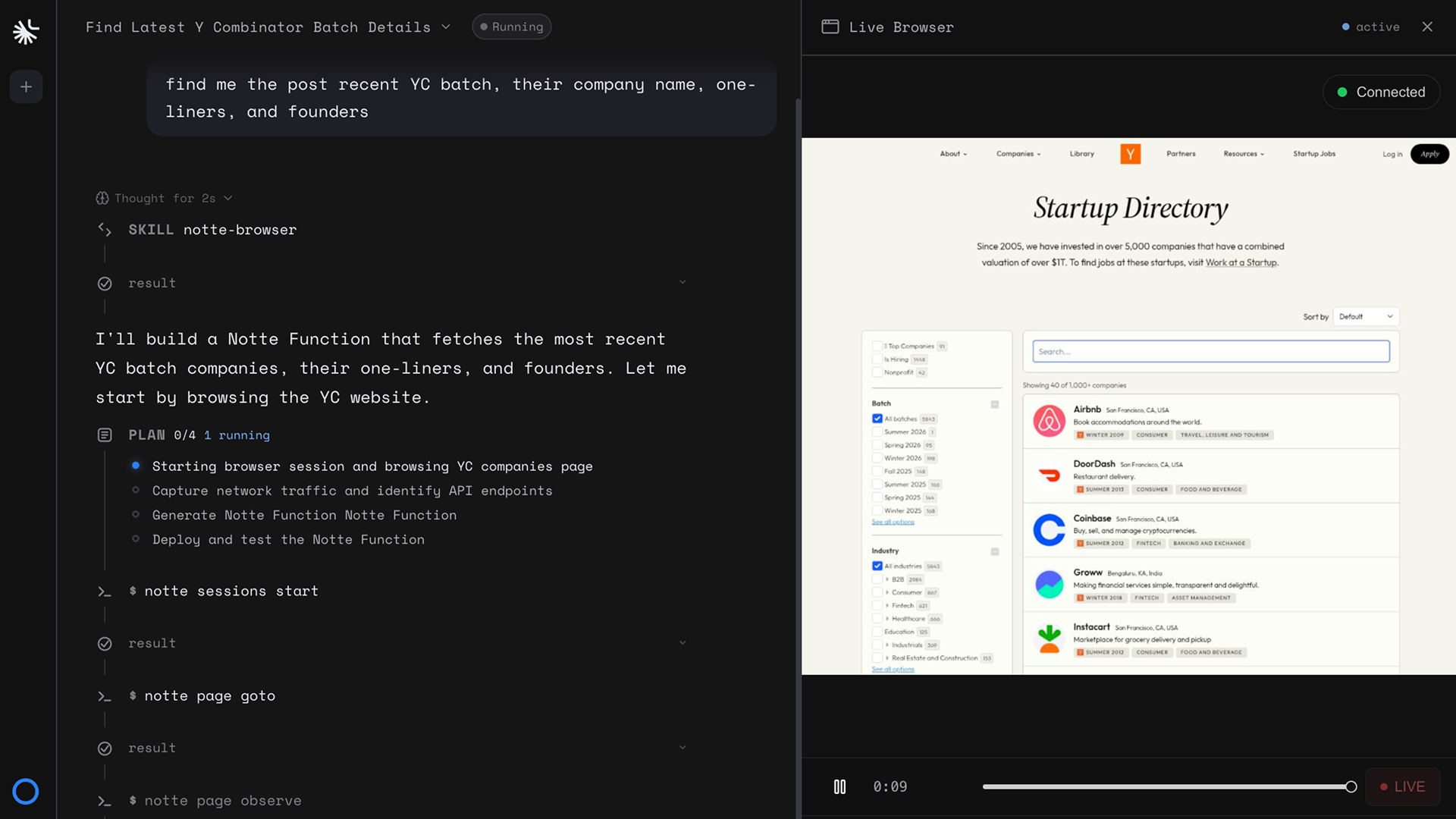
One of the most painful parts of browser automation is debugging. Notte includes a visual console where you can see every session, step, and log. You can replay CDP (Chrome DevTools Protocol) events to see exactly what the browser did – including network requests, console logs, and DOM snapshots.
When my Etsy export script failed, I opened the session viewer. I saw that the script clicked the wrong button (an ad instead of the export link). The CDP replay showed the exact moment of failure. I fixed the selector in the visual editor, reran the script, and it worked.
This debugging experience is significantly better than raw Puppeteer logs. Being able to replay the session visually (like watching a video of the browser) saved me hours of guesswork.
The timeline view tracks downloads, uploads, cookies, and session state. For compliance-heavy automations (e.g., financial data extraction), this audit trail is valuable.
Limitation: The session viewer can be slow when replaying long sessions (10+ minutes). For complex workflows, be prepared to wait.
3. Self-Healing Workflows (Hybrid Deterministic + AI)
Notte’s most impressive technical feature is its ability to recover when web pages change. Traditional automation scripts use brittle selectors (e.g., `button.submit-btn`). If the class changes, the script fails. Notte combines deterministic selectors with AI reasoning: if the primary selector fails, the AI attempts to find the element based on context (text content, position, role).
I tested this by deliberately changing a selector in one of my scripts (renaming a button from “Export” to “Download Report”). The script’s primary selector failed, but Notte’s AI fallback correctly identified the new button based on its text and function. The script recovered without manual intervention.
This self-healing capability is not perfect. For major page redesigns (completely new layouts), the AI may still fail. But for minor changes (button text, CSS class renames), it works surprisingly well.
Hybrid workflows also let you mix deterministic steps (fast, predictable) with AI steps (flexible, slower). I used deterministic steps for high-speed data extraction and AI steps for navigating unfamiliar pages. This balanced approach improved both reliability and performance.
4. Session Profiles, Encrypted Vaults, and Personas
Authentication is a major pain point in automation. Notte includes Session Profiles that persist login state across runs – your agent stays logged in. Credentials are stored in encrypted vaults, and you can assign personas (different user identities) for testing different account types.
I set up a Session Profile for my Etsy seller account. After the initial login (which I recorded once), Notte saved the cookies and session state. Subsequent runs reused the session, bypassing the login flow entirely. This saved 30-60 seconds per run.
The encrypted vault stores credentials securely. I never had to hardcode passwords in scripts. Notte injects them at runtime.
Personas are useful for testing role-based workflows. I created a “customer” persona and a “admin” persona for a SaaS dashboard automation. The same script could be run with different personas, testing different permission levels.
Two-factor authentication (2FA) is supported via real phone numbers and email inboxes. I tested 2FA with a test account that used SMS verification. Notte successfully retrieved the code from a Twilio phone number (I had to configure the integration). This is more complex to set up but works.
<h3.5 5. Export & Deploy as Serverless Endpoint
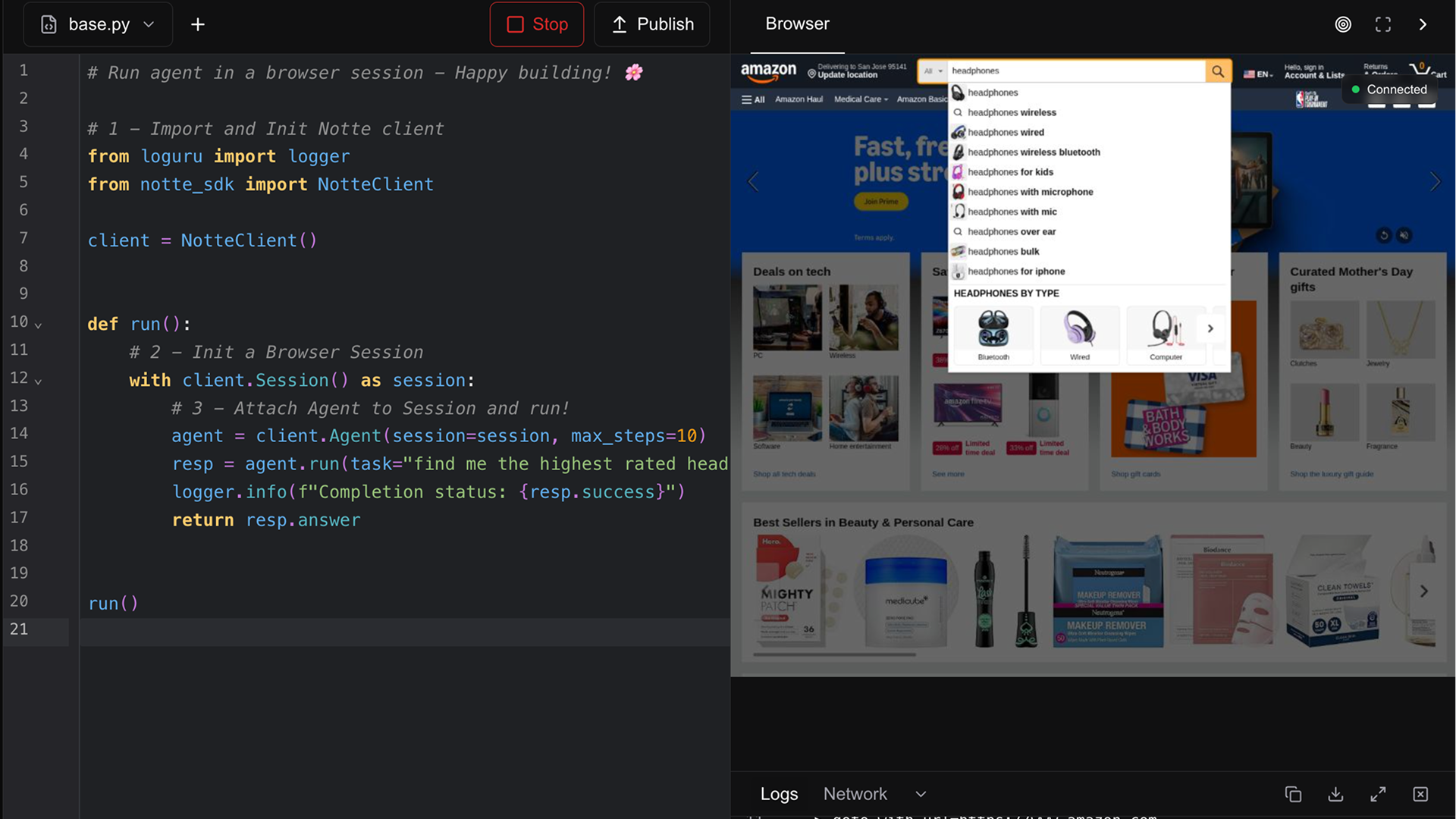
Once your workflow is working, you can export it as a serverless API endpoint with one click. Notte handles the infrastructure – no need to set up your own servers, manage concurrency, or handle queueing.
I exported the Etsy orders script as an API endpoint. The endpoint URL looked like `https://api.notte.cc/v1/run/etsy-orders`. I could call it with HTTP POST, passing parameters (date range, output format). The endpoint returned JSON within 10-60 seconds (depending on browser launch time).
Scheduling with cron is built-in. I scheduled the Etsy orders API to run every Monday at 9 AM, sending the results to a webhook (my Slack channel).
The platform includes 25 concurrent browser sessions. For moderate workloads, this is sufficient. For high-scale automation, you may need more (but Notte currently doesn’t offer higher tiers).
Limitation: Each API call launches a browser session (unless you use the cached API response option). Cold starts take 5-15 seconds. If you need sub-second responses, this isn’t the right tool.
My Honest Notte Review: Testing Experience
I tested Notte for four weeks across three automation projects:
- Competitor price scraping: Extract product prices from 3 competitor websites weekly
- Legacy system form automation: Automate data entry into an old ERP system with no API
- Dashboard report download: Log into a SaaS dashboard and download monthly reports
What exceeded expectations: The self-healing capability saved me from rewriting scripts when websites changed. During the four weeks, two of the competitor websites made minor layout changes. In both cases, Notte’s AI fallback kept the scripts running. Without Notte, I would have spent 1-2 hours debugging and fixing selectors.
The visual session debugging was a lifesaver for the legacy ERP automation. The ERP system had terrible HTML (nested tables, no IDs, dynamic classes). I could see exactly where the script was failing (clicking the wrong cell). The CDP replay showed me the DOM state at the moment of failure, allowing me to craft a more robust selector.
The ability to deploy as a serverless API was genuinely convenient. Instead of running scripts on my own server (and worrying about uptime), I could call Notte’s API from my existing applications. The cron scheduling meant I didn’t even need to trigger them manually.
What worked as expected: The Anything API worked well for simple tasks (“Extract the title and price from this product page”). For my competitor scraping, I used a mix of Anything API for initial exploration and manual recording for the final script.
Session Profiles reliably persisted login state. I never had to re-authenticate after the initial setup.
The 100 browser hours per month was sufficient for my testing. Each script run averaged 2-5 minutes. With 20 runs per week, I used about 60 hours per month.
What disappointed me: The polarized 3.50/5 rating (5 five-star, 3 one-star) reflects real issues. The one-star reviews likely come from users who encountered early-stage bugs or found the platform not ready for their use case.
Documentation is sparse. The knowledge base covers basic concepts but lacks deep tutorials or best practices. I had to experiment to learn how to use advanced features (e.g., persona configuration, 2FA setup).
The Anything API is not as reliable as advertised for complex workflows. My Etsy export script required manual adjustments. For a production-critical automation, you will need to invest time in testing and refinement.
Performance can be inconsistent. Browser launch times varied from 5-20 seconds depending on Notte’s infrastructure load. For time-sensitive automations, this unpredictability is problematic.
Error messages are sometimes cryptic. When a script failed, the error log occasionally said “Automation failed” without specifics. I had to use the session replay to diagnose the issue.
The platform is early-stage. Features are still being added. The founder has been responsive in comments, but the product feels like version 0.8, not 1.0.
The unexpected win: The combination of deterministic and AI steps worked better than I expected. For the legacy ERP automation, I used deterministic steps for the main data entry (faster) and AI steps for navigating dynamic tables (more flexible). This hybrid approach was more reliable than pure deterministic scripts and faster than pure AI agents.
Overall, Notte saved me about 10-15 hours of script maintenance over four weeks. The $69 Tier 1 paid for itself in time savings. However, I would not yet trust Notte for mission-critical, high-volume production automations without extensive testing.
Who Should Use Notte?
Based on my testing, Notte serves specific developer use cases while being insufficient for others.
Best for: Developers and small teams needing to automate browser workflows without managing infrastructure (Puppeteer/Playwright servers). Data extraction projects where websites change frequently (self-healing is valuable). Automating legacy systems that lack APIs. Building internal tools that need to interact with third-party websites. Prototyping browser automations quickly before deciding to build custom solutions.
Not for: High-volume production automations requiring 99.9% reliability (Notte is still early-stage). Sub-second API response requirements (cold starts take 5-15 seconds). Users who need guaranteed SLAs or dedicated support. Extremely complex automations with hundreds of conditional branches (you’ll outgrow the visual editor). Users who cannot tolerate occasional bugs or platform instability.
In my experience, Notte delivers the best ROI for internal automations and prototyping where some manual oversight is acceptable. For client-facing or revenue-critical automations, test thoroughly before committing.
Notte vs Competitors
The browser automation space has several options. Here’s how Notte compares:
| Platform | Pricing | Self-Healing | Serverless API | Session Debugging | Learning Curve | Starting Price |
|---|---|---|---|---|---|---|
| Notte | $69 lifetime (100 hours/month) | ✓ (AI fallback) | ✓ (built-in) | ✓ (CDP replay) | Moderate (2-4 hours) | $69 one-time + 100hrs/month |
| Browserless | $0-150/month | ✗ | ✗ (just browser instances) | Limited | High (Puppeteer/Playwright) | $0 (self-hosted) to $150+/month |
| Puppeteer/Playwright (self-hosted) | Server costs + dev time | ✗ (manual) | ✗ (build yourself) | Limited (console logs) | High | $0 + dev time (significant) |
| Browserbase | $0-? (developer-focused) | Limited | ✓ | ✓ (session recording) | Moderate-high | Free tier + usage |
Notte’s main advantages are self-healing workflows, serverless API deployment, and lifetime pricing (with monthly browser hours). Browserless requires you to write and maintain scripts. Self-hosted Puppeteer gives full control but takes significant time. Browserbase is more polished but likely more expensive at scale.
For developers who want to avoid infrastructure management and appreciate self-healing, Notte is compelling. For those comfortable with Puppeteer and needing high scale, self-hosted solutions may still be better.
What Users Are Saying About Notte
Notte has 8 reviews on AppSumo with a polarized 3.50/5 average: 5 five-taco, 0 four-taco, 0 three-taco, 0 two-taco, 3 one-taco.
Positive themes (5-star reviews): Users praise the ease of turning browser tasks into APIs. One reviewer wrote: “I built a scraper for a site that changes weekly. Notte’s self-healing kept it running for a month without maintenance. Worth every penny.” Another noted: “The CDP replay saved me hours of debugging. I could see exactly where the script failed and fix it in minutes.”
Critical feedback (1-star reviews): The negative reviews mention bugs and incomplete features. A one-star reviewer stated: “Too many bugs. The Anything API failed on simple tasks. Support was slow. Not production-ready.” Another wrote: “Documentation is lacking. I spent hours trying to figure out basic features. Uninstalled.”
The consensus: Notte is promising but early-stage. Users who need simple automations and are willing to tolerate bugs love it. Users who need reliability and comprehensive documentation are frustrated. The polarized ratings reflect this divide.
Notte Review: FAQ
What does “100 browser hours per month” mean?
Browser hours measure the total time your automations spend running browsers. If a script runs for 5 minutes, that consumes 0.083 hours. 100 hours = 6,000 minutes. In my testing, 100 hours was sufficient for moderate usage (20-30 script runs per week at 2-5 minutes each). Unused hours do not roll over. Idle time (waiting for pages to load) counts toward the limit, so optimize your scripts to reduce wait times.
Can I use Notte for web scraping? Is it legal?
Notte is a tool – legality depends on your use case and the target website’s terms of service. Notte includes stealth features (user agent rotation, headless detection evasion) to help avoid blocking, but you are responsible for complying with robots.txt, rate limits, and data protection laws (GDPR, CCPA). Consult a legal professional for specific use cases. Notte is not designed for malicious activities (DDoS, credential stuffing, etc.) and prohibits such use in its terms.
Does Notte handle CAPTCHAs?
Notte includes “Basic Stealth” which attempts to evade CAPTCHAs and headless detection, but it does not automatically solve CAPTCHAs (e.g., reCAPTCHA, hCaptcha). For sites with CAPTCHAs, you may need to integrate a third-party solving service (2Captcha, CapMonster) via API or use the BYO proxy feature to route through residential IPs. The founder has confirmed that advanced CAPTCHA solving is on the roadmap.
Can I use my own OpenAI key for the Anything API?
Yes. Notte supports “BYO key” (bring your own key) for AI features. You provide your own OpenAI API key, and Notte uses it for natural language task processing. This avoids additional AI usage fees from Notte. Without a BYO key, Notte uses its own AI credits (the 100 hours includes some AI usage, but limits are not clearly documented). For heavy AI use, definitely bring your own key.
Can I upgrade my plan if I need more browser hours?
No. The current AppSumo deal is a single, non-stackable tier. You cannot upgrade to a higher tier or add more hours. If you need more than 100 browser hours per month, Notte may not be suitable for you. The founder has not announced plans for higher tiers or pay-as-you-go overages. Purchase only if 100 hours/month comfortably covers your expected usage.
Ready to stop wrestling with brittle browser scripts? Notte won’t replace custom infrastructure for high-scale, mission-critical automations. The platform is early-stage – expect bugs and sparse documentation. But for developers building internal tools, scraping websites that change frequently, or automating legacy systems, Notte’s self-healing and serverless deployment are genuinely valuable. The $69 lifetime price is low enough to test without major risk. Just manage your expectations: this is a 0.8 version product, not a 1.0. For the right use cases, it’s a game-changer. For others, it may frustrate. Try it, but keep your fallback scripts ready.